# How To Consent to Receive an Online 1098T Form
---
This 'How To' is to show you how to consent to receive online 1098T forms. Therefore you can access them 24/7 for saving and/or printing.
\*\*\*If you have not consented for the online form, then you will not have a form in your myBill account as it was mailed to the Billing Address you have on file at the time the form is issued.
Step 1: Login to your [Pack Portal](https://pack.astate.edu/) Account
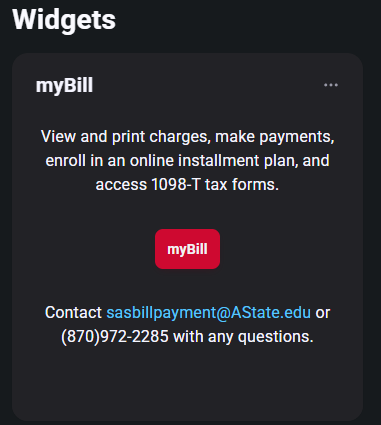
Step 2: Click on the myBill button in the myBill widget in your Dashboard
[](https://kb.astate.edu/uploads/images/gallery/2025-11/image-1762465994768.png)
Step 3: Click on 'Consents and Agreements' under the 'My Account' Tab at the top left OR click on 'Consents and Agreements' to the right of myBill's homepage under the 'My Profile Setup' section.
[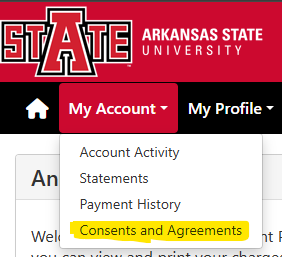](https://kb.astate.edu/uploads/images/gallery/2025-11/image-1762467329194.png) **OR** [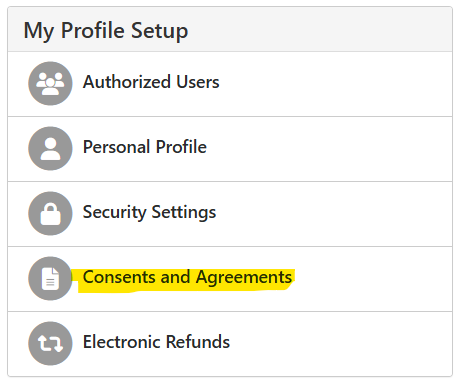](https://kb.astate.edu/uploads/images/gallery/2025-11/image-1762467297228.png)
Step 4: Click on the 'Change' button
[](https://kb.astate.edu/uploads/images/gallery/2025-11/image-1762467465949.png)
Step 5: Reach through the information on the popup box and if you consent, then click the 'Accept Consent' button
[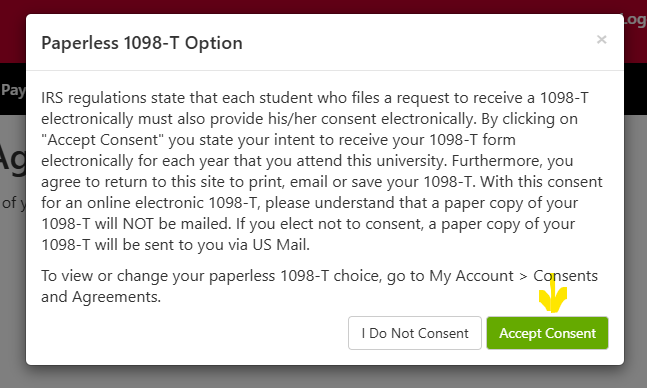](https://kb.astate.edu/uploads/images/gallery/2025-11/image-1762467562703.png)
Step 6: You will then see your status change to 'You have switched to paperless 1098-T.'
[](https://kb.astate.edu/uploads/images/gallery/2025-11/image-1762467615110.png)
\*\*\* Note: If this process is done after 1098-T forms have been issued for the tax year, then it will not go into affect until the following year's tax forms are issued. Therefore the current and previous tax forms will have been mailed out to the address on file at the time the form is issued.
If you have questions regarding your 1098T tax form please contact the Treasurer's Office at 870-972-2285 or email <1098T@AState.edu>.