A-State Website Governance
Tools, resources, and in-depth guidance for creating A-State website pages and content using Modern Campus CMS
- Overview
- What do you need the most help with?
- 1. Web Governance Charter
- 2. User Roles, Training, & Workflow
- 3. Page Creation & Site Structure Guidelines
- 4. New Page Prep
- 5. Page Templates
- 6. Pattern Library
- 7. Brand Voice Guidelines
- 8. Copywriting Best Practices
- 9. Multimedia Do & Don’ts
- 10. Search Engine Optimization
- 11. Accessibility Guidelines
- 12. Glossary & Key Terms
- New Website Known Issues
Overview
GOVERNANCE
Version 1-0 | February 18, 2025
The Arkansas State University website is only as powerful as the organization and quality of its content. And we know as content creators it can be challenging to know where to start, and what to focus on.
Here you’ll find all the tools and resources you need to:
- get a user login and proper permissions
- obtain training information
- understand content workflow
- identify the primary audience you're speaking to
- determine if you need a new page
- pick the correct page template
- write quality, on-brand content
- choose images that engage your audience
What do you need the most help with?
Check out the following questions and choose the resource that most closely matches your query. You can also come back here to check out another resource if you don’t find the answer you’re looking for.
Who manages the website?
Review the Website Governance Charter. This document outlines the overall structure for the governance of the website. Here, you’ll find who is in charge of the day-to-day running of the site and strategic advisors throughout the college.
How do I get added to the website and what will I be allowed to do?
Review the User Roles, Training & Workflow Document. This document outlines the processes for creating new users and training them to use the website and maintain their content. Additionally, this provides an overview of who can help you create and edit content when new pages are requested or content needs to be updated.
How do I identify a page’s goal and audience?
Review the New Page Prep Document. Whether you’re creating a new page or editing an existing one, this worksheet can help establish why this page exists, and who this page is for. Taking this step before writing & editing will allow you to holistically understand the needs of this page and create content accordingly.
How do I know when to add a new page or edit the site structure?
Check out the Page Creation & Site Structure Guidelines. We’re going to define when it’s okay to make a new page and when content should be added to already existing pages. We will also provide some guidelines to follow around keeping the site structured appropriately.
How do I create a page?
Review the Page Templates resource. We’re going to outline some page structure ideas in templates for you to use when creating pages, based on the content you have. Grab a layout you like and recreate in your CMS with the recommended patterns.
How do I choose patterns for the page I’m building?
Review the Pattern Library. We will outline the different kinds of patterns available on the new site, and how they can be used. Use this library to help decide what pattern to use after you’ve chosen a page template.
How do I write page content?
We’ve got two resources for you here.
Review Brand Voice Guidelines. We’re going to help you understand your brand, and what this means when you create content.
Review Copywriting Best Practices. We’re going to point out some writing do’s and don'ts that will help get your creative juices flowing. This way you can highlight what’s important to your audience in a way they will understand.
How do I choose quality photos and videos?
Check out Multimedia Dos and Don’ts. We’re going to help you make quality, on-brand photo and video selections that elevate the pages you’re creating.
How do I get my page seen and placed higher in search engine results?
Check out Search Engine Optimization to better market your page and ensure the content gets seen by your intended audience.
How do I make sure my content does not break accessibility guidelines?
Review the Accessibility Guidelines to make sure you don’t accidentally break rules that could lead to legal action and create pages that maintain the accessibility standards for your website.
I’m seeing terms that I don’t understand the meaning of.
Check out the Glossary & Key Terms resource. We’re going to define the terminology that you will see throughout our documentation. This can be a handy guide to refer back to while acquainting yourself with the process of creating & managing content on the site.
Still have questions?
If you can’t find an answer to your question, please contact the Director of Marketing and Communications.
1. Web Governance Charter
Web governance refers to people, policies, procedures, standards, and guidelines that govern the creation and maintenance of the Arkansas State University official website and digital properties.
The overall goals of Web Governance are to:
- Detail roles, responsibilities, and workflows for creating content and updating the website
- Assist site users in creating digital content that aligns with our brand and engages the site audience(s)
- Maintain long-term consistency and integrity of our website.
To that end, this policy outlines the management and governance of our web environment.
University Communications & Marketing
The day-to-day operation of the website is the responsibility of Marketing and Communications and the Web Advisory Committee. The committee works closely with university stakeholders to understand both the holistic, strategic goals of the website as a marketing tool and to implement the technical tactics to achieve those goals.
The Chief Marketing & Communications Officer has the final say on what and how content is put on the website and is the top liaison between the team and the rest of the Arkansas State community.
Goals:
- Maintain a modern, attractive, and user-friendly website that highlights Arkansas State’s brand strengths, qualities, and values
- A site that targets prospective undergrad and grad students, without sacrificing the needs of secondary audiences (current students, faculty, staff, alumni, accreditors, and the larger university community)
- An information architecture that organizes content in an efficient and logical manner for primary target audiences, while preserving deeper content structures to meet secondary audience needs
- Incorporate SEO best practices to improve site visibility
Web Advisory Committee:
The Web Advisory Group provides insight and support and shares suggestions and concerns on behalf of all areas of the college for the continued enhancement of the website.
The Web Advisory Committee includes representatives from:
- Marketing and Communications, Co-Chair
- Accreditation and Assessment, Co-Chair
- Assistant Director of Accreditation
- Information Technology Services, Co-Chair
- Academic Affairs and Faculty
- Online Learning
- Student Affairs
- Enrollment Management
- Advancement & Alumni
The Web Advisory Group may provide any concerns or suggestions regarding the website to the attention of the Director of Marketing, Communications, and Advancement and the Webmaster at any time. The group will meet annually to review successes, and concerns, and provide suggestions in shaping the future of the website. As liaisons to the college community, the Web Advisory Group members offer unique perspectives while also understanding the core strategy and goals of the website. Their feedback is valued by the Marketing, Communications, and Advancement team.
The Web Advisory Group will meet annually. The Chair will set an agenda, lead meetings, and share minutes.
Responsibilities:
- Attend meetings
- Report successes, concerns, and suggestions
- Understand site goals, objectives, and performance
- Provide regular web feedback and suggestions related to their particular department to improve the website
- Understanding the entire digital ecosystem
- Communicate the work of the Group to their department
2. User Roles, Training, & Workflow
Roles & Permissions
The University Communications & Marketing team assigns roles in the content management system. Users fall into three categories of roles, with the following permissions:
- Contributors:
University employees that closely understand site goals & objectives and are responsible for:
- Ensuring content is kept up to date across their department pages
- Follows copywriting and user experience best practices mentioned in governance documents
- Works with members of the A-State community to make any necessary edits
- Can publish page updates to the site directly
- Can publish changes/additions to new events, date changes, outdated content, etc.
- Can request new pages as needed to align department content with website goals but cannot add new pages without approval from an Administrator
- Administrators
Members of the Marketing & Communications Department and the Web Advisory Committee and are responsible for:
- Reviews and publishes content to align with sitewide goals (IE, marketing objectives), SEO optimization, accessibility, and final editorial review
- Reviews and approves new page requests from Contributors
- Adds and edits content and pages as needed
- Maintains overall quality control of content on website
Training New Users
The Marketing and Communications Team is responsible for organizing and conducting all trainings. All roles are expected to review the training and governance materials to properly understand how to create and edit content in a way that maintains quality across the site. There are three mandatory trainings for all users:
- CMS Training: Cover how to technically add elements to pages and use the platform from the backend
- Governance Training: Covers the rules and guidelines outlined in this document and the patterns in Modern Campus specific to Arkansas State
- Content Development, SEO, & Accessibility: Covers the Arkansas State brand and the best practices of content development, search engine optimization, and accessibility
Editorial Workflow
Editorial workflows are the processes that determine who is responsible for what when creating or editing a page.
Existing Page Workflow:
- The Contributor edits and updates the page and publishes the changes.
New Page Workflow:
The Marketing & Communications Team reserves the right to reject new page requests and may suggest editing a current page instead of adding a new one. The process will go as follows:
- A Contributor completes the Goal & Audience Worksheet and reads Page Creation & Site Structure Guidelines.
- The Contributor submits their new page request to an Administrator.
- An Administrator will review the request. If approved, the contributor will create the new page. If the request is denied, the Administrator will make a recommendation for where to put the content on an existing page.
- Once the content meets the requirements for the website, the Administrator will publish the page.
Page Maintenance Schedule
How can I ensure the content on a page is kept up to date? How often should we be checking in and making sure it’s useful to our audience?
Regular Updates: Semesterly Review
The frequency with which a page may have to be updated depends on the purpose of the page itself. Departments with many different deadlines and events (financial aid, departments that offer frequent workshops, etc.) will need to be checked and updated often to ensure old dates/events are not featured and users are not confused. Contributors should work with their departments/offices to ensure these pages are kept up to date. Other pages will not need to be checked as frequently.
At a minimum, most pages should be checked before the start of each semester to ensure no outdated content stays on the website for too long. There will be some pages where content remains untouched (policies, directions, etc.).
Contributors will receive an email before the start of each semester reminding them to review their content.
Content Audit: Yearly Review
Each July, Contributors will conduct a content audit. The audit will ensure that content is accurate, up-to-date and in alignment with the A-State brand. They will also ensure that the content aligns with best practices of web design and content writing using the rubric below.
|
1 (Poor) |
2 |
3 (Satisfactory) |
4 |
5 (Excellent) |
|
|
Purpose Is the message of the page delivered clearly and in alignment with the strategic goals of the organization and the page? |
The purpose of the page is unclear, little to none CTAs are used, and the institution's message is not or hardly conveyed. |
The purpose of the page is clearly attempted but there are opportunities to clarify the purpose, use CTAs, and invoke the institution's messaging. |
The purpose of the page is clear and fulfills the user tasks pertinent to the page with clear CTAs and relevant messaging. |
||
|
Audience Is the page speaking to the right people? |
The target audience of the page is unclear and does not align with any user tasks. |
The target audience is clear but there's more opportunity to fulfill user tasks. |
The target audience of the page is clear and aligns with pertinent user tasks. |
||
|
Tone/Voice Does the content portray the desired voice and tone? |
The tone and voice do not align with the institution and would not engage a persona. |
The tone and voice of the page mostly align with the institution but more could be done to provide consistency, amplify the voice of the institution, and engage a persona. |
The content embodies the defined voice, tone, and attributes to engage a persona. |
||
|
Structure/ Organization Is the information conveyed easily and effectively? |
The structure of the page makes a persona scroll deep into the page to find an answer to a common question/user task. The size, spacing, and placement of headings may be confusing to personas. The page is particularly text-heavy and does not attempt to use content types to convey information in an effective way. |
The structure of the page is sensible but some of the information is buried. The size, spacing, and placement of headings tells personas what they're looking at but more could be done to increase the overall clarity of the page. There's more opportunity to make the page easily scannable while conveying the same information and incorporating engaging content types. |
The structure of the page follows a logical information hierarchy with important information at the top that connects to the purpose of the page. Headings are descriptive, well-sized, well-spaced, and well-placed headings. The information is easily scannable and effectively leverages content types. |
||
|
Readability What is the reading level of the content? |
Readability score of 12+ |
Readability score of 9-10th grade |
Readability score of 7th grade or lower |
3. Page Creation & Site Structure Guidelines
We’re going to define when it’s okay to make a new page and when content should be added to already existing pages. We will also provide some guidelines to follow around keeping the site structured appropriately.
Planning to add a new page?
Before creating a page, answer these questions, thinking about your content and the section in which you would be adding this content:
Is it marketing content?
If yes, it should be incorporated as a new section on an already existing page. If the section begins to get too long when all information is added to it, then a new page can be added instead.
Is it task-focused content?
If yes, a new page can be created to house this information. Consider adding a section to the parent page that links to this new page.
Is it featuring a specific news story or event?
If yes, feature this content on an already existing page using news/events display types.
Do you know who will be maintaining this content?
If no, a new page should not be created if no one will be maintaining & updating this content.
Is there a landing page that can “house” this content?
If yes, think about whether this landing page could fit another pattern to feature this content. If no, consider if this new page should serve as a landing page for related content in the future.
Dos and don’ts of accordions
Sometimes, you may have a lot of information to add to a page. Rather than making the page extra long, you decide to put all of this content into an accordion. This is not always the best practice when it comes to the user’s experience of reading this page. Before adding an accordion to a page, answer these questions:
Is there any content that is imperative for your audience to know?
If yes, it is important to not hide any important content into an accordion. This can easily be missed or skimmed over by a user who doesn’t know what they should be looking for.
Is the content explaining a service, opportunity, or resource for students?
If yes, it should probably get its own page, especially if it has enough content to fill up more than 2 accordion tabs.
Is the content linking off to resources from other organizations?
If yes, this content could comfortably fit into an accordion.
If you’re not sure whether or not your content should live in an accordion, try writing out all your content outside of the accordion first. If the page gets to be too long, then consider using an accordion. Remember, if there’s any content that is imperative for your audience to know, leave that out and above the accordion to ensure that users see it.
Site structure guidelines
When thinking about adding a new page, consider these guidelines:
No dedicated “About Us” pages. Instead, incorporate this content throughout already existing pages.
4. New Page Prep
Use this worksheet to establish why a new page is necessary, who this page is for, and what content and assets will be featured on the page. Taking this step before writing & editing will allow you to holistically understand the needs of this page and create content accordingly.
What is the primary goal of the page?
It’s important to establish what this page and its content are hoping to accomplish. Look at the list of possible page goals below. Pick out all the goals that apply to this page. You should try to have 4 goals or fewer.
- Promote an event
- Share A-State news or announcements
- Market an A-State offering
- Get people to take a particular action
- Draw traffic to an online resource
- Fundraising
- Tell a story about a member of the A-State community
- Share policy or procedure information
- Highlight an A-State initiative
- Create a connection with alumni
- Share guides or step-by-step instructions
- Other…
Ready to refine?
Great! Look back at the list of primary goals, and select your top 2 goals. Rewrite the goals to be more specific to the content you are sharing. The more specific you are, the easier it will be to write & gather content that supports the page’s goals.
- Goal 1:
- Goal 2:
How do I know if I’m successful in achieving the goals for this page?
We can help make our goals more measurable by defining the content that supports those goals and identifying success criteria for when we meet those goals. For each goal, identify the following:
- What content supports this goal? Look at the kind of content planned for this page. Does this content support the page’s goal? Does additional content need to be gathered?
- What is the goal’s purpose? Why is this goal important? What will the benefit be for A-State?
- How is it measurable? Come up with quantifiable measurements for each goal.
- What defines success? Identify a benchmark for each measurement that will help to define when you are reaching your goal.
Using a copy of the table below, refine your goals & make them measurable.
|
Goal |
What content supports this goal? |
What is the goal’s purpose? |
How is it measurable? |
What defines success? |
|
#1 |
||||
|
#2 |
Who is my audience?
It’s important to define who we are writing & creating content for. Typically, there are two levels of audiences: primary audiences and secondary audiences. Primary audiences consist of people who you must reach, while secondary audiences consist of people who you may like to reach. While there can be a lot of overlap, selecting a primary one will help focus the writing & content gathering process.
Here are some examples of audiences:
- High school students
- Adult learners
- Parents
- High school counselors
- Current students
- Community members
- Employers
- Faculty or staff members
- Alumni
Make sure you define your primary and secondary audiences before beginning content writing and page creation.
- Primary audience:
- Secondary audience:
What assets do I have? What else do I need?
Consider storytelling elements, images, forms, videos, student stories, etc. Remember, pages should be more than a few paragraphs of text on the page.
- Assets I have:
- Assets I need:
Final Logistics & Questions
- Write a brief description or introduction to your new page.
- Where will the new page live? What section of the site will this be under?
- Who will be responsible for maintaining the page? List the title or department that will be responsible for the upkeep of the page.
5. Page Templates
We’re going to outline some page structure ideas in templates for you to use when creating pages, based on the content you have. Determine which kind of page aligns most with the content you have, and recreate it in your CMS with the recommended patterns.
How to determine your page template
Page templates allow the user to have a consistent experience across the site, and makes it easier for us to build out pages according to user expectations. The following questions can help you determine which page template you should select.
Is this page at the first hierarchical level of the site?
If yes, use the Top-Level Landing Page template.
Is this page providing an overview for a range of programs, services, or opportunities?
If yes, use the Guide Page template.
Is this page introducing one specific department, office, or group that is relevant to prospective or current students?
If yes, use the Overview Page template.
Is this page sharing detailed information about one topic?
If yes, use the Basic Page template.
Is this page sharing curated resources for a specific audience?
If yes, use the Curated Page template.
If none of the questions above seem to apply to the page you’re working on, go with the Basic Page template. You may always modify or add to these templates to make them fit user needs better.
Templates
Top-Level Landing Page
| Purpose | A high-impact page that prioritizes imagery & linking deeper into the site. |  |
| Content | Include imagery, videos, testimonials, and CTAs. | |
| Suggested Patterns | Photo Collage, Image List, WYSIWYG, CTA Bar, Outcomes Feature, Contact | |
Guide Page
| Purpose | A scannable page that gives high-level overviews for a range of options, presenting each option equally. |  |
| Content | Include consistent links and an overview of how to compare options. | |
| Suggested Patterns | 3 Column, Stats + Photo, Accordion, Directory Embed, Contact | |
Overview Page
| Purpose | A scannable page that introduces one specific offering, department, group, or service. | 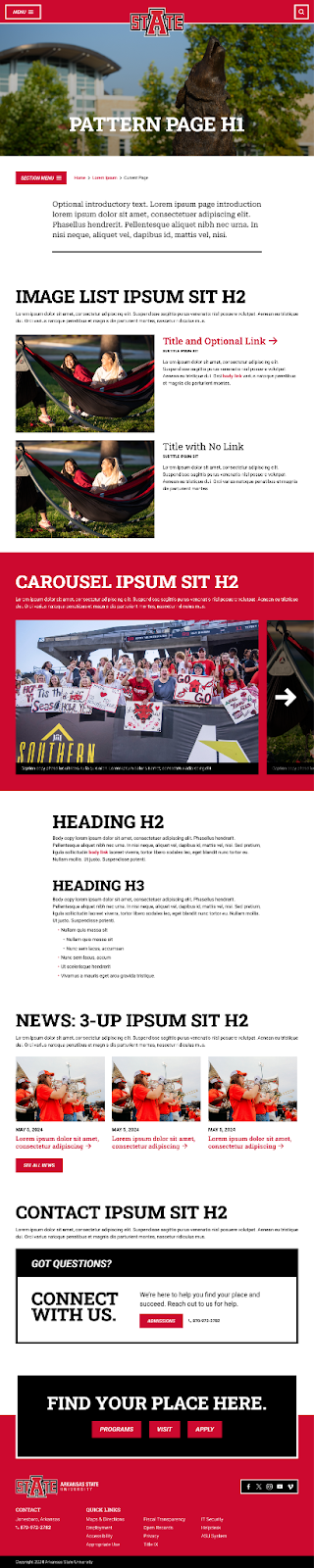 |
| Content | Primarily text content, with some stories or imagery included for visual variety. | |
| Suggested Patterns | Image List, Carousel, WYSIWYG, News 3-Up, Contact | |
Basic Page
| Purpose | A succinct, primarily informational page which describes one topic in detail. | 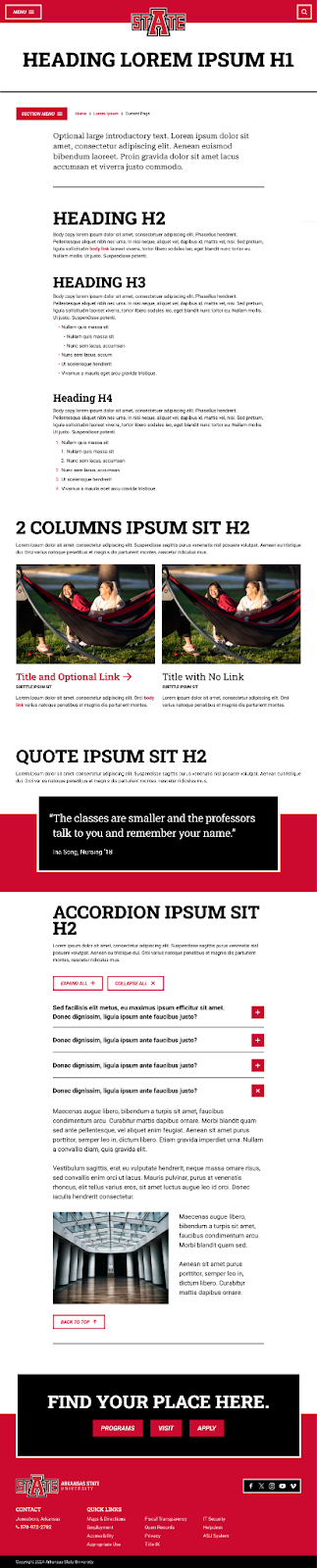 |
| Content | Text content with images or lists as needed. | |
| Suggested Patterns | WYSIWYG, 2 Column, Quote, Accordion | |
Curated Page
| Purpose | A page gathering a range of helpful links and resources for one specific audience. |  |
| Content | Lists of links, with and without images, and callouts for specific pieces of information that users should know. | |
| Suggested Patterns | 2 Column, Accordion, News 3-Up, Calendar 3-Up, Contact | |
6. Pattern Library
We will outline the different kinds of patterns available on the new site, and how they can be used. Use this library to help decide what patterns to use after you’ve chosen a page template.
Read on to learn about the different types of patterns or explore the full pattern library.
Types of patterns
These patterns rely on imagery to leave an impression on users.
These patterns focus on organizing primarily textual information to make it easy for users to understand information & options.
These patterns focus on prioritizing & presenting text on the page.
These patterns are used to share or connect with other content on the site, such as news, events, and social media.
How to choose a pattern
Before adding a pattern, think about what kind of content you have:
Do you have access to high quality images or other media?
If yes, consider using a visual pattern to display this content.
If yes, an organizational pattern would be best to display content in a clear & consistent manner.
Do you have important announcements or timely information to share through text?
If yes, consider using a typographic pattern to ensure this information is highly visible and emphasized.
Are you looking to link to social media?
If yes, a connected pattern may have the flexibility you need to share links.
Are you looking to share news or events?
If yes, some connected patterns allow you to dynamically or manually link to that content.
Visual Patterns
Organizational Patterns
Typographic Patterns
Connected Patterns
7. Brand Voice Guidelines
What is a brand?
“A brand is the identity and story of a company that makes it stand out from competitors that sell similar products or services. The goal of branding is to earn space in the minds of the target audience and become their preferred option for doing business.” - Hubspot
Whether you realize it or not, your school is a brand. You have a unique story and a unique experience to “sell” to students and your website should represent this. From open houses and campus tours to emails, social media, and your website, everyone should know your brand and understand their role in maintaining the brand values. If you boast a “friendly, welcoming environment,” on campus then you want everyone from the professors to the administrators to the cleaning staff to feel and show that too. Your digital content, including the website, should operate the same way.
Current high school students, first-gen students, and adult students alike rank the website as the most used and most helpful information source they use during their search process (RNL, E-Expectations Trend Report). Therefore, it is critical that your website leverages your brand and the experience that students will have at your school, so take the time to get to know your brand and what you have to offer that sets you apart from other schools. Then, be sure to implement that experience into your web content.
What is the A-State brand?
Brand goals are determined by strategic priorities and create a unique value proposition that will entice prospective students and help them succeed in reaching their goals. For A-State brand identity to succeed, the visual and language guidelines need to be expressed clearly and consistently across all materials, platforms, and channels.
The A-State brand reflects a dynamic, inclusive, and forward-thinking identity, rooted in community pride and academic excellence. Our brand values include:
- Every Red Wolf Counts: A-State emphasizes creating a close-knit, supportive environment where students can find a sense of home and connection.
- Innovation and Research: With its R2 designation as a "High Research Activity" institution, A-State highlights experiential learning opportunities, collaborative projects with organizations like NASA and USDA, and a commitment to impactful research.
- Accessibility and Opportunity: A-State positions itself as accessible and affordable, with strong support for first-generation and non-traditional students. The university focuses on guiding students through admissions, financial aid, and academic success with minimal barriers.
- Pride and Tradition: Red Wolf traditions, campus life, and NCAA Division I athletics foster a strong school spirit and pride.
- Global Engagement: The A-State community is comprised of a vibrant mix of cultures and offers study abroad opportunities and international campuses to enhance global perspectives.
Mission Statement: Arkansas State educates leaders, enhances intellectual growth, and enriches lives.
Core Message: A-State is a “big time” university that is student-friendly and innovative. We offer world-class academics, exciting student research opportunities, a vibrant campus life experience, NCAA Division I athletics, etc. The two words we feel describe it are dynamic and distinguished. We want our website to indicate that we are a destination university.
Overall, the A-State brand communicates a welcoming and empowering environment where students are equipped to achieve their personal and professional aspirations while making meaningful contributions to their communities and beyond.
How do I put the brand into action?
Content—written and visual—should reflect these on both a macro and micro level. It’s not just about which words we use or who appears in the images; it’s about ensuring that the story we tell across the website consistently aligns with these values.
To put the A-State brand into action, it’s essential to integrate our brand values and mission into every aspect of communication, ensuring consistency and resonance with target audiences.
Start by focusing on one or two of the brand values. They are essential features that we want our audiences to associate with A-State, and elaborate on the mission statement and core message described above.
- Community and Belonging: Showcase stories of students finding a home at A-State, participating in traditions, and connecting through clubs, athletics, and events.
- Innovation and Research: Highlight research projects, faculty accomplishments, and partnerships with organizations like NASA and USDA.
- Accessibility and Opportunity: Feature testimonials from first-generation and non-traditional students, and provide clear, accessible information on financial aid and resources. Remember to check for accessibility. We need to walk the walk if we’re going to talk the talk.
- Pride and Tradition: Celebrate A-State’s unique traditions, Red Wolf pride, and NCAA Division I athletics in engaging ways.
- Global Engagement: Include content that showcases cultural events, study abroad programs, and the wide-ranging backgrounds of students at A-State.
By embedding A-State’s brand values and goals into every piece of communication, the university can effectively tell its story, inspire action, and build meaningful connections with its audience.
8. Copywriting Best Practices
Follow these style guidelines and best practices to write engaging and clear pages.
Writing Style Guide
Style refers to the guidelines that editors and writers follow whenever they refer to persons, places and things; whenever they capitalize, abbreviate, punctuate or spell.
Explore our Writing Style Guide.
Where Do I Begin?
Before writing content for your page, read through:
New Page Prep Worksheet: Who are you writing for? What’s the purpose of the new page? What resources do you have?
Page Creation Guidelines: Is your content going in the right place?
Keep in mind: The goal of your page, and your copy, is to inspire action in your audience.
What type of page am I writing/editing?
When writing or editing content, it’s important to first understand the primary purpose of the page you’re working on. This understanding shapes how you approach the tone, structure, and functionality of the content. Some of the tips provided in this guide will be more relevant to your specific page type, while others may have less bearing. Exercise your best judgment, but always prioritize clarity, usability, and alignment with A-State’s brand values.
- Identify the Page’s Purpose
- Is it marketing-focused? Marketing-heavy pages are designed to capture attention, inspire engagement, and persuade the reader to take action (e.g., request information, schedule a visit, or apply). These pages often require a more dynamic and engaging tone, as well as the use of strong visual elements, storytelling, and clear calls-to-action (CTAs). Consider how the page will communicate A-State’s unique value proposition and make a strong impression on prospective students.
- Is it transactional or straightforward? Transactional pages serve a more functional role, such as providing specific information or guiding users through a process (e.g., submitting an application, reviewing tuition fees, or checking degree requirements). While the content may be more straightforward, it’s still important to frame the information in a way that’s user-friendly, clear, and engaging. Even these pages can subtly reinforce the A-State brand through thoughtful language, tone, and organization.
- Keep the Prospective Student at the Center: No matter the type of page, always write with the prospective student’s needs, questions, and journey in mind. Consider:
- How will this page help them? Ensure the content provides value, whether it’s answering questions, clarifying a process, or inspiring them to envision themselves at A-State.
- What can they learn about A-State from this page? Every page, whether functional or marketing-focused, should contribute to the overall story of A-State. Even a seemingly transactional page, like one explaining financial aid, can emphasize the university’s commitment to accessibility and student support.
- Framing Content Effectively
- For transactional pages: While these pages are more utilitarian, consider how to frame the content in a way that draws users into the experience. Use clear headings, concise language, and straightforward navigation to make the information easy to find and understand. Add value by highlighting how A-State simplifies or supports the process being explained.
- For marketing-heavy pages: Leverage the full suite of tools available—visual elements, storytelling, and strategic organization of content. Use page display types (e.g., image galleries, testimonials, CTAs) to market A-State’s strengths effectively. Ensure that every element of the page works cohesively to create an inspiring and memorable experience.
- Leveraging A-State’s Brand Values
- Reinforce the A-State identity through the tone, imagery, and storytelling used in your content.
- Highlight brand values like innovation, inclusivity, and community pride to build trust and connection with your audience.
Whether your page is primarily marketing or transactional, always strive to create a seamless user experience that aligns with A-State’s mission and values. Every page is an opportunity to connect with prospective students, showcase A-State’s strengths, and help guide users on their journey.
Writing for the Web Tips
Writing for the web doesn’t have to be daunting. You can write! Follow these tips to craft effective, audience-focused content.
- Always Ask: "Why Should They Care?"
- Write for your audience. Think about the prospective student.
- Use personas to guide your tone and content.
- Speak to readers, not at them. Use “you” (not “students”) and “we” (not “the school”).
- Focus on benefits. Instead of listing what your office/program offers, show how it benefits the audience.
- Example: Instead of “Our mission is…,” rewrite it to reflect how it impacts students directly.
- Student-focused example: “At [Department Name], we’re here to help you [specific benefit].”
- Start Strong
- Make your headline count. A great headline grabs attention and encourages readers to keep going.
- Use the Eugene Schwartz method: Every sentence compels the reader to move to the next.
- If the tone allows, align your headline with your brand personality—even if it’s transactional.
- Tell Student Stories
- Why stories?
- Human connection. They make your services relatable.
- Originality. Your student, faculty, and alumni stories are unique to your institution.
- What makes a story?
- Character: The audience (your student) who wants something.
- Problem: A challenge they face.
- Guide: Your program or service that helps.
- Call to Action: The steps they take.
- Success: The outcome they achieve.
- Show how your audience can avoid failure, succeed, and act. Use buttons and links to drive engagement.
- Keep It Clear and Easy
- Be conversational. Write in a way that feels natural to your audience.
- Use:
- Bullet points and lists for scannability.
- Short sentences and paragraphs.
- Check readability. Aim for a 9th-grade level for broad content (use tools like HemingwayApp).
- Exceptions: Technical or detailed content (policies, procedures, etc.).
- Tips for Engaging Copy
- Draw inspiration. Use content from other departments or competitors as a starting point, then make it your own.
- Avoid weak language.
- Skip adverbs and passive voice.
- Use strong, specific verbs (e.g., “cultivate” instead of “form”).
- Break the rules—strategically.
- Use contractions.
- Starting sentences with “and,” “but,” or “because” is okay for emphasis.
- Use sentence fragments sparingly for impact.
- Revisit your work. Write a draft, then return with fresh eyes to revise and refine.
- Stay True to Your Brand
- Reflect your institution’s unique values in every piece.
- Highlight what sets you apart:
- What’s unique about your program or services?
- What outcomes can students expect?
By following these guidelines, you’ll write content that’s clear, engaging, and action-driven.
9. Multimedia Do & Don’ts
How important is multimedia?
Multimedia content is a key display type in the A-State visual language. Prospective students prefer multimedia content that is:
- Authentic
- Concise
- Visual
- Peer-approved
- Purpose-driven
- Mobile-friendly
What makes a photo/video “on-brand” for A-State?
A-State photography should fall in line with the success criteria for the brand:
- Convey the supportive, community-oriented nature of A-State
- Showcase the aspects of A-State that are unmatched by our competitors
- Highlight the value of an A-State education as a soft launching pad that helps students succeed and prepares them for next steps in education or career
- Support a mobile-friendly web experience that considers users with varying bandwidth access
Every effort should be made to ensure photography and video aligns with A-State brand voice. Photography and videography should have an authentic feel, use rich color, and support A-State brand identity and key messages.
All photos used must be properly sourced and cleared for use, ensuring they are either owned by Arkansas State University, licensed for use, or fall under public domain or copyright-free guidelines. Unauthorized or copyrighted images should not be used without proper permissions. Website contributors should use the A-State Photography Portal and avoid using clipart or external stock photography, if possible.
Style Guidelines
General Qualities
All photography, regardless of subject and distance, should share the following qualities:
- Be well-lit – Having adequate brightness and contrast
- Be authentic – Relying on non-posed scenes with genuine expressions
- Have dynamic angles – Leaning into asymmetry and interesting points of view
- Use a journalistic lens - the viewer should feel invested in the subject
Portraits
Highlight the strength and personality of individuals
- Pair these with quotes or bios
- Non busy backgrounds – To keep the attention on the subject’s face
- Choose simple backgrounds when possible – uncluttered walls, foliage
- Shallow depth of field – blur out irrelevant details
- Genuine expression – Ensure faces convey genuine emotion – pride, happiness, determination. Avoid blank expressions and “fake” smiles.
- Cropped just below the shoulders

Situations
Show off how learning and interaction works at A-State
- Include the environment if it contributes to understanding the subject – for example, a lab, classroom, or street scene
- Invite the viewer into the scene – have a strong focal point and avoid too many backs of people

Environments
Convey the character of a large space, for tone-setting
- Use occasionally
- Landscape shots of campus that establish the location as well as show off an exciting and bustling campus life
- Local landmarks, street scenes, and hot spots

Objects
Used to symbolically represent subject matter and give a future-focused appearance
- Use occasionally
- Stock is okay– used selectively
- Avoid cliches (examples: a gavel or beaker for “science”, dollar bills for “money”)

Incorrect Usages
| AVOID Abstract, impersonal illustrations in place of custom images. |  |
| AVOID Overly filtered/stylized shots. Especially images that flatten the content using cool-toned filters. |  |
| AVOID Extreme angles and stylized lens techniques (such as fish eye, zoom, and blur). |  |
| AVOID Over-laying distracting graphics/text. | 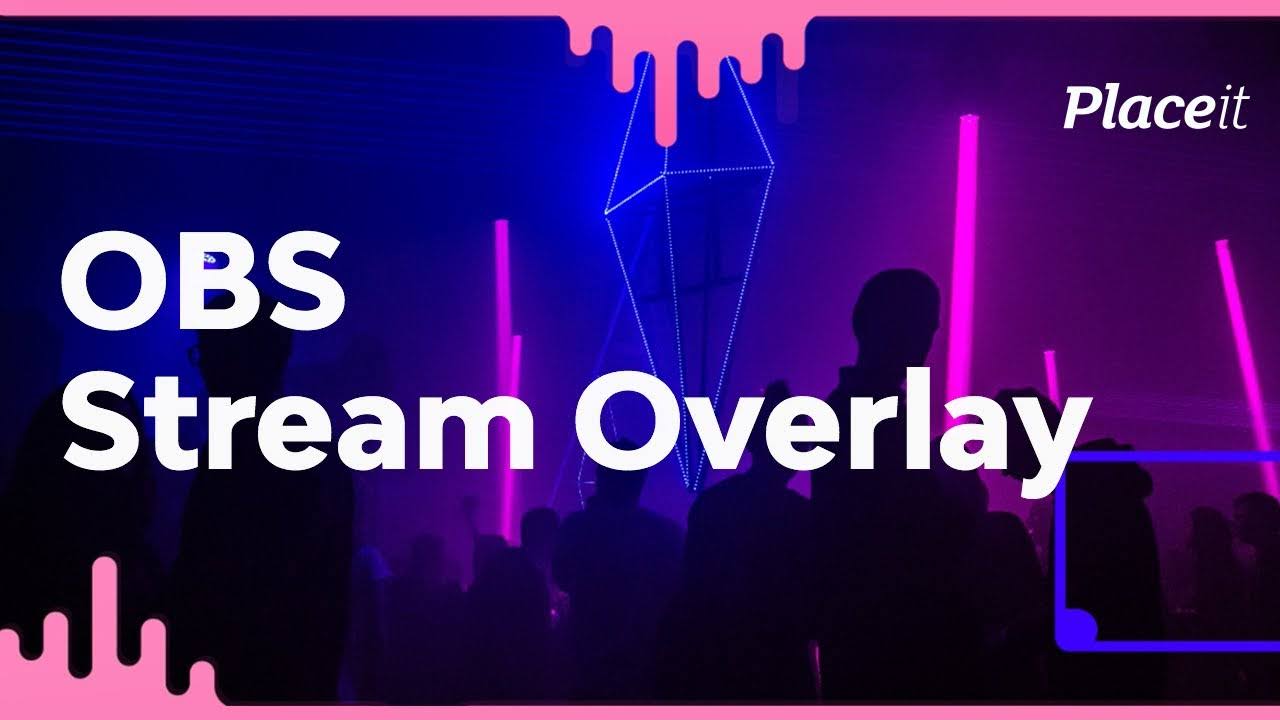 |
Shot Recommendations
Based on the Designed Screens and Sitemap, the following is a list of recommended shots for populating the website:
Campus Photography
Campus photos play an important role in giving students the context of their surroundings. Photographers should capture a good balance of simple, establishing shots and more personal shots displaying bustling student life.
Campuses
- Photos with and without campus signage.
- Large groups of students walking around the campuses:
- Shots capturing the motion on campus: students commuting from place to place.
- Smaller groups of students and individuals with recognizable campus features in the background.
- Exterior shots of important facilities on each campus. Capture a range of facilities that are academically significant and can be used on program-specific pages.
- Campuses in different seasons/decorated for specific holidays.
Amenities
Show off A-State amenities in an engaging way. It may be useful to photograph facilities in a plain, establishing way, but also show them in use. Add human subjects to these shots as well as showing multiple subjects interacting.
- Housing
- Health and Safety
- Offices and Faculty
- Fitness Centers
- Libraries
Local Culture
The campuses aren’t the only part of A-State story. The local area have a large influence over the culture. Photographers should capture the essence of the local culture and show what a beautiful place A-State is. These images can be used on the About and Visit pages.
Student Life
Show off the student life by using an intimate, personal lens. Get up close and personal with students in their natural environment. Student features are not only a great way to highlight a unique story of success, but demonstrate how others can follow in their footsteps. These vignettes can act as a vehicle for showing the impact of certain clubs, programs, mentors, and facilities on campus.
Ideally, the students whose stories are being highlighted are the same ones being photographed for the website.
- The viewer should feel like they’re getting an inside look at this student’s life on campus.
- Photographers should capture a good mix of posed portraits and shots of the student in action. Depending on what is being highlighted, either of these could be useful.
Student stories are a great way to add a personal touch to other information across the site. When gathering stories, keep in mind how they might add substance to the following:
- Pathways of study (e.g. different types of students and applicants)
- Program information (e.g. a story highlighting the Biology program and how a student took advantage of A-State resources)
- Clubs and organizations (e.g. the president of a student organization)
- Faculty (e.g. how a student was inspired and mentored by a faculty member)
- Facilities (e.g. a student who took advantage of a creative space on campus to create a work of art)
- Athletics (e.g. how a student balances their academic and athletic interests)
Faculty and Alumni
When gathering photographs of faculty members and alumni, treat them similarly to students by humanizing them and showing them in a social context. These photos should build upon A-State community image, how do you want to come across to those who don’t know you? Showing a welcoming, diverse cast of characters that allows viewers to create a personal connection.
As well as gathering posed portraits, photographers should show faculty supporting students:
- Tutoring Services
- Academic Advising
- Skills Development Resources
- Disability Services
Build out the community image by showing Alumni stories and the possibilities that await after a A-State education. These can be used in tandem with program information in order to demonstrate how students could use their degree in the future.
Program Highlights
Academic programs are the “products” you offer. As such, we recommend that your Program Detail pages are engaging and visually appealing, highlighting the experiences students will have while studying at A-State.
In addition to one hero image, use at least one more photo per program. More may be needed if a program has more to offer. Images may come in the form of a student or faculty story, a carousel, in the WYSIWYG editor, or any other pattern.
- The Hero image should not be too visually overwhelming since there will be text placed on top of it. Avoid busy computer screens, faces getting overlapped by text, and nondescript placeholder imagery.
Gathering a wide range of generic shots of programs can provide content for other pages across the site. A lot of topics on the site do not yield visually interesting photo opportunities, so photographers should create a repository of program images to accurately represent the student experience. The following topics would benefit from supplemental program imagery:
- Registration
- Applications and Admissions
- Online Programming
- Program Catalogs
- Testing and Placement
- Workforce Development
- Fees and Financial Aid
- Academic Support
News and Events
News stories should be populated with an appropriate image. As these swap out for new stories, ensure that all featured articles and events have an accompanying image. This may be a big lift since there are a lot of existing articles and upcoming events, so employ stock imagery here if necessary.
Image Storage and File Naming
Naming Images
When you upload a new image, it will be uploaded to the A-State media library in the CMS. Naming images clearly allows other users - or maybe even yourself! - to find a relevant image at a later date if they do not have one on hand.
When uploading your image, please follow these naming convention guidelines:
- Briefly describe the image. Try to keep the description under 5 words
- You can eliminate “stop words” such as “in,” “and,” “the,” etc.
- File names should always be lower case
- Use hyphens to separate words. Do not use spaces.
- File names should have only letters or numbers (or hyphens)
- If there are multiple versions of the same image, add the image size at the end
- If you have a particular keyword for the page, trying to insert it into the file name is a plus
Good image titles:
- chemistry-professor-lecture.jpg
- students-collaborating-writing-center-400x400.jpg
- students-collaborating-writing-center-1080x720.jpg
Bad image titles:
- Untitled1.jpg
- IMG_3084.jpg
- Screen Shot 2019-03-08 at 1_08_55 PM.png
Alt text:
- Alt text is used for both accessibility and SEO purposes.
- Describing the image clearly is priority #1. See the Accessibility guidelines for more information.
Image Sizes
Follow these sizing requirements to optimize the designs and display of imagery.
Videos: Best Practices
A-State already has some quality videos on its YouTube channel and across the site but many of the videos are outdated. Whether you’re choosing from existing video assets or creating from scratch, keep the following guidelines top of mind.
Keep it real
Use diverse, user-generated content that is authentic. Staged photos and videos won’t pass the sniff test. Prospective students don’t want to be sold to. They want to be understood and respected. They want to be spoken to like adults. They want to see themselves in someone else.
- Featured A-State students, faculty, & alumni should feel confident, direct, and successful.
- Focus on polished ‘real talk’: overcoming obstacles, and achieving goals
- Keep the visual fabric rich
- Allow groups to bring natural energy to the conversation
- Consider user-generated content (with permission)
Make it snappy
Short. Timely. Layered context. Prospective students are impatient. They want to get as much information as possible as quickly as possible. Value their time by focusing on what’s really important.
- Focus on snackable video content. 1-2 minutes is ideal. No mini-lectures
- Use simple captions to provide additional context and to add a layer of A-State branding and voices
Ensure Accessibility
Accessibility isn’t just a nice-to-have; it’s essential for providing equal access to information and ensuring that all audiences, including those with disabilities, can fully engage with your video content. While automatic captions generated by platforms like YouTube are a starting point, they often fall short in terms of accuracy and clarity. To meet accessibility standards and offer a more inclusive viewing experience, consider the following:
- Accurate, Human-Edited Captions
- Review and correct autocaptions to ensure timing, spelling, and grammar accurately reflect the spoken dialogue.
- Include captions for all speech, as well as relevant non-speech audio elements (e.g., laughter, applause, background music, sound effects). This ensures that viewers who are Deaf or hard of hearing can follow along without missing context.
- Transcripts for Supplemental Access
- Provide a full transcript of the video content— including descriptions of important on-screen actions or visuals not described in the dialogue. This benefits users who rely on screen readers and allows those without the ability to watch video to still access the information.
- Post transcripts alongside the video or make them easily accessible via a link in the description.
- Audio Descriptions for Visual Content
- If your video heavily relies on visuals (such as diagrams, text overlays, or demonstrations) to convey information not spoken aloud, consider adding audio descriptions. These narrations fill in details that blind or low-vision users may otherwise miss.
- Integrate these descriptions into the main audio track or provide a secondary audio track that can be enabled as needed.
- Clear, Legible On-Screen Text
- If using titles, lower-thirds, or text overlays, ensure high contrast between text and background, and choose an easy-to-read font size and style. This benefits all viewers, including those with low vision or dyslexia.
- Screen Reader-Friendly Metadata
- Ensure that any metadata associated with the video (titles, tags, descriptions) is written in a clear and descriptive manner. Screen reader users rely heavily on this information to understand the content before pressing play.
- Compliance with Accessibility Guidelines
- Familiarize yourself with the Web Content Accessibility Guidelines (WCAG) and strive to meet or exceed their recommendations. Adhering to these standards helps ensure your videos are accessible to the widest possible audience.
By thoughtfully implementing these practices, you not only create a more inclusive environment for all current and prospective students, faculty, and staff but also strengthen your overall brand credibility. Accessible video content is an investment that honors Butte College’s commitment to diversity, inclusion, and equal opportunity.
YouTube has SEO, too!
The internet’s second-largest search engine! Beyond hosting your videos on YouTube and embedding them onto your site, YouTube is an extremely powerful search tool.
Leverage your keyword research and insert keywords into appropriate YouTube metadata AND the video itself.
- SAY the keyword in the video
- Include keyword in video title, description, & tags
- Leverage hashtags to drive traffic to videos
10. Search Engine Optimization
We’ll help you:
- Understand SEO at a high-level
- Learn about your target audience perspectives
- Illustrate SEO best practices to optimize your content and help users find the information
What is SEO?
Search Engine Optimization (SEO) is a practice designed to increase the visibility and ranking of your website in search engine results. When you write content for a website, SEO involves using specific techniques and strategies to make your content more attractive and understandable to search engines like Google.
The primary goal of SEO is to ensure that when people search for information related to your content, your web pages appear prominently in the search results, leading to increased traffic and visibility for your site.
The Role of Content in SEO
Additionally, SEO encompasses optimizing your content structure, using descriptive titles and headings, adding meta descriptions, and ensuring your content is accessible and easy to navigate. By integrating SEO practices into your content creation process, you enhance the likelihood of your content reaching and resonating with the right audience.
Important Perspectives
Target Audience
Understanding keyword intent and target audience is crucial for effective SEO efforts. By aligning your content and optimization strategies with user search intent, you can provide relevant information and meet their needs.
Considering your target audience's preferences helps tailor your SEO to resonate with them, driving higher-quality traffic and improving engagement. This ultimately enhances your website's visibility and success in search engine rankings.
Expertise, Experience, Authoritativeness, Trustworthiness (EEAT)
EEAT is crucial for SEO. Demonstrate expertise, relevant experience, and authoritativeness through your content. Build trust through accurate content, reputable sources, and testimonials. Prioritize quality and relevance to improve search visibility and user satisfaction.
Do not write generic content that could be written on any other college site. Write content that is specific for our target audiences and in alignment with our brand.
Keyword Research
Identifying a relevant keyword for your page that aligns with what your users are searching for is pivotal to increasing the number of people visiting the page over time. For example, if users are searching for "register for classes," on the Registration page, it's important to work the phrase "register for classes" into the content.
As a content editor, understanding that the main topic of your page often naturally aligns with your target keyword can simplify the SEO process. In many cases, the primary subject or theme of your content is precisely what your audience will search for.
For instance, if you're creating a page about 'undergraduate admissions,' this phrase itself likely represents your target keyword, as it directly reflects what prospective students might search for. To further refine this, adding your school's name or another qualifier, like a specific program or geo-location (state), can transform it into a more targeted keyword.
This approach requires minimal research and often relies on your intuition and understanding of your audience. Trusting your instincts in these scenarios is not just acceptable; it’s an efficient way to ensure your content resonates with and is easily discoverable by your intended users. Remember, sometimes the most effective keyword strategy is to think like the person who will be searching for your content, making common sense and simplicity key assets in your SEO toolkit.
Should there be instances where you want to refine your keyword strategy further, or if you're aiming to expand your content's reach, conducting more thorough keyword research becomes valuable.
This is especially relevant when you're exploring new topics, addressing niche subjects, or targeting specific audience segments where your intuition might need the backing of data. In higher education, this is most commonly needed for program pages. For example, the Monthly Search Volume (MSV) for “2 year nursing degree” is 720, while the MSV for “nursing AAS” is 480. The content on your page should reflect what people are searching for, so you would want to work the phrase “2 year nursing degree” into the content more than “nursing aas.”
In cases where more keyword research is needed, leveraging various keyword research tools can provide insights into the specific terms and phrases your audience is using, helping you tailor your content more effectively to their search behaviors. These tools can help you uncover related keywords, gauge popularity through search volume, thereby enabling you to optimize your content in a way that's more likely to generate increased traffic to your site.
Free Keyword Research Tools
While in-depth keyword research tools are paid, there are free tools out there that you can use to find a keyword for your page.
Type in some suggested phrases that your audience may search for and considering their perspective, you will want to balance the highest volume with the keywords that make most sense grammatically from their perspective. SEO and keyword research is part art, part science, and this step of the process is really an exercise in balancing the two.
For example: Ubersuggest
- Enter Your Keyword/Page Topic: In the search bar on the Ubersuggest homepage, type in your keyword, in this case, 'register for classes'. Then, press enter or click the search button.
- Review Keyword Overview: Ubersuggest will present an overview of your keyword, including search volume, SEO difficulty, paid difficulty, and cost per click (CPC). The search volume indicates how many times the keyword is searched per month.
- Analyze Keyword Ideas: Scroll down to the 'Keyword Ideas' section. This area provides a list of related keywords, along with their respective MSVs, trends, and difficulty scores. Look for variations or related terms that might be relevant to your content. For example, 'how to register for college classes' or 'class registration process'.
- Evaluate Content Ideas: Ubersuggest also offers a 'Content Ideas' section, which shows popular web pages related to your keyword. This can provide insights into what kind of content is successfully attracting traffic for similar keywords, which can inspire your own content creation.
- Apply Insights to Your Content: Use the insights gathered from Ubersuggest to refine your content. Consider incorporating related keywords that have high search volumes but lower difficulty scores to increase your chances of ranking higher.
Meta Tag Guide
Meta titles and descriptions play a crucial role in attracting search engine users and driving traffic to your pages. By crafting concise and engaging meta tags, you can improve search engine visibility, enhance click-through rates, and provide users with relevant information about your college's programs and pages.
Meta Titles
- Keep it concise: Limit your meta titles to around 50-60 characters to ensure they display properly in search results. Do not exceed 60 characters.
- Include target keywords: Incorporate relevant keywords that accurately represent the page content and align with user search intent.
- Make it compelling: Craft a compelling and unique meta title that entices users to click on your page in search results.
- Maintain relevance: Ensure that the meta title accurately reflects the content of the page, setting clear expectations for users.
Meta Descriptions
- Be informative: Write informative meta descriptions that provide a concise summary of the page's content, addressing user needs.
- Utilize keywords: Include relevant keywords naturally within the meta description to improve search engine visibility.
- Focus on benefits: Highlight the unique value proposition or benefits users will gain from visiting the page.
- Maintain optimal length: Keep meta descriptions around 150-160 characters to ensure they are fully displayed in search results.
General Tips
- Avoid duplicate meta titles and descriptions across pages to prevent confusion for search engines and users.
- Incorporate local SEO elements when applicable, such as location-based keywords or geo-specific information.
- Regularly review and update meta titles and descriptions based on performance and changes in search trends.
- Use tools like Yoast SEO or SEMrush to analyze and optimize meta titles and descriptions for better SEO performance.
- Remember, while optimizing meta titles and descriptions is important for SEO, it's equally essential to ensure they accurately represent the content and provide value to users. Balancing optimization with user experience will contribute to better search visibility and higher click-through rates.
Page Structure Guide
- Page Title (<title> tag): Include relevant keywords, accurately describe the page content, and be within the recommended character limit (typically around 50-60 characters).
- Meta Description (<meta name="description" content="">): Write a concise and compelling description that summarizes the page content and entices users to click. Optimize it with relevant keywords and keep it within the recommended length (around 150-160 characters).
- Heading Structure (<h1>, <h2>, etc.): Use a clear and hierarchical heading structure that aligns with the page content. Use the primary keyword or related variations in the main heading if possible (<h1>) and/or in subheadings (<h2>, <h3>, etc.) to organize and break down the content. Ensure headings follow best practices as laid out in the Accessibility Guidelines.
- URL Structure: Create clean, descriptive, and keyword-rich URLs that accurately reflect the page content. Use hyphens to separate words and keep the URL concise.
- Introduction and Opening Paragraph: Begin the page with an engaging introduction that captures the reader's attention and provides a clear overview of the page's purpose and relevance. Incorporate primary keywords naturally within the opening paragraph.
- Content Body: Develop high-quality, informative, and well-structured content that is relevant to the page topic. Incorporate keywords strategically throughout the content, but ensure it reads naturally and provides value to the reader. Use subheadings (<h2>, <h3>, etc.) to organize different sections of the content. Page snippets already have headings included in the styling.
- Keyword Placement: Place primary keywords and related variations strategically throughout the content, including in headings, subheadings, body paragraphs, and image alt tags. However, prioritize user experience and readability, avoiding keyword stuffing.
- Internal Linking: Incorporate relevant internal links within the content to guide users to related pages or resources on your website. This helps with navigation and enhances the overall user experience.
- Image Optimization: Optimize images by adding relevant alt tags and using descriptive file names that provide a brief description of the image using targeted keywords where appropriate.
- Call-to-Action (CTA): Include clear and compelling CTAs within the content to encourage user engagement, such as signing up for a newsletter, contacting the school, or exploring related resources.
- Image Compression: Optimize the page's loading speed by minimizing file sizes. Compress images before uploading into the CMS using tools such as https://imagecompressor.com/.
11. Accessibility Guidelines
Why is accessibility important?
All users deserve to easily access a website and enjoy the experience. Nearly 20% of the U.S. population lives with a disability that makes accessing the internet difficult, or impossible. When the A-State website was designed and developed, all the colors and heading styles were chosen to ensure the site met, and exceeded globally accepted website accessibility standards for companies and institutions of all sizes: WCAG 2.1 and Section 508 of the Rehabilitation Act of 1973.
Any changes, unintentional or otherwise, that are made to the default colors and fonts on the new website risk frustrating users, missing business opportunities, and creating potential legal problems.
Compliance Requirements
To remain compliant, follow the guidelines listed below.
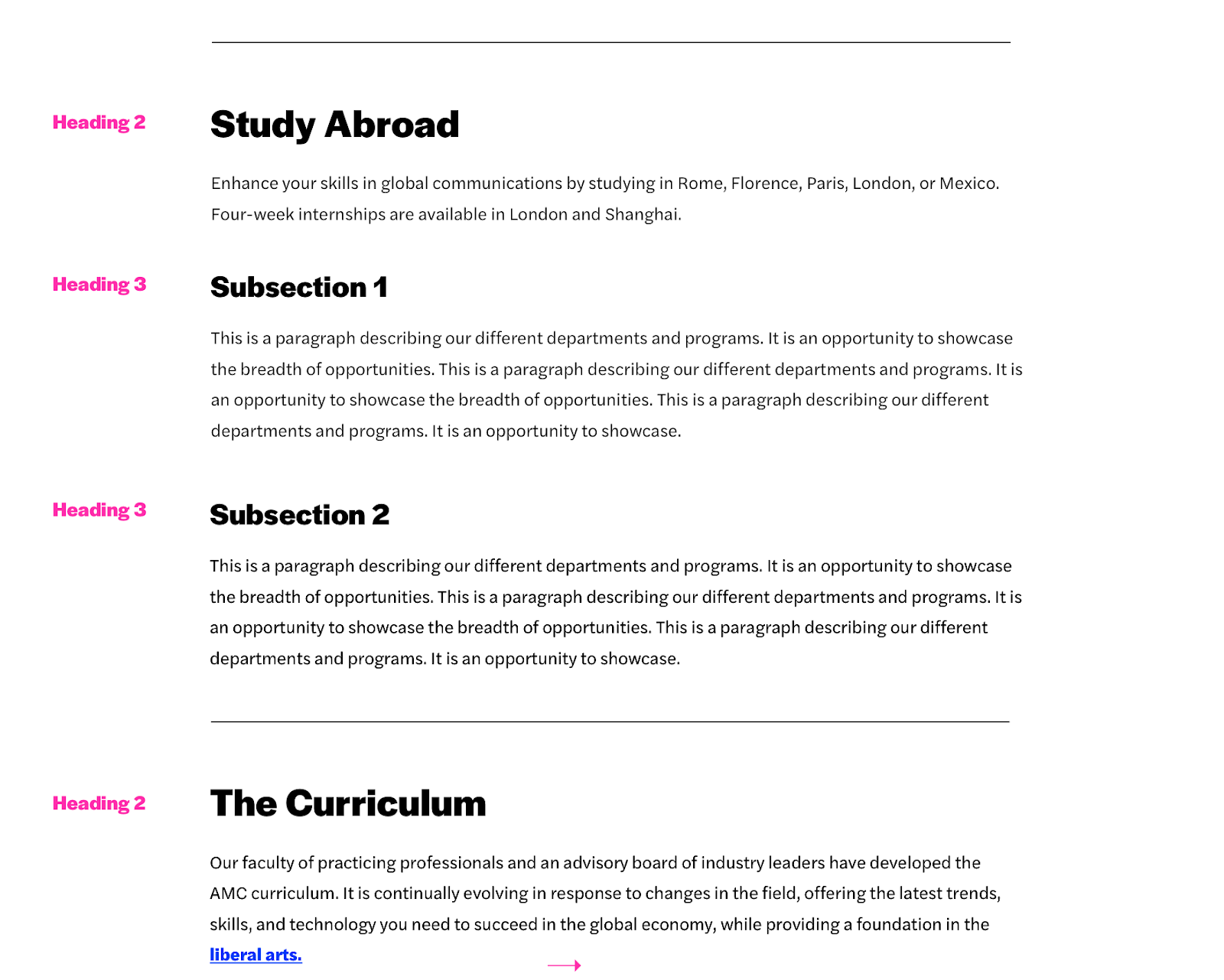
Headings
Any text that serves as a heading should use heading tags.
- Headings should use <h1>-<h6> tags, not merely text styled to look large.
- <h1> is reserved for the page title only, and there can only be one per page.
Headings must be sequential.
- A heading level cannot be skipped (e.g. <h2> cannot be followed by <h4>).
- Regardless of the visual style in the design, the underlying tags must follow the correct order.
Lists
Use a bulleted list <ul> or numbered list <ol> for lists.
- Do not use paragraphs <p> with line breaks.
- Do not use spaces to simulate indentation.
Images
All images should have descriptive alternative text.
- The “alt” attribute should describe the contents of the image in a few words, not be the filename, the word “photo”, or repeat the text of a nearby link or heading.
- Avoid the “title” attribute.
Avoid uploading images with text in them.
- If absolutely necessary, the text should be included in the image’s alternative text, and the text embedded in the image should have a contrast ratio of at least 4.5:1 between text color and background color. Test with this tool: http://webaim.org/resources/contrastchecker/
- Logos are permitted.
Tables
Tables should have column and/or row headers using <th>.
- The headers cannot be blank.
- They should contain text that describes the data in the associated columns or rows.
Links
Link text should provide information about its destination.
- Don’t use “click here”. Link the name of the destination instead.
- Non-specific links like “learn more” or “see all” should be rewritten or contained in a paragraph or list item that provides context.
- Avoid the “title” attribute.
Text
No interface element should be referenced solely based on its visual characteristics.
- Incorrect examples: “Click the blue button.” “Content in the circle to the right.”
- “Above” and “below” are permitted.
Language changes must be marked.
- Add <span lang="xx"></span> around text in a language other than English, where xx is the 2-letter language code from this chart: https://www.w3schools.com/tags/ref_language_codes.asp
Be careful when changing the color, font family, or size of text.
- If this is necessary, ensure the text color and background color have a contrast ratio of at least 4.5:1 using this tool: https://webaim.org/resources/contrastchecker/
Forms
All form fields should have a label.
- Form fields are: text fields, checkboxes, and radio buttons <input>, dropdown menus <select>, and text areas <textarea>.
- Labels should be associated with the fields they describe: <label for="name">Name:</label><input id="name" type="text">
- Required for radio buttons <input type="radio"> and checkboxes <input type="checkbox">
- The <legend> should be the first element inside the <fieldset>.
Audio
All audio (such as radio shows or podcasts) should have a transcript.
- Link to the transcript after the audio player.
Video
All videos should have captions and audio descriptions.
- The captions should contain the audio content.
- The audio descriptions should contain the visual content.
- Consult with your video service provider (Brightcove, Vimeo, YouTube, or other) regarding how to add captions. If supported, run the automated captioning feature, and then edit for accuracy.
- If the video player doesn’t provide a separate track for audio descriptions, the captions should also describe the visual content in a few words (the people, actions, and places in the video) during pauses in the audio.
Motion
Any motion longer than 5 seconds or auto-updating information:
- Cannot flash more than 3 times per second.
- Must have a mechanism to pause, stop, or hide it.
Animated GIFs should stop moving within 5 seconds and not loop infinitely.
Documents & Embeds
Documents should be avoided as much as possible. If the information can be displayed on a page, that should always be the first option.
- PDFs should be tagged.
- All of the other content requirements above apply.
- Make sure any files linked to the content are corrected for accessibility. Follow these checklists:
How to Use the Accessibility Checkers
After you click “Publish,” you’ll be presented with the “Final Check.” Click Run All Checks.
- Spelling: Shows any words the CMS does not recognize. This may include terms that are spelled correctly but it will also show you any obvious spelling errors.
- Links: Shows any broken internal or external links
- Accessibility: Checks if the page is W3C Valid
Accessibility (Axe): Checks for Section 508 and Web Content Accessibility Guidelines (WCAG) compliance
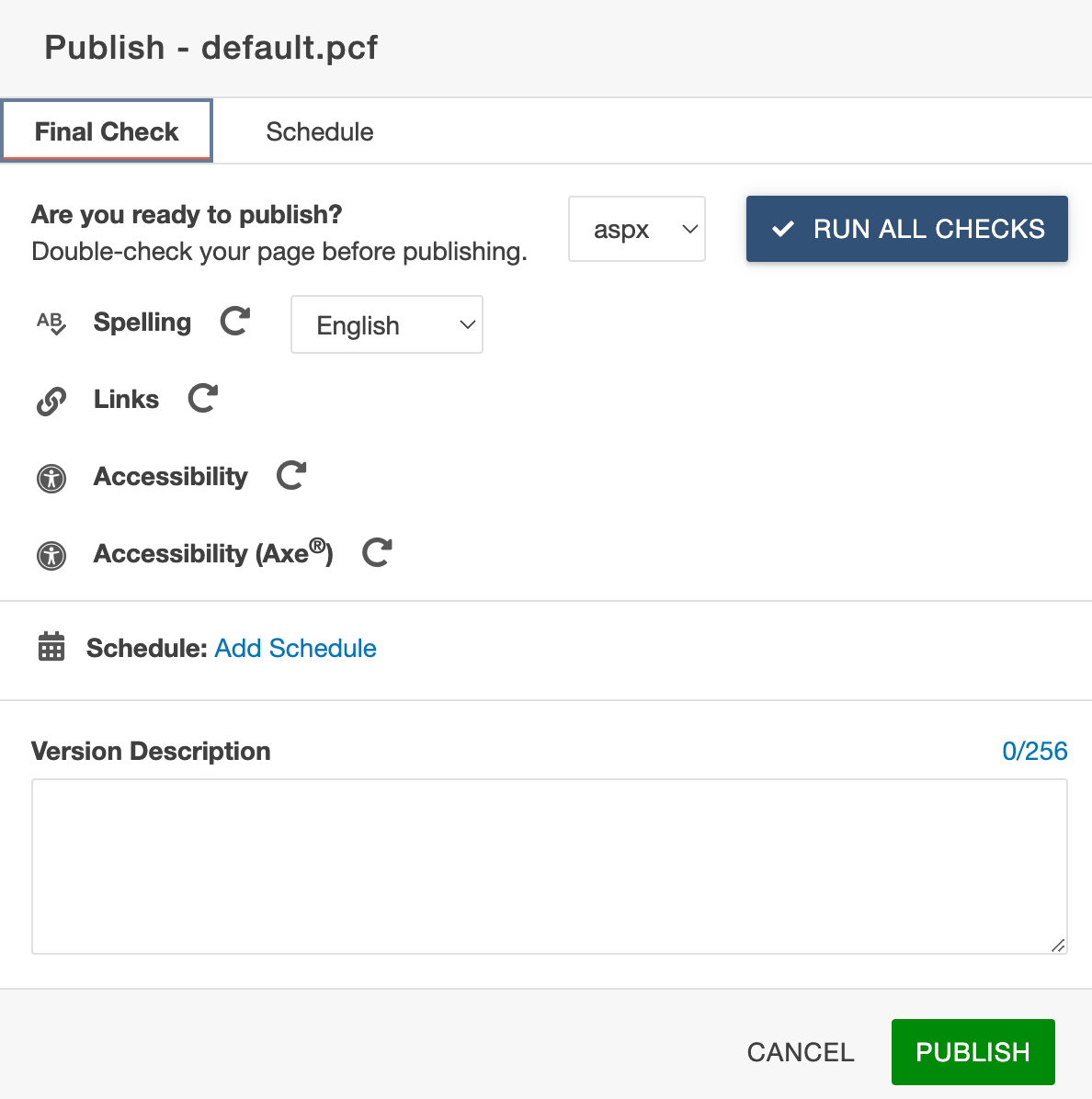
If you receive an error, the screen will show:
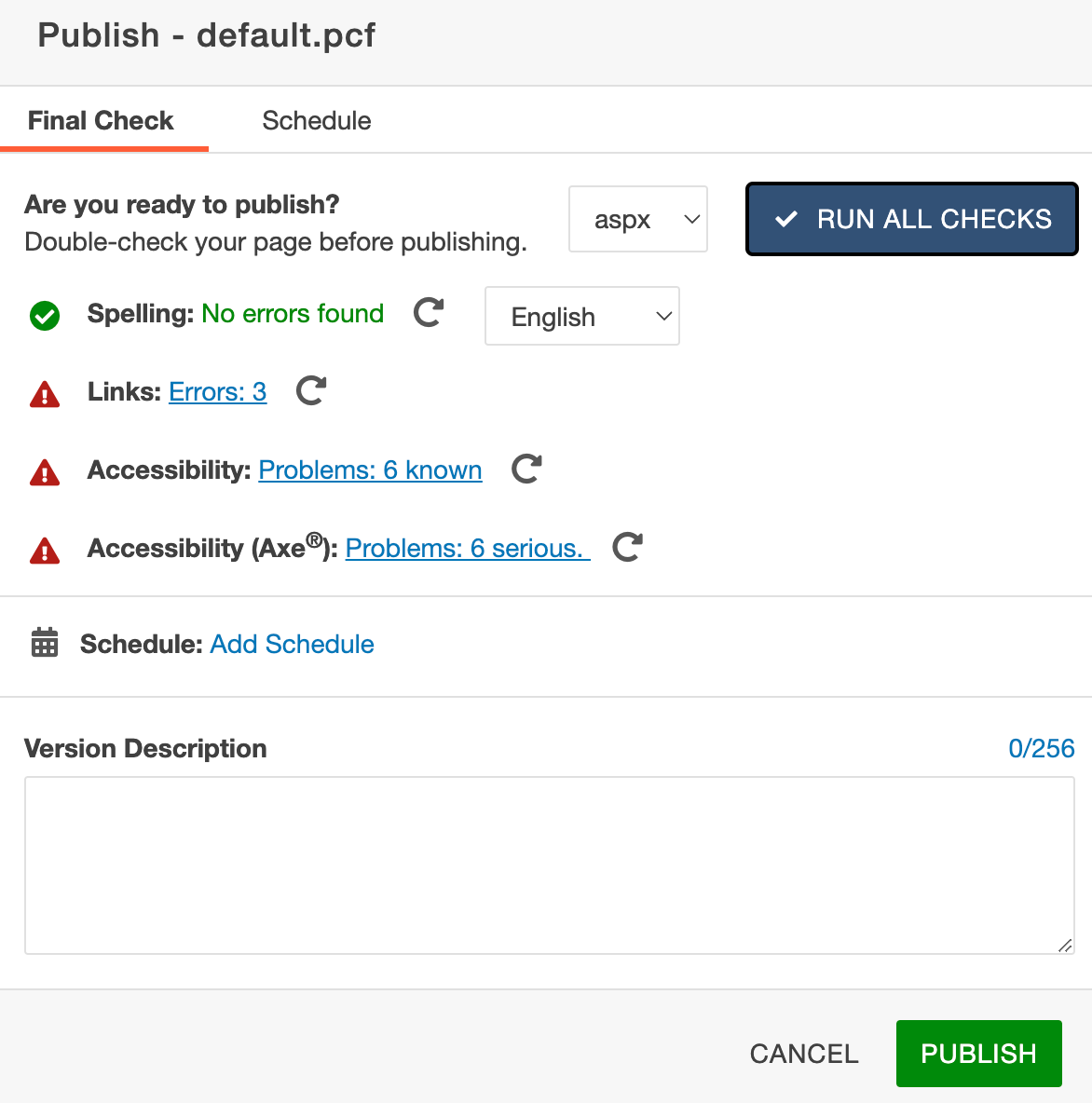
Click on the errors to see the errors. Do not publish without fixing these errors. Reach out the Marketing and Communications Team if you have problems fixing these errors.
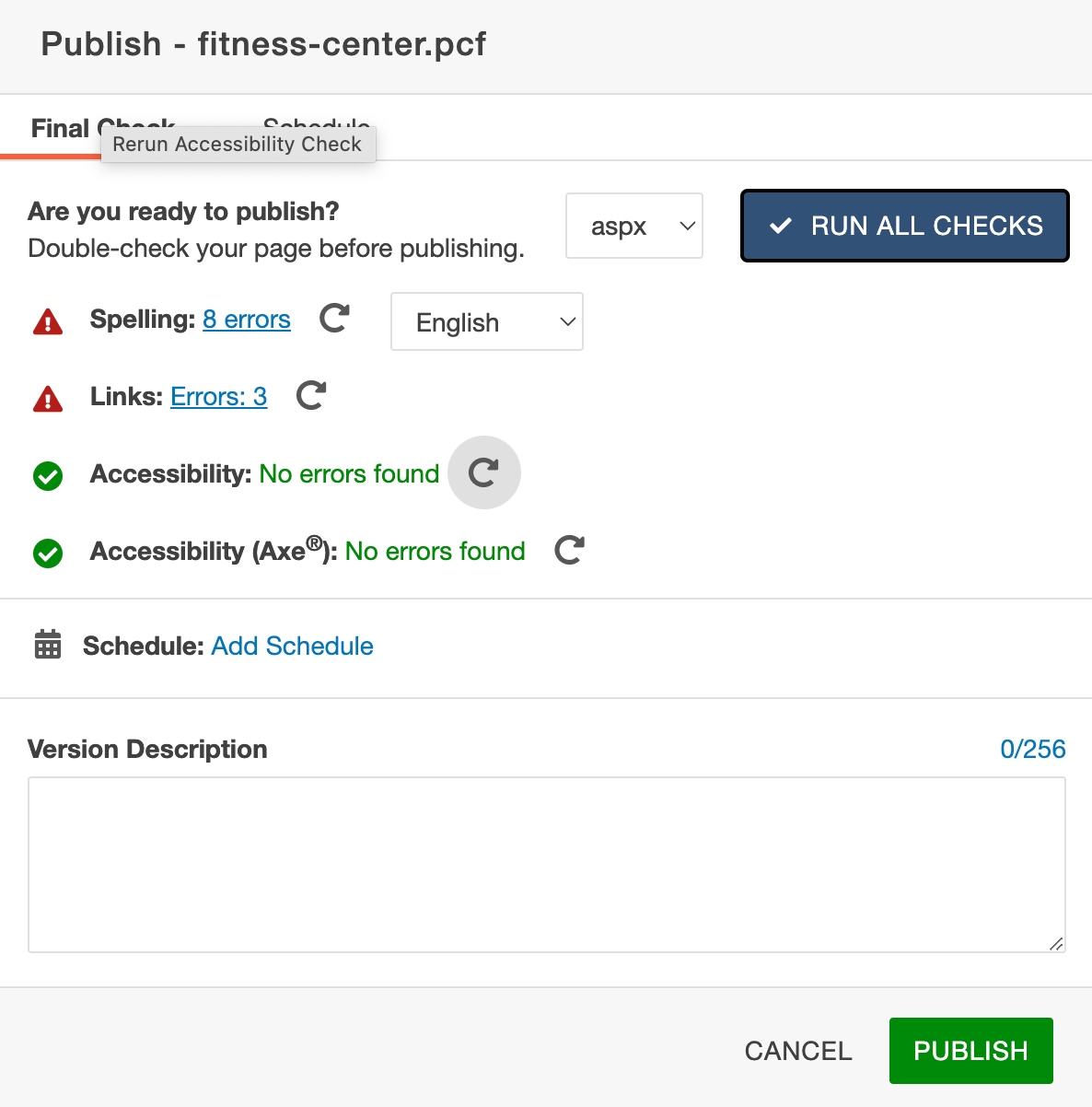
Once you receive green checkmarks, click publish.
12. Glossary & Key Terms
We’re going to define the terminology that you will see throughout our documentation. This can be a handy guide to refer back to while acquainting yourself with the process of creating & managing content on the site.
General Terminology
Audience
The people for whom the content on a page is for. A page can have multiple audiences, but the more specific a page’s audience, the easier it will be to write the content for that page.
Example: prospective students
Pattern
A piece of structured content that can be put in a page’s body.
Example: 2-column pattern
The system by which a user gets around a site.
Site Structure
Parent page
In the site’s structure, the page that is hierarchically directly above the current page.
Child page
In the site’s structure, the page that is hierarchically directly below the current page.
Sibling page
In the site’s structure, the page that is hierarchically at the same level as the current page.
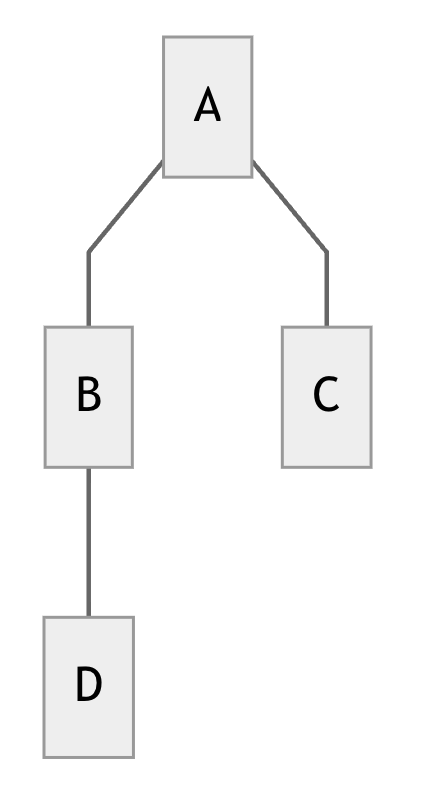 |
In the diagram to the left, consider page B as the current page. This means that: Page A is the parent page of B, Page C is a sibling page of B, and Page D is a child page of B. |
Patterns
WYSIWYG
Stands for “what you see is what you get”. This pattern allows for all kinds of rich text editing, including headings, paragraph text, images, lists, and quotes. This is the most flexible pattern available. When in doubt about which pattern to use, try using a WYSIWYG.
Accordion
A pattern which allows for keeping information in individual “tabs” for the user to access. The tabs are presented stacked on top of one another, and can be opened to view more information.
CTA
Stands for “call to action”. CTAs should be used throughout the site to guide users to key pages and experiences that they need to know.
New Website Known Issues
We appreciate the feedback from across campus regarding the new website. We wanted to provide a list of commonly reported issues we are aware of.
Search
Our site search is powered by Google. On the day of launch, we submitted details on our new site to Google, but we are waiting for them to crawl our site and remove old pages from their search results. We are following this closely, as we know search is crucial in helping find information. In the meantime, please explore the site using the menu navigation.
Faculty and Staff Directory
- Filter list has duplicates, multiple departments
- Faculty/staff have multiple departments listed with no spaces
- Emails and phone numbers may wrap to a new line in strange ways
We are continuing to import people from our old website, as not all may have been imported prior to launch. If you find people that are missing or have incorrect data, please open a ticket.