# 12. Glossary & Key Terms

<span style="font-weight: 300;">We’re going to define the terminology that you will see throughout our documentation. This can be a handy guide to refer back to while acquainting yourself with the process of creating &amp; managing content on the site.</span>

### <span style="color: #cc092f;">**General Terminology**</span>

**Audience**

<span style="font-weight: 300;">The people for whom the content on a page is for. A page can have multiple audiences, but the more specific a page’s audience, the easier it will be to write the content for that page.</span>

*<span style="font-weight: 300;">Example: prospective students</span>*

**Pattern**

<span style="font-weight: 300;">A piece of structured content that can be put in a page’s body.</span>

*<span style="font-weight: 300;">Example: 2-column pattern</span>*

**Navigation**

<span style="font-weight: 300;">The system by which a user gets around a site.</span>

*<span style="font-weight: 300;">Example: a main menu is one form of navigation</span>*

### <span style="color: #cc092f;">**Site Structure**</span>

**Parent page**

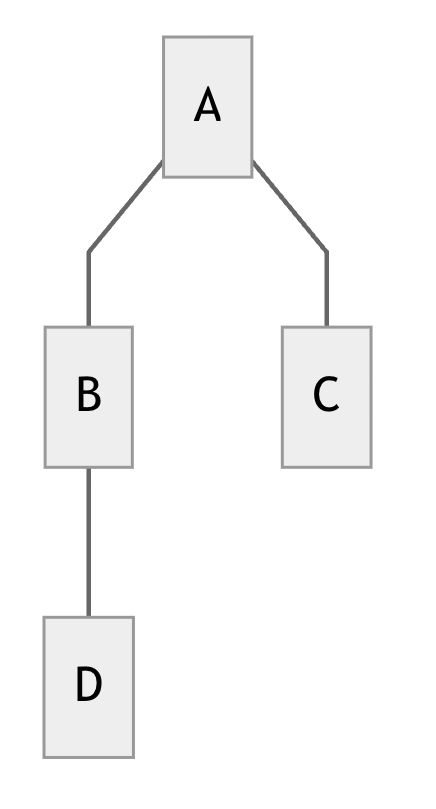
<span style="font-weight: 300;">In the site’s structure, the page that is hierarchically directly above the current page.</span>

**Child page**

<span style="font-weight: 300;">In the site’s structure, the page that is hierarchically directly below the current page.</span>

**Sibling page**

<span style="font-weight: 300;">In the site’s structure, the page that is hierarchically at the same level as the current page.</span>

<table border="0" id="bkmrk-in-the-diagram-to-th" style="width: 70.4938%; border-collapse: collapse; border-style: none;"><tbody><tr><td style="width: 31.4815%;">[![keywords-img.png](https://kb.astate.edu/uploads/images/gallery/2025-06/scaled-1680-/keywords-img.png)](https://kb.astate.edu/uploads/images/gallery/2025-06/keywords-img.png)</td><td style="width: 36.5572%; vertical-align: top;">*<span style="font-weight: 300;">In the diagram to the left, consider page B as the current page. This means that: Page A is the parent page of B, Page C is a sibling page of B, and Page D is a child page of B.</span>*</td></tr></tbody></table>

### <span style="color: #cc092f;">**Patterns**</span>

**WYSIWYG**

<span style="font-weight: 300;">Stands for “what you see is what you get”. This pattern allows for all kinds of rich text editing, including headings, paragraph text, images, lists, and quotes. This is the most flexible pattern available. When in doubt about which pattern to use, try using a WYSIWYG.</span>

**Accordion**

<span style="font-weight: 300;">A pattern which allows for keeping information in individual “tabs” for the user to access. The tabs are presented stacked on top of one another, and can be opened to view more information.</span>

**CTA**

<span style="font-weight: 300;">Stands for “call to action”. CTAs should be used throughout the site to guide users to key pages and experiences that they need to know.</span>