# UPDATE PREFERRED FIRST NAME
**To update your preferred first name in Self Service (which then adjusts your display name in Canvas):**
#####
**1. Select the *four-square menu button* on the upper left, then select “Banner”**
[](https://kb.astate.edu/uploads/images/gallery/2024-10/image-1729712888557.png)
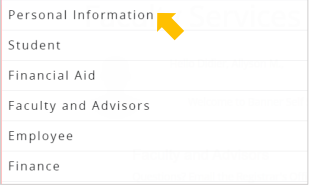
##### **2. Select “Personal Information”**
[](https://kb.astate.edu/uploads/images/gallery/2024-10/image-1729712903522.png)
##### **3. Your personal information will display. Under *Personal Details* select “Edit”**
[](https://kb.astate.edu/uploads/images/gallery/2024-10/image-1729712915971.png)
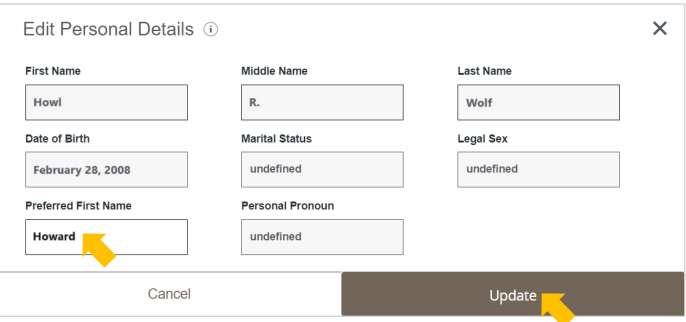
##### **4. Enter your “Preferred First Name” and select “Update”**
[](https://kb.astate.edu/uploads/images/gallery/2024-10/image-1729712938747.png)
##### If you do not see your preferred first name adjusted as your display name in Canvas within 24hours,
please email AOS@AState.edu with your name and ID number for further assistance.