# How to Request a Home@AState Wi-Fi Password
---
If you are living on campus you will connect to the **Home@AState** Wi-Fi network. To request a password you will need to submit a ticket which should include your building name and room number. A password will then be assigned and emailed to you.
---
1\. Go to [pack.astate.edu.](https://pack.astate.edu/)
[](https://kb.astate.edu/uploads/images/gallery/2025-05/image-1747341110902.png)
2\. Click **Log In** on the top right corner of the screen.
3\. Enter your full A-State email address and click **Next**.
[](https://kb.astate.edu/uploads/images/gallery/2025-05/image-1747341135131.png)
4\. Enter your A-State password and click **Login**.

5. Authenticate using **Microsoft Authenticator** on your mobile device.
 
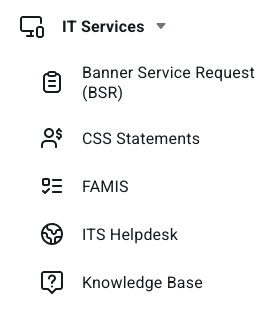
6\. Click **IT Services** on the left.
[](https://kb.astate.edu/uploads/images/gallery/2026-08/new-its.png)
7\. Click **ITS Helpdesk**.
5\. Click on **Sign In** located at the top right of the screen.
[](https://kb.astate.edu/uploads/images/gallery/2022-02/1.png)
6\. Enter your full A-State email address and password and click **Login**.
[](https://kb.astate.edu/uploads/images/gallery/2025-05/image-1747341283228.png)
7\. Authenticate using **Microsoft Authenticator** on your mobile device.
 
8\. Click on **Get Started**.
[](https://kb.astate.edu/uploads/images/gallery/2023-12/getstarted.png)
9. Scroll to the bottom of the page and click **Get Help**.
[](https://kb.astate.edu/uploads/images/gallery/2023-12/image-1701463697567.png)
10\. Click **Create A Ticket**.[](https://kb.astate.edu/uploads/images/gallery/2023-12/image-1701463802562.png)
10\. Fill out the required fields on the form with your full A-State email address, phone number, building name, room number, and a subject of **Home@AState password request**.
11\. This will be sent to our Housing and Student Support team and they will generate a password and email it to your A-State email address. The email should come from **no-reply@extremecloudiq.com**. If you do not see the email in your inbox, check your spam folder.
For further assistance, contact the ITS Help Desk at 870-972-3933 or stop by IT Support Services (). It is located on the bottom floor of the Dean B. Ellis Library, Room 149.