# Create@State
***The 17th Annual Create @ State Symposium will be Thursday, April 22, 2027***
A-State’s student research and creativity development program, Create @ State, is a year-long program that provides our traditional and online students with opportunities to become engaged in faculty mentored research and creativity with industry, community, and alumni for student learning and community building.
This program culminates each year with the Create @ State Symposium to showcase the co-curricular research, scholarly, and creative works of our students in a professional setting, with judges being those from industry, stakeholders, alumni, community leaders, and administration.
# 16th Annual Create@State Symposium Schedule (2026)
## **Wednesday, April 15th**
#### **9:00 AM - 6:00 PM**
#### Registration/Set-up in Centennial Hall and Spring River Room
Instructions: Participants can stop by at any time to drop off their poster and set up showcase pieces. Please stop at the registration desk (Alumni Lounge, in front of Centennial Hall) to check in and pick up your name badge.
#### Comm Center Practice Sessions in Mockingbird Room
Staff from the A-State Communication Center will be on hand throughout the day to help you prepare for your presentation! Look for signs to direct you where to go/ how to find Comm Center staff to help you.
## **Thursday, April 16th**
#### **9:00 AM - 10:00 AM**
#### Registration and Badge Pick-up in Alumni Lounge
#### **10:00 AM - 12:00 PM**
#### Ice Cream Social
#### **10:00 AM - 12:00 PM**
#### Poster Session in Centennial Hall
#### Showcase of Creativity in Spring River Room
#### Performances and Business Pitch Competition in Auditorium
#### **12:00 PM - 1:30 PM**
#### Networking Lunch in Diamond Lounge and Mockingbird Room
#### **1:30 PM - 3:00 PM**
#### 3MT - 3 Minute Thesis Competition in Auditorium
## **Friday, April 17th**
#### **3:00 PM - 5:00 PM**
#### Celebration of Research and Awards at the Woodard McAlister Family Club (Centennial Bank Stadium)
# Program Book
The complete Create@State 2026 Program Book. Includes schedule of events, list of students presenting, and abstracts
# Program Book
[Program Book](https://kb.astate.edu/attachments/2217)
(Please do not use list of Abstracts posted to the left, as it is an old version; we are working to have it removed. Please refer to the Program Book.)
# Poster Presentations by Name
List of presentations is attached (see top left of screen in red).
# Showcase Presentations by Name
List of presentations is attached (see top left of screen in red).
# Pitches and Pitches Showcase Schedule
Schedule of events is attached (see top left of screen in red).
# Abstract Submission
***Abstracts for Create@State are currently closed and will reopen in Fall 2026*****.**
The sixteenth annual Create @ State: A Symposium of Research, Scholarship & Creativity will be held on Thursday, April 16, in the Student Union.
About Create @ State:
A-State’s student research and creativity development program, Create @ State, is a year-long program that provides students with opportunities to become engaged in faculty mentored research and creativity with industry, community, and alumni for student learning and community building.
This program culminates each year with the Create @ State Symposium to showcase the co-curricular research, scholarly, and creative works of our students in a professional setting, with judges being those from industry, stakeholders, alumni, community leaders, and administration. This provides a diverse setting for students to engage with the community, showcase research for community impact, and to receive feedback from potential employers and networks for student learning and community building.
All A-State students engaged in faculty-mentored research and creative works, are eligible to present in this showcase.
# 2026 Presentation Formats & Categories for Judging
**Presentation Format:**
- **Poster Presentation:** Will include all research, quality assessment, and quality improvement presentations. If you need assistance creating a poster, you can find templates on the A-State Student Research Webpage. Poster printing vouchers will be available to students who need printing assistance. Voucher information will be sent to students presenting posters at least three weeks prior to the symposium.
- **Showcase Participant:** Typically will be a creative presentation, performance, or other non-poster format presentation to be presented outside of the poster presentation format. (Note: If you choose this presentation type, make sure you include your AV and installation needs with your abstract. Examples include: Easel, 6' Folding Table, Use of Auditorium. If you are unsure, please describe your presentation or work and we will contact you to determine the best way to support your presentation). **Showcase participation is not for traditional oral presentations**.
**Categories for Judging:**
Research can be broadly classified into several categories based on various criteria such as purpose, methodology, and application. Self-select the category that your research best fits in for judging purposes.
- **Basic or Experimental Research:** Basic research, also known as pure or fundamental research, aims to expand knowledge and understanding of a subject without any specific practical application in mind. Experimental research involves manipulating variables to determine cause-and-effect relationships; it often includes the use of control groups and random assignments.
- **Observational, Descriptive, or Cross-Sectional Research:** Research that collects data through observation where researchers observe subjects and record their behavior without intervening or manipulating variables or aims to describe the characteristics of a population, or collects data from a population at a single point in time to examine relationships or characteristics within that population research, researchers observe subjects and record their behavior without intervening or manipulating variables.
- **Quality Assessment, or Quality Improvement:** Define a problem, implement best practices and define implications for site quality improvements.
- **Creative Work:** Creative work is a manifestation of creative effort including fine artwork, dance, writing, filmmaking, and composition, computer code, among other things.
- **Decline to Participate in Judging:** I would like to present at Create@State, but I would like to refrain from the judging component. I understand that not allowing my work to be judged may result in my not receiving feedback on my presentation and will disqualify me from receiving any awards/prizes for my work.
# Guide for Abstract Submission
All students participating in the event—**regardless of presentation type**—must submit an abstract. Please read the following instructions carefully to ensure your submission is complete and approved on time.
### **1. Abstract Requirements**
- Abstracts must be **200 words or less**.
- Your abstract should clearly and concisely **describe the work you will be presenting**, including the main purpose, methods, results, or themes, depending on your discipline.
### **2. Submission Deadline**
- **Monday, March 2nd, 2026 at 11:59 PM**
Late submissions cannot be accepted, so please plan early.
### **3. How to Submit Your Abstract**
- Visit the submission portal:
**[https://astate.infoready4.com/#homePage](https://astate.infoready4.com/#homePage)**
- Log in using your **A-State student ID**.
- Complete the application and copy/paste your abstract where instructed.
- Add all co-authors using the **“Add Co-Author”** feature within the application.
- Please ensure that all student collaborators and faculty mentor information is listed correctly (double check email addresses and spelling of names).
- Submit your application.
### **4. Faculty Mentor Review**
- After you submit, your **faculty mentor will receive an automated notification** from InfoReady.
- Your mentor must review and approve your submission before it is officially accepted.
### **5. Selecting Presentation Format and Judging Category**
- Students should carefully review available **presentation formats** and **judging categories** before submitting.
- Discuss options with your **faculty mentor** to determine the most appropriate format and category for your work.
# Deadline: March 13th
# Poster Resources
# Poster Templates
### Official Poster Template for Create @ State:
[Create@State Hybrid Poster Template Portrait2.pptx](https://kb.astate.edu/attachments/1924)
You are welcome to use other poster templates and styles as long as they meet the [guidelines](https://kb.astate.edu/books/create-at-state-573/page/setting-poster-size-and-saving-as-pdf).
Additional Templates:
[Create@State Updated Poster Template](https://kb.astate.edu/attachments/1884)
[Old Style Create at State Poster Template\_Vertical.pptx](https://kb.astate.edu/attachments/1905)
[Old Style Create at State Poster Template\_Horizontal.pptx](https://kb.astate.edu/attachments/1906)
# Guidelines for Posters
#### **All posters presented at Create@State should follow these guidelines:**
1. **The poster size should be 36"x48" or 48"x36".** See "Setting Poster Size and Saving as PDF" instructions below and "[Poster Templates](https://kb.astate.edu/books/create-at-state-573/page/poster-templates)".
2. **Poster should be digitally created and professionally printed.** See "[Poster Printing](https://kb.astate.edu/books/create-at-state-573/page/printing-a-poster)" resource
3. **Title, name of presenter(s), and faculty mentor(s) name(s) should be clearly listed at the top of the poster.**
4. **Include all appropriate logos for A-State, academic college, and any organizations or entities that have significantly contributed to your project.** (For example, if your project is funded by a grant, include the grant agency logo on your poster)
**Setting Poster Size and Saving as PDF**
- **Open PowerPoint**
- Start a new blank presentation OR
- Open an existing template
- **Open Slide Size Settings (this may already be done if you are using a template)**
- Go to the **Design** tab.
- Click **Slide Size** on the right end of the toolbar.
- Select **Custom Slide Size**.
- **Enter the Required Poster Size**
Choose **one** of the required dimensions:
- **36 inches (height) × 48 inches (width)** for **landscape** posters
- **48 inches (height) × 36 inches (width)** for **portrait** posters
Make sure the **Orientation** matches your chosen layout.
- **Apply Scaling**
When prompted:
- Choose **Ensure Fit** to prevent content from being cut off,
**or**
- Choose **Maximize** to scale content up (you may need to re-adjust elements).
- **Design Your Poster**
Insert text, images, charts, and layout elements.
- Use **View → Zoom** for easier editing.
- Use **Arrange** tools under the **Home** tab for alignment and spacing.
- **Export as PDF**
Useful for printing or submission:
- Go to **File → Export → Create PDF Document**.
- Select **Standard** and click **Publish**.
# Printing a Poster
The Office of Student Research and Scholarship will print your Create@State poster at no cost. To have your poster printed:
1. Save your poster according to the [guidelines](https://kb.astate.edu/books/create-at-state-573/page/setting-poster-size-and-saving-as-ppt-file)
2. Navigate to the 2026 [Create@State page on ARCH](https://arch.astate.edu/evn-createstate/)
3. Create an ARCH account if you do not have one (ARCH does not have single sign on with A-State, be sure to save your username and password in a secure location)
4. Click on the Submit Poster link
5. Fill in the required fields, upload your file, and in the **COMMENTS** field type "Print my poster" along with the name of the person picking up the poster at Create@State.
*\*Posters will be picked up when you check-in for the event.\*
**IMPORTANT: Deadline to request a Free Poster Printing is Wednesday, April 8th***
# Design Resources: Quality Assessment Research
Example Poster:
[Quality Assessment\_Riley Jackson 2025.pdf](https://kb.astate.edu/attachments/1892)
# Design Resources: Observational Research
# Design Resources: Creative Works
# Design Resources: Basic or Experimental Research
Example Poster #1
[Basic-Exper\_KennonH\_Create@State.pdf](https://kb.astate.edu/attachments/1889)
Example Poster #2
[Basic-Exper\_Cara Pirani 2025.pdf](https://kb.astate.edu/attachments/1891)
# Tips and Tricks for Making a Great Presentation
Slides from [Create@State](mailto:Create@State) Poster Prep Workshop 3/17/27.
Click on attachment at top left of screen in red to download a PDF of presentation slides.
# Judging Rubrics
# Rubric for Quality Assessment Research
[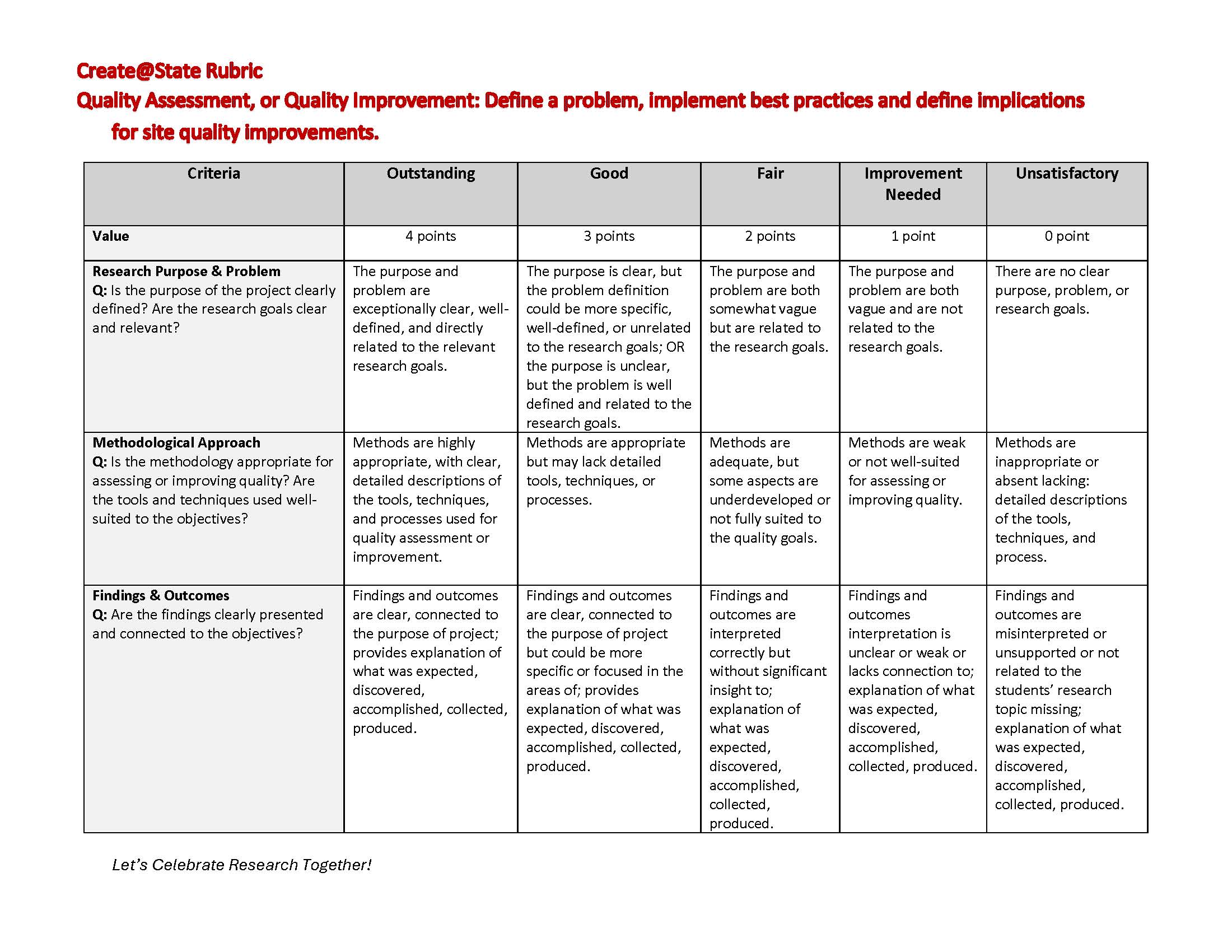](https://kb.astate.edu/uploads/images/gallery/2025-11/rubric-for-quality-assessment-research-1-page-1.jpg)
[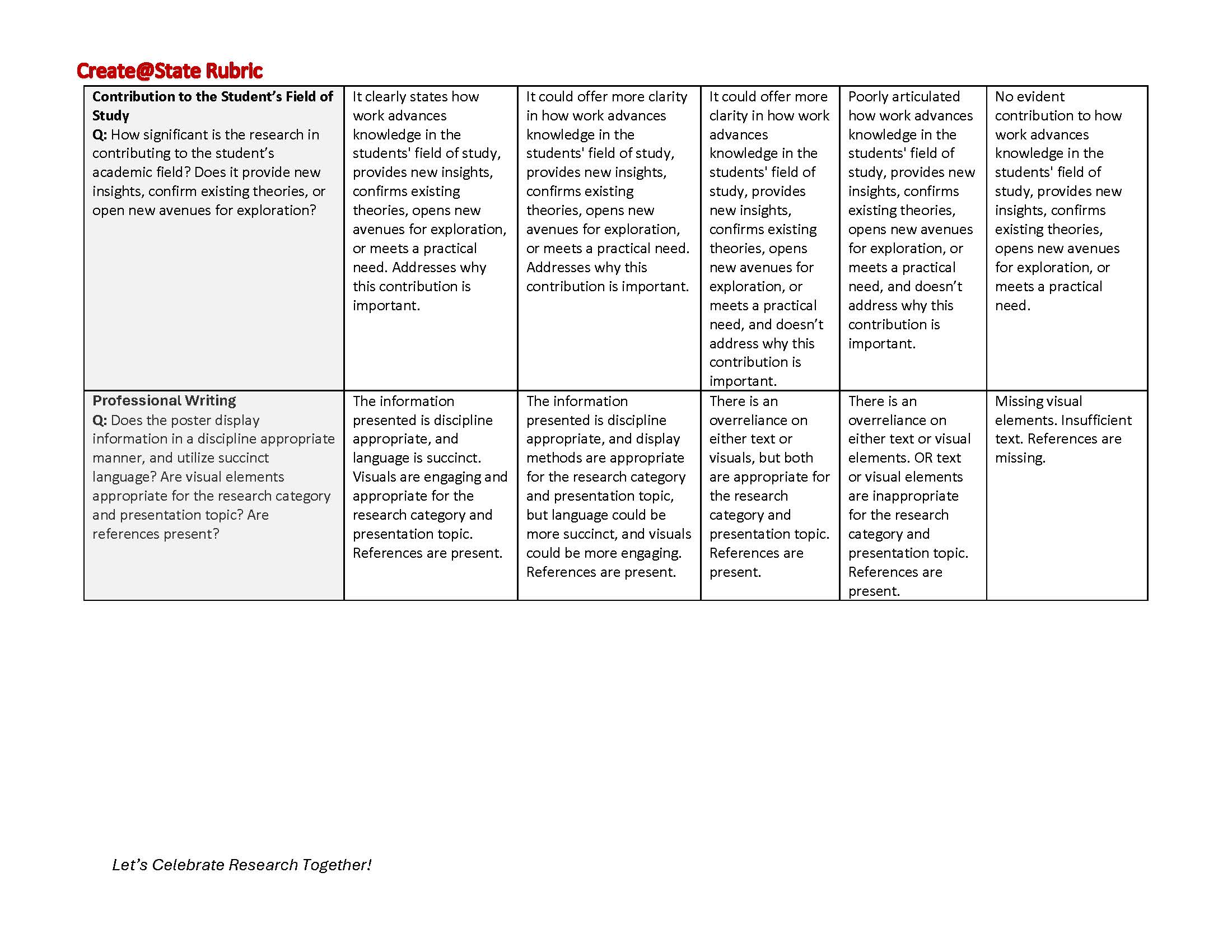](https://kb.astate.edu/uploads/images/gallery/2025-11/rubric-for-quality-assessment-research-1-page-2.jpg)
# Rubric for Observational Research
[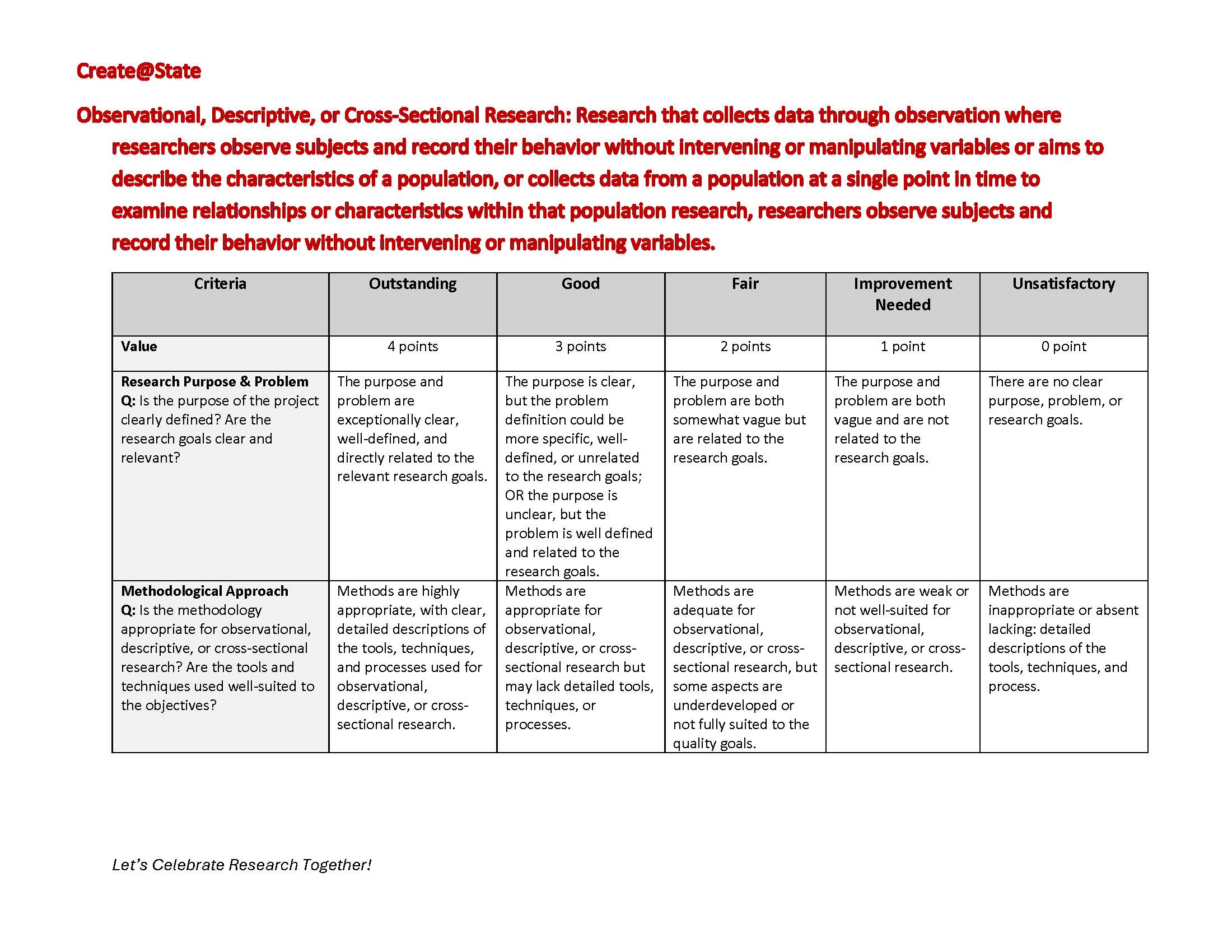](https://kb.astate.edu/uploads/images/gallery/2025-11/rubric-for-observational-research-page-1.jpg)
[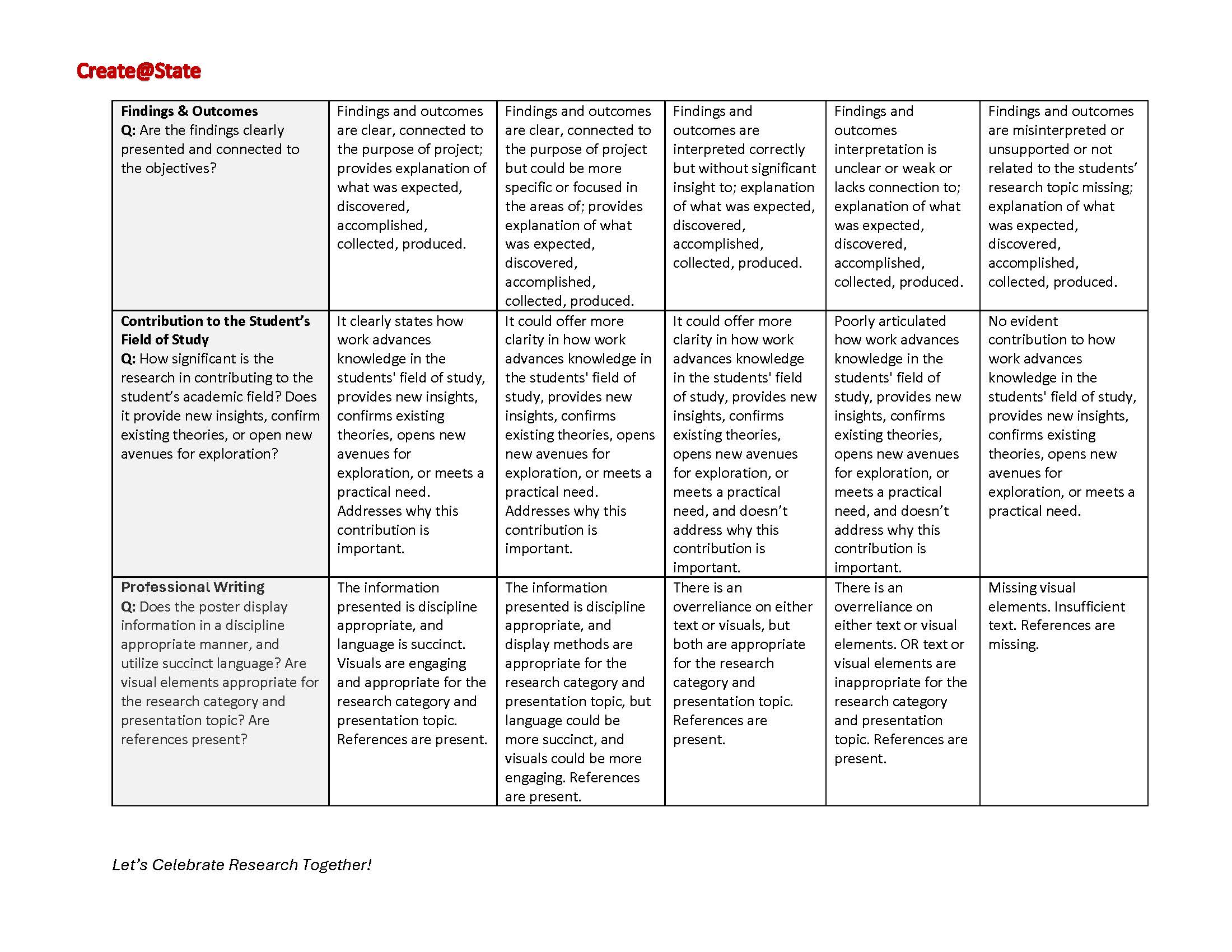](https://kb.astate.edu/uploads/images/gallery/2025-11/rubric-for-observational-research-page-2.jpg)
# Rubric for Creative Work
[](https://kb.astate.edu/uploads/images/gallery/2025-11/rubric-for-creative-work-page-1.jpg)
[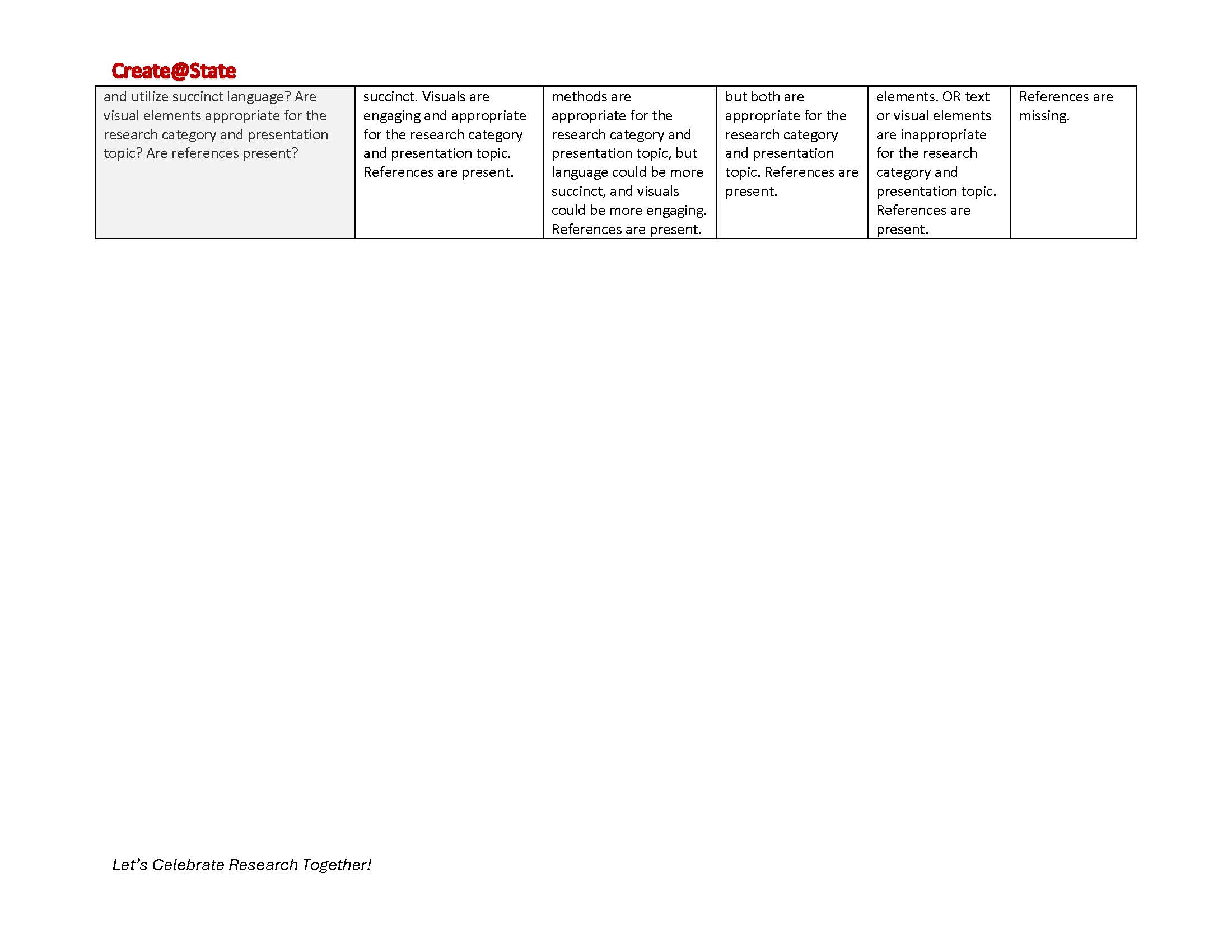](https://kb.astate.edu/uploads/images/gallery/2025-11/rubric-for-creative-work-page-2.jpg)
# Rubric for Basic or Experimental Research
[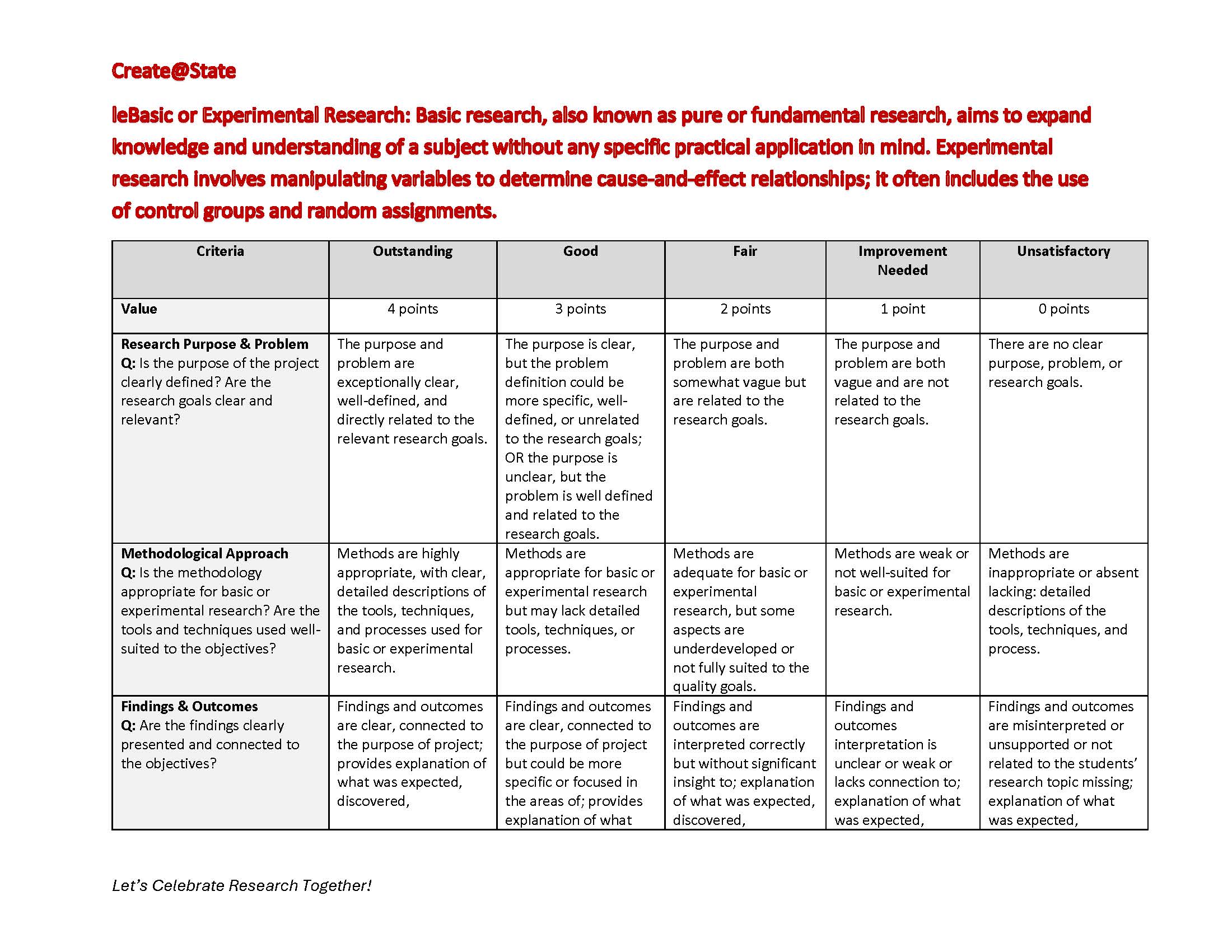](https://kb.astate.edu/uploads/images/gallery/2025-11/rubic-for-basic-or-experimental-research-page-1.jpg)
[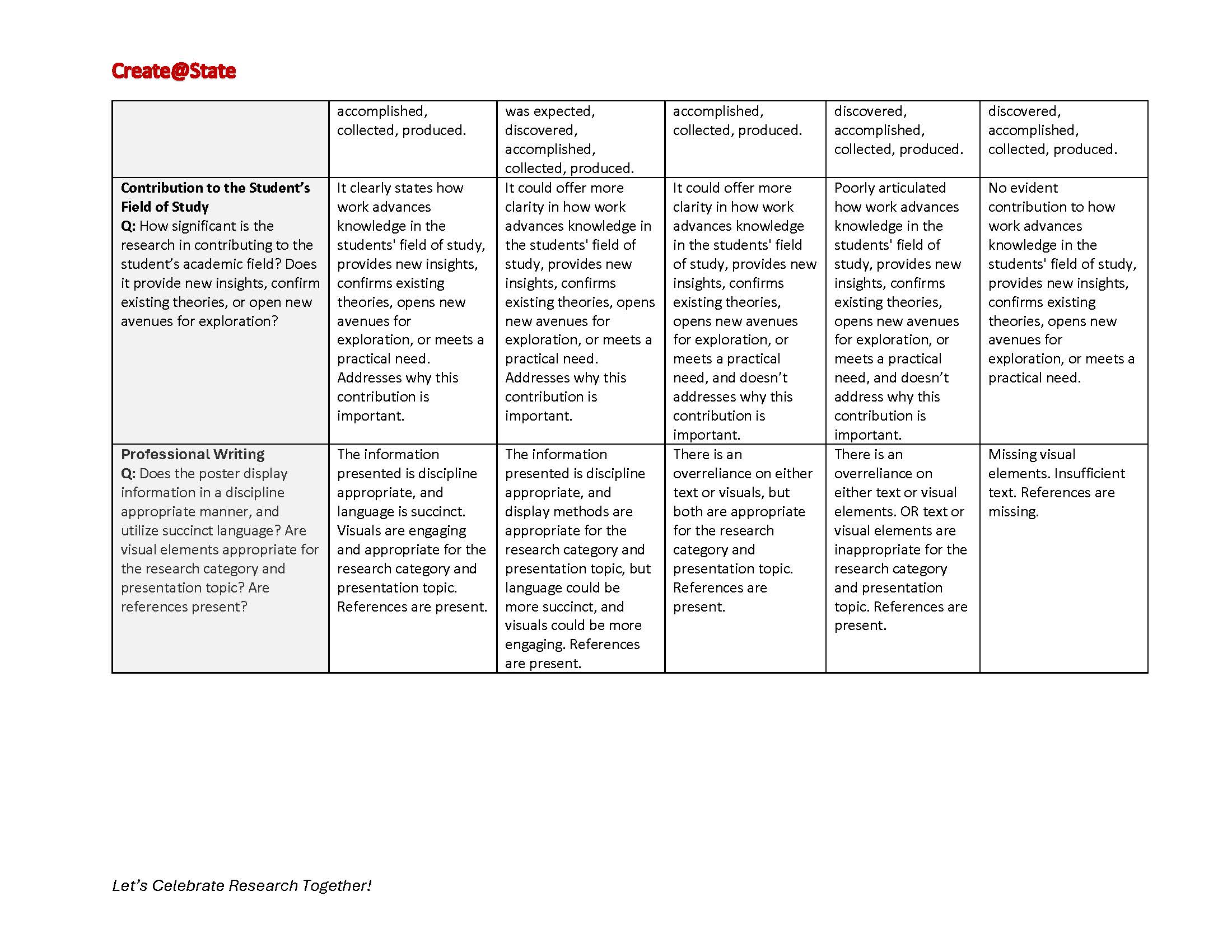](https://kb.astate.edu/uploads/images/gallery/2025-11/rubic-for-basic-or-experimental-research-page-2.jpg)
# Rubric for Literature Review
New category coming for Create@State 2027. Rubric to be posted soon.
# Create@State on ARCH
The A-State library is collecting a repository of Create@State presentations. Information on how to view or contribute to this repository can be found in this book.
# Accessing ARCH
https://arch.astate.edu/evn-createstate/
# Information for Judges
# Sign Up to Judge
### We welcome faculty, staff, and professional members of the community to serve as judges for the Create@State poster session.
## [**SIGN UP TO JUDGE**](https://astate.qualtrics.com/jfe/form/SV_202sjnCmonxGodw)
# Judging FAQ
### **1. I have students participating in Create@State. Can I still judge?**
#### Yes! As university professionals, we trust you to ethically and fairly judge any presentation you are assigned. We will work to ensure you do not judge your own student, but you may judge students presentations similar in subject or category.
### **2. What is the expected time commitment?**
#### Judges are invited to check-in one hour prior to the start of the session they are judging. Please refer to the schedule for current session times for the event you are judging.
#### Typically, judging takes approximately 2-3 hours.
### **3. I am coming from off campus. Where do I park?**
#### Paid parking is available in the parking garage at the student union. For judges who are visiting A-State from off-campus, you are welcome to request a parking pass when you sign up to judge.
#### The day of the event, volunteers will be stationed at either entrance of the parking garage to distribute parking passes. \*\*Please do not request a parking pass if you work on campus.
### **4. Where do I check in on event day?**
#### Judges check-in will be in the Cache River Room on the 3rd floor of the student union. From the parking garage, walk into the building towards Centennial Hall, and take a left at the hallway right past the testing center. Follow signs for "Cache River Room" and "Create@State Judges Check-In". Breakfast will be available for judges in the hour before the first poster session and refreshments will be available in the judges room throughout the event.
# Instructional Resourses
1\. Judging Rubrics can be found here: [https://kb.astate.edu/books/create-at-state-573/chapter/judging-rubrics](https://kb.astate.edu/books/create-at-state-573/chapter/judging-rubrics)
# Volunteer at Create@State
Volunteers are a key part of the [Create@State ](mailto:Create@State)event. We are seeking student volunteers throughout the event week.
# Create@State 2026 List of Awards
**Creative Works**
1st Place ($300) -- Christopher Sayers, Gabby Taunton, and Tyler Baugus; Piano Aid
2nd Place ($200) -- Claudia Santiago Ramos, Sarah Bullen, Seth Prunty, and Fletcher Pearson; American Society of Civil Engineers Sustainable Solutions
3rd Place ($100) -- Kayla Minick, and Jacob King; Through the Lense of the Camera Obscura
**Observational**
1st Place ($300) -- Kamana Kafle; Who will grow our food in the future? Factors Influencing A-State Agricultural Student's Intentions to Enter Production Agriculture
2nd Place ($200) -- Dorise Clark; The Rate of Burnout in Athletic Trainers; in Collegiate Settings
3rd Place ($100) -- Emily Long, Anna Claire Harris, Macey Lindsey, Jayna Harris, and Faith Ochoa; Treatment for Children with Hypertonicity using Hippotherapy: A Scoping Review
**Basic or Experimental**
1st Place ($300) -- Salma Abdel-Karim; Anti-Inflammatory Activity of Isoflavones from Pigeon Pea Hairy Root Cultures in RAW 264.7 Macrophages
2nd Place ($200) -- Carlos Balmaceda Cuenca, Megha Goyal, and Anubhav Pal; Producing Oral Medicines in Lettuce to Fight Chronic Diseases
3rd Place ($100) -- Cara Pirani; Functional Genomics of Streptococcus Mutans: Identifying Critical Genes for Oral Biofilm Formation
**Quality Assessment**
1st Place ($300) -- Rachel Gibbons, Wesley Johnson, and Rachel Cartillar; Enhancing Anesthesia Practice by Evaluating the Impact of Evidence-Based Education of the Utilization of Preoperative Gastric Ultrasound for Patients on GLP-1 Agonists
2nd Place ($200) -- 166: Breanne Phillips, Brayton Ragsdale, and Griffin McCowan; The Use of Intraoperative Lidocaine to Decrease the Incidence of Postoperative Pain in Surgical Patients: A Pre- and Post-Education Analysis
3rd Place ($100) -- Elizabeth Huffmaster; From Sequence to Skill: Building Argumentative Writers Through Structured Inquiry
**Business Pitch**
1st Place ($500) – Emilia Guadalupe Gomez Lopez
2nd Place ($250) – Anne-Lea Lavoie
3rd Place($100) – Lucas Lee Walling
Epicenter Venture Award ($250) – Emilia Guadalupe Gomez Lopez
InfoReady Endowed Award ($100) – Makayla Collum
**Dr. Emily Devereux Student Research & Creativity Award** ($400)
Julia Renee Pye and Taylor Fiedor
**Best Overall Undergraduate** ($500)
Zane Kenzik, Mason Kibble, and Logan Hayungs
**Best Overall Graduate** ($500)
Joshua Cook, Jared Barker, and Steven Shipp
# Presenter FAQ