IT Security
This section includes useful information that everyone should know and utilize to keep your information secure.
- Phishing Attempts
- CrowdStrike Compromised Password Information
- Post Phishing Procedures - Changing Rules
- Technology & Digital Service Purchase Pre-Authorization Procedure
Phishing Attempts
If you think you may have been compromised, or notice any suspicious activity occurring, you should take action as soon as possible to prevent any exposure to data or other university systems, and take the following steps:
- If your department has a designated IT Support person, contact them to check your device.
- If you do not have a designated IT Support person, or do not know who that person is, please contact ITS Security at 870-972-3770 so the appropriate individuals can be contacted. You can also forward the email to security@astate.edu.
For further assistance, contact the ITS Help Desk at 870-972-3933 or stop by IT Support Services (itsupportservices@astate.edu). It is located on the bottom floor of the Dean B. Ellis Library, Room 149.
CrowdStrike Compromised Password Information
Beginning October 20th, 2025, students, faculty, and staff will receive automated notifications from CrowdStrike informing them that their password has been detected as compromised.
This message originating from falcon@crowdstrike.com is legitimate and does not indicate any malicious activity. Recipients of these messages should be aware that a password change must be completed prior to 5:00 PM the day of receipt. If this is not completed before that time, a password change will be required at their next login.
This process is executed daily, with regular updates to the compromised password databases. As a result, passwords previously considered secure may subsequently be flagged as compromised and require resetting.
All students, faculty, and staff passwords are continually monitored under this protocol to ensure A-State resources remain secure.
Below is an example of the email users will receive if their password is flagged as compromised:

Tips for identifying these emails as non-malicious:
1. The sender address is falcon@crowdstrike.com
2. This message is marked as “from an external sender” due to CrowdStrike not being an internal resource.
3. This message requires no action from the recipient. There are no forms, no requests for a reply, and no directions to reply from an email address not associated with A-State.
4. No user information is requested. As this is from a legitimate source, any necessary information is already available to the ITS Security Team.
If you ever doubt the legitimacy of an email or communication, reports can be submitted to security@astate.edu for review.
Post Phishing Procedures - Changing Rules
If your account was previously compromised and you are not currently receiving any emails, you still have a rule set for your email where its automatically deleting all your emails.
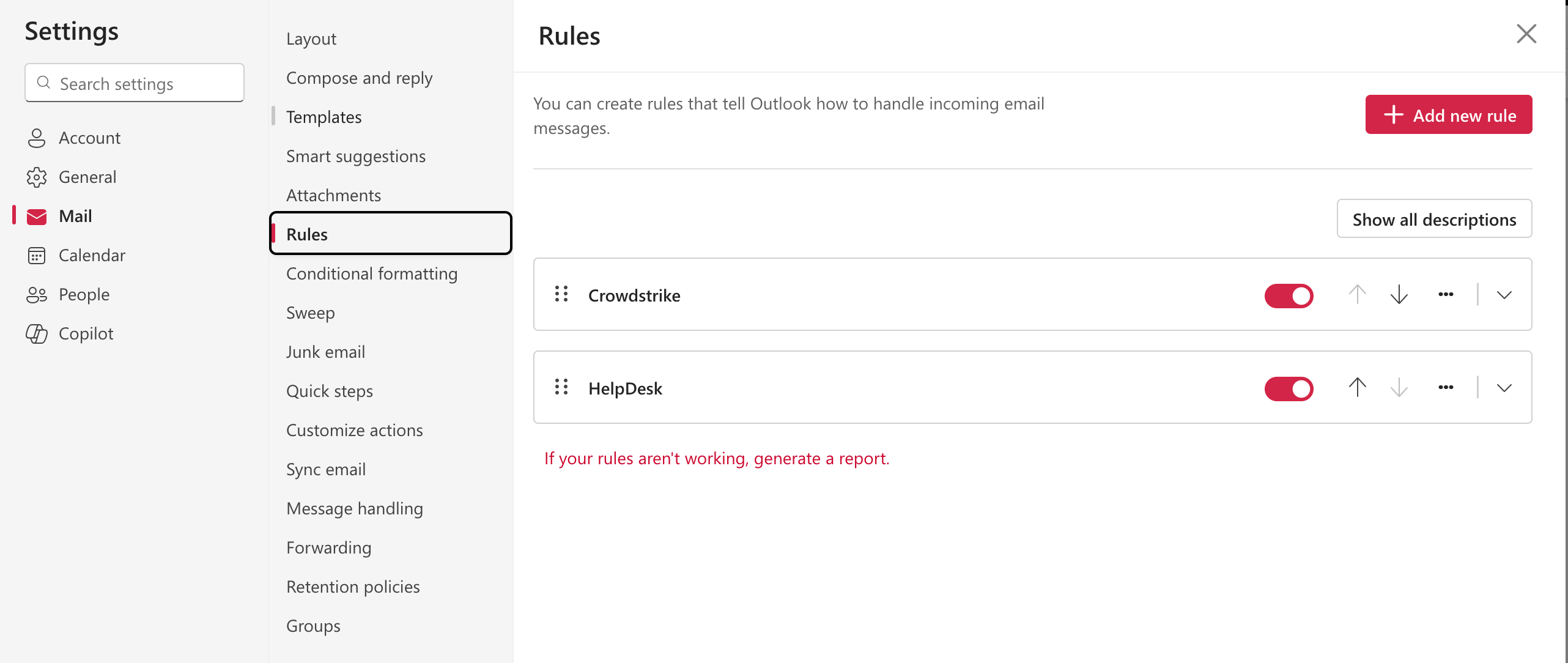
- Go to Outlook.com
- Click sign in
- Once you see your inbox click on the gear icon in the top far-right corner located directly to the left of your initials
- Click on Mail
- Then Click Rules
- If you see any, click on the 3 dots to the right of each rule and click delete
After the rules are deleted, You may want to go to your trash folder and move any important emails back to your inbox
That should fix the issue and help you start receiving your emails in your inbox again
For further assistance, contact the ITS Help Desk at 870-972-3933 or stop by IT Support Services. It is located on the bottom floor of the Dean B. Ellis Library, Room 149.
Technology & Digital Service Purchase Pre-Authorization Procedure
1. Purpose
This procedure outlines the step-by-step instructions Arkansas State University faculty and staff must follow when seeking security clearance to procure technology and digital services. Completion of this procedure ensures that all relevant parties for the approval process can review the Pre-Authorization request without delay. This procedure serves as a pre-authorization for software purchase. After the ticket is approved, you will still need to contact procurement to receive approval and complete the purchase.
2. Defining Public Data
Public data in higher education refers to information that colleges, universities, and education agencies make openly available to promote transparency and informed decision‑making. This typically includes items such as enrollment figures, graduation and retention rates, accreditation status, degree programs, course catalogs, tuition and fee information, campus policies, and high‑level research outputs.
Not all higher education data is public. Information that is considered private or protected includes, but is not limited to, individual student records, personal information about students, faculty, or staff, unpublished research data, internal financial or strategic planning documents, and data protected by laws such as FERPA. Please see appendix B for additional examples.
3. Submission Requirements
All Technology & Digital Service Purchase Pre-Authorization requests for resources that will access non-public data must include sufficient security documentation. If the vendor is unable or unwilling to provide these required security documents, the request cannot be reviewed and may be rejected by IT Security. Please ensure that all documentation is included in your submission.
The following table outlines the necessary documents:
|
Documentation |
Required for |
Substitutions Accepted? |
|
Voluntary Product Accessibility Template (VPAT) |
CPI Security to determine accessibility. |
No substitutions are accepted. Exceptions may be granted on a case-by-case basis. |
|
Federal Risk and Authorization Management Program (FedRAMP) |
IT Security to determine data security. |
Substitutions are accepted. ISO 27001 certification or SOC 2 report can be submitted in lieu of this document. |
|
International Organization for Standardization (ISO) - ISO 27001 (IT Security) |
IT Security to determine data security.
|
Substitutions are accepted. A FedRAMP Packet or SOC 2 report can be submitted in lieu of this document. |
|
System and Organization Controls 2 (SOC 2) Report |
IT Security to determine data security.
|
Substitutions are accepted. ISO 27001 certification or FedRAMP Packet can be submitted in lieu of this document.
|
NOTE: General staff should not sign an NDA to access security documentation. IT Security will not accept links to vendor trust centers in place of documentation. It is the responsibility of the requestor to get the links and contact lglasco@astate.edu to complete the NDA process to receive these documents for upload.
4. Pre-Authorization Request – Step by Step Guide
This form can be found here: Technology & Digital Service Purchase Pre-Authorization
- Section 0: Requestor Information
-
- This section requests basic user information such as your name, email address, and department.
- Section 1: Technology and digital service questions.
-
- Technology & Digital Service Classification:
-
-
- Software or application: A program installed on a computer.
-
-
-
- Cloud Service: A service hosted online and accessed through the internet.
-
-
-
- Data Processing Tool: A tool used to collect, analyze, manipulate, transform, or report data.
-
-
-
- Vendor or third-party Service: A service provided by an external company.
-
-
-
- Artificial Intelligence (AI) Tool: Tool that uses machine learning, automation, or predictive algorithms to generate content or analyze information.
-
-
- Will this Technology or Digital Resource access or host data that is not publicly available:
-
-
- This question requires the requestor to define the data being accessed. Please see “Defining Public Data” in this guide to help determine how to answer this question. If you need additional support, please contact security@astate.edu for assistance classifying this data.
-
-
- The remaining questions in this section ask for basic Technology or Digital resource information such as user counts, name of resource, and for a detailed description of how it will be used.
- Section 2: Vendor or Manufacturer Questions.
-
- This section requests basic information about the vendor or manufacture such as their name, the name of your contact within the organization, the contacts email address and phone number.
- Section 3: Accessibility & Security Questions.
-
- This section is to confirm that you have gathered the relevant documentation for submission. If you have any questions about this, please see sections 2 and 3 above. If you need additional support, then please contact:
1. security@astate.edu for assistance with security documentation.
2. CPI-Security@astate.edu for VPAT related questions.
- Section 4: Documentation Upload.
-
- The final section of the request process where you will upload all required documentation.
5. Completing the Procurement Process
- Once approval has been received, contact procurement to verify they have received the approved pre-authorization request and confirm the next steps.
- Please note that all current procurement processes remain in effect, including those for any purchases or contracts exceeding $20,000. Departments should contact procurement@astate.edu for further guidance on these purchases.
Appendix A – Vendor Outreach Template
Good morning / afternoon, Vendor,
To move forward with procuring your solution, Arkansas State University requires accessibility and security documentation to be on file. I’ll need your most recent copies of the following documents to proceed:
- A Voluntary Product Accessibility Template (VPAT)
And
- Federal Risk and Authorization Management Program (FedRAMP) Packet.
Or
- International Organization for Standardization (ISO) - ISO 27001 (IT Security)
Or
- System and Organization Controls 2 (SOC 2) Report.
Or
- Any auditor-validated, independently assessed report attesting to the security practices of the vendor or manufacturer of this resource.
Thank you for your assistance with this matter and I look forward to procuring your solution.
Thanks,
Your name here
Appendix B – Data Classification Examples
Please note: This is not an exhaustive list.
|
Data Type |
Classification |
Justification |
|
Export Controlled data |
Regulated |
ITAR, EAR |
|
Credit card cardholder data |
Regulated |
PCI |
|
Social Security Numbers |
Regulated |
PII |
|
Donor Financial Records |
Regulated |
GLBA |
|
Patient health records (identifiable) |
Regulated |
HIPAA |
|
Student records (non-directory) |
Confidential |
FERPA |
|
Class Schedules |
Confidential |
PII |
|
Transcripts |
Confidential |
FERPA |
|
Personally Identifiable Information |
Confidential |
|
|
Employee data (not including SSN) |
Confidential |
Employee privacy |
|
System security plans |
Internal |
Protective information |
|
Unpublished research results |
Internal |
Competitive and commercial potential |
|
Exams (question banks and answer keys) |
Internal |
Exam integrity |
|
ASU System Directory (students & staff) |
Public |
FERPA |
|
University regulations |
Public |
Intended for public use |
|
Course catalog |
Public |
Intended for public use |
|
Public web sites |
Public |
Intended for public use |
If you have any questions or need assistance, please contact the IT Support Services team at itsupportservices@astate.edu.