Payment Options
University Policy states that tuition is due and payable no later than the 11th class day of the term (5th class day for summer term).
Any unpaid charges will reaming the liability of the debtor and will be remitted to a collection agency if not paid in full. The debtor will bear all collection cost/fees and attorney's fees associated with this debt.
Students are responsible for dropping/withdrawing from all classes they are not attending.
Late fees will be assessed for outstanding or past due balances monthly.
Students with remaining balances after financial aid or student not receiving financial aid must use one of the following payment options:
Pay Online (myBill)
Online payments are an easy and convenient way of making payments! Payments can be made 24/7 (unless noted maintenance time).
If you have any questions, you can contact the Treasurer's Office at sasbillpayment@astate.edu or 870-972-2285.
myBill Payment Options
Credit or Debit Card Payments
- Domestic credit/debit card transactions are assessed a 3.09% service fee.
- International card transactions are assessed a 4.34% service fee.
Please note that the service fees are assessed to each transaction and are an additional charge upon your payment.
Web Check Payments (E-check)
Enter your routing and account number from your checking or savings account.
Web check payments are not assessed a service fee.
Bank Wire
We accept payments in your local currency or US $ through Convera. Select Bank Wire as the payment method when making a payment in myBill.
How To Make a Payment in myBill
This How To is to guide you through the steps of making a payment towards your student account balance.
1. Login to Pack Portal

2. Click on the myBill button within the myBill widget in your Dashboard

3. Click on the green Make Payment button on the myBill homepage

4. Enter in the amount you are paying for each term you want to make a payment towards. You will see the total generate at the bottom right.
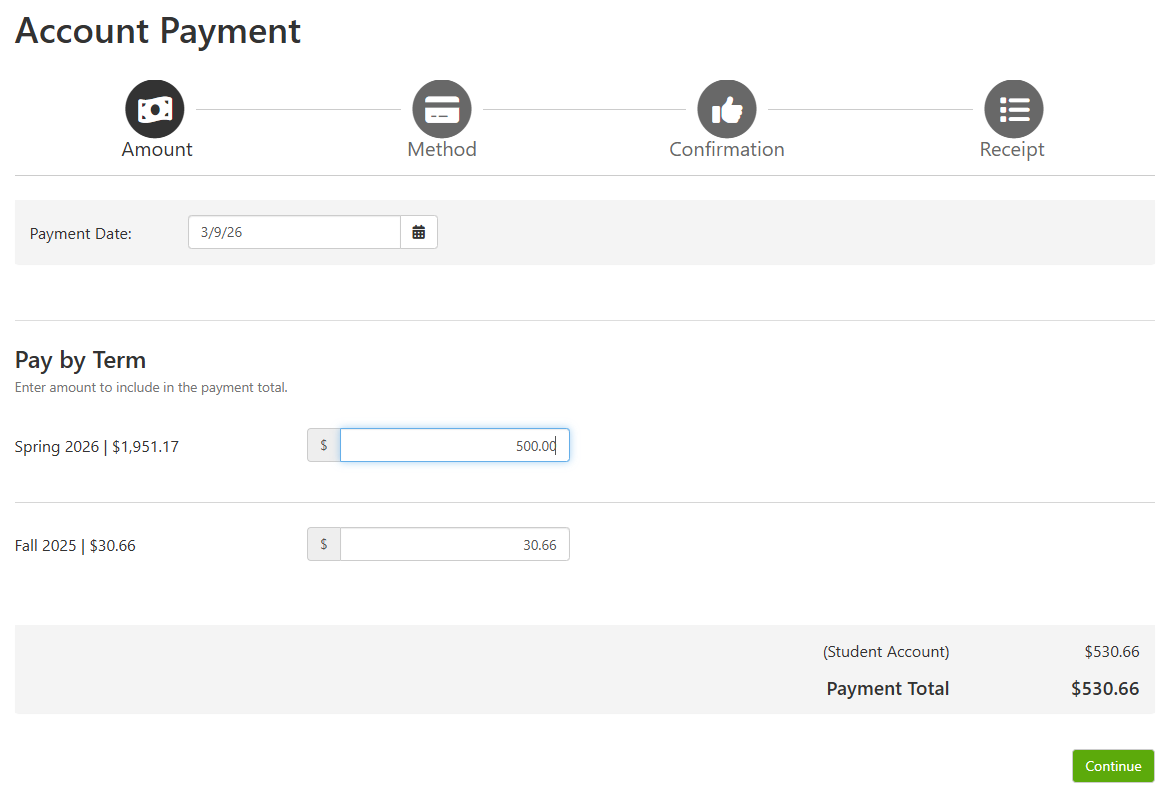
5. Click Continue
6. Select your payment method.
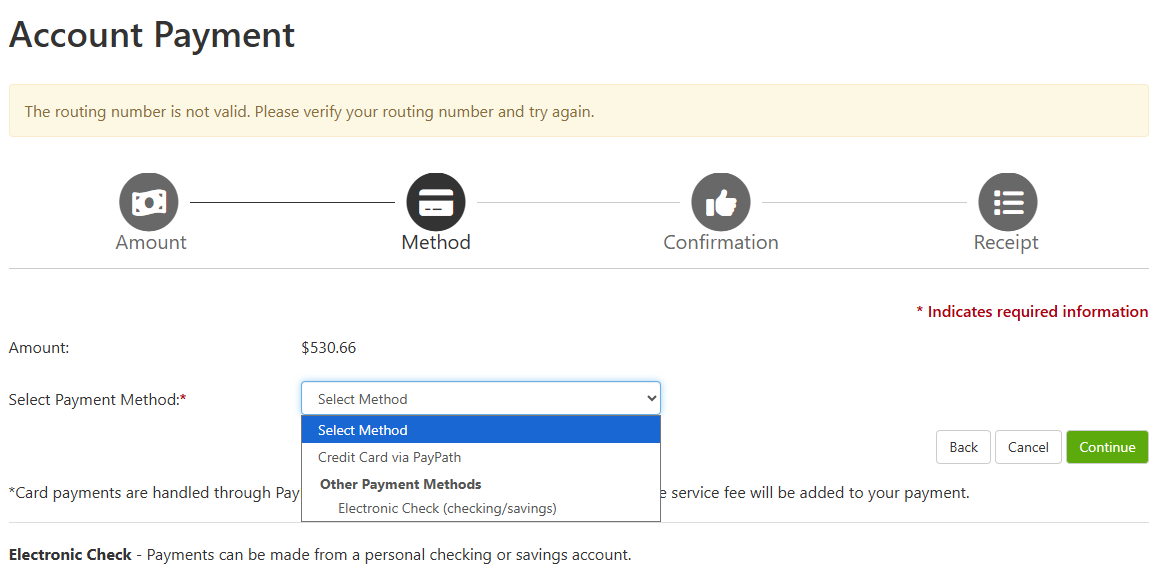
7. Click Continue
8. Follow the prompts to enter your information for an Electronic Check, Card, or Bank Wire.
Please note that Card payments are assessed an additional service fee; Domestic cards = 3.09% and International cards = 4.34%.
Electronic Check (web-check) are not assessed a service fee. You will need to ensure that you have the correct routing and bank account number and select the correct account type, i.e. savings versus checking type.
The Billing Information asked for during the 'make payment' process is the billing name and address on the card or bank account being used for payment.
If you have any questions, then please reach out to the Treasurer's Office at 870-972-2285 or sasbillpayment@astate.edu.
Payment Plan
Students can setup online payment plans in their myBill account. Please login to Pack Portal > Click on the myBill button in the myBill widget in your Dashboard.
Payment Plan Options
Fall 2026 Payment Plan Options
Monthly
Enrollment Period: 08/06/2026 - 11/29/2026
Payment Dates: 08/31 09/30 10/31 11/30
Setup Fee: $40.00 Required
Late Fee: $30.00 (assess 5 days after each missed payment)
Semi-Monthly
Enrollment Period: 08/06/2026 - 11/29/2026
Payment Dates: 08/15 08/31 09/15 09/30 10/15 10/31 11/15 11/30
Setup Fee: $40.00 Required
Late Fee: $15.00 (assess 5 days after each missed payment)
Please note: A-State Online Students have different payment deadlines and cannot enroll within payment plans. Visit A-State Online's website or contact the A-State Online Office at onlinebilling@astate.edu for more information.
If you have any questions, please contact the Treasurer's Office at sasbillpayment@astate.edu or 870-972-2285.
About Payment Plans
Students enroll, setup payments, and cancel payment plans themselves through myBill.
**A-State Online students have different payment deadlines and cannot enroll within payment plans. Visit the A-State Online website or contact the A-State Online office at onlinebilling@astate.edu for more information.**
Pay Anytime
- Payments can be made at any time and in any amount as long as the installment amount is paid in full before or on the installment due date.
- Example: If your first installment is $500.00 and due on 5/31, you can pay $100 on 5/15, $200 on 5/20, and $200 on 5/31.
Schedule Automatic Payments
- Installments can be scheduled to automatically draft from a bank account or charge a credit/debit card.
Automatically Adjusts
- Payment dates automatically adjust if students enroll after the first payment date.
- Example: The plan's first installment date was 7/31, but you signed up on 8/16. The payment amounts will equally divide out amongst the remaining plan dates.
- Payment amounts automatically adjust as charges/payments are posted to the student account.
- If a student is receiving financial aid, they can sign up for a payment plan before or after aid posts. Once aid posts to the student account, the installment amounts will adjust.
Fees
- A $40.00 installment fee is due at the time of enrollment.
- Late fees are automatically assessed 5 days after each missed payment.
Authorized Financial Aid and Student Responsibility
Important Information
- Students are responsible for monitoring their payment plan and charges on their student account. Some charges may not be included and must be paid outside of the plan.
- Per University policy, transcripts are not released based on payment plan enrollment.
- Registration based on enrollment in a payment plan is not guaranteed and may vary by semester.
If you have any questions, please contact the Treasurer's Office at sasbillpayment@astate.edu or 870-972-2285.
Other Payment Options
Mail Payment to the Treasurer's Office
When mailing in payments, the student's name and ID number must be included on the check to ensure the payment is applied to the correct account.
Mail To: Treasurer's Office, PO Box 2640, State University, AR 72467
International Wires
Flywire offers an innovative and streamlined way to make international wires for tuition payments. For more information, visit Flywire for more information.
To pay A-State Jonesboro, visit our Flywire payment page.
Payroll Deduction
Payroll deductions are available for benefited employees. The payroll form is completed online and then approved by the Treasurer's Office and Payroll. Complete the form online: Payroll Deduction Form.
If you have any questions, please contact the Treasurer's Office at sasbillpayment@astate.edu or 870-972-2285.
Third Party Billing
If you have any questions, please contact the Third Party Billing Team at thirdparty@astate.edu or 870-972-2285.
About Third Party Billing
Agencies
All agencies will be billed for the total due after discounts, waivers, exemptions and aid have been applied.
- Americorps
- Arkansas Rehabilitation
- Arkansas Rehabilitation for the Blind
- Baxter Regional Medical Center
- Central Arkansas Planning and Developing District, Inc
- Central Arkansas Veteran Healthcare
- Department of Human Services
- Department of the Army
- Fordyce Scholarship
- Hamm Scholarship
- SERCO/Arkansas Workforce Center West Memphis
- Mississippi Country Arkansas Economic Opportunity Commission, Inc
- Missouri Rehabilitation
- NUCOR
- Riceland Foods
- ROTC
- State of Missouri, Department of Elementary & Secondary Education, Division of Vocational Rehabilitation
- Sturgis Foundation
- Tennessee Rehabilitation
- Veteran's Administration
- Workforce
Note: This list does not include every agency that is billed by A-State Jonesboro.
Sponsor Agreements
A-State will accept tuition assistance (sponsor) agreements in lieu of payments at the time of registration. However, students will be responsible for all amounts owed if the sponsoring agency does not remit payment in full.
Third Party Billing Authorization Form
Students must complete the Third Party Billing Authorization Form each term in order for A-State to bill third parties for student charges. Completing this form does not guarantee authorization from a third party sponsor. Students must turn in an authorization from their third party sponsor in addition to the Third Party Billing Authorization Form.
Steps to Follow:
- Complete the Treasurer's Office Third Party Billing Authorization Form
- Email the authorization from your third party sponsor to thirdparty@astate.edu. If you are an A-State Online student, please copy onlinebilling@astate.edu on the email.
How to Fill out the Third Party Authorization Form
This How To is to assist with filling out the Third Party Billing Authorization Form. This form is to be submitted at the beginning of each semester you are expecting to receive a third party payment.
**Please Note: If your Third Party Billing Sponsor is NOT requesting an invoice directly from the University before payment will be made, then the payment is not considered Third Party. This form is only for qualifying Third Party Billing Sponsor payments.
1. Go to the Third Party Billing Authorization Form.
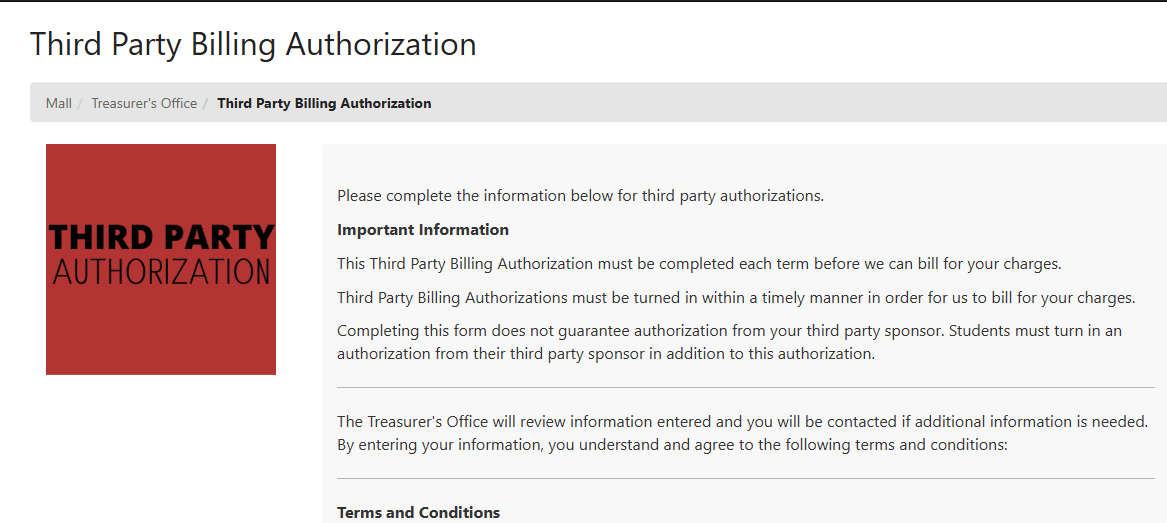
2. Read through the information, scroll down, and click Add to Cart.
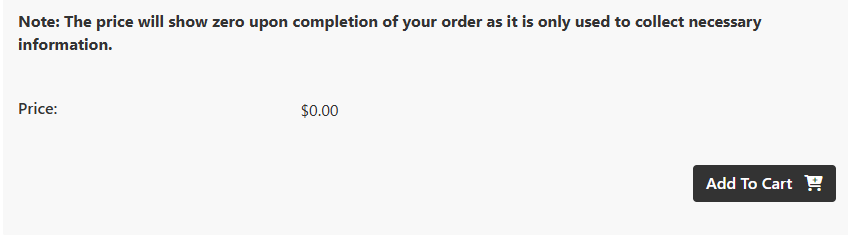
3. Scroll down.
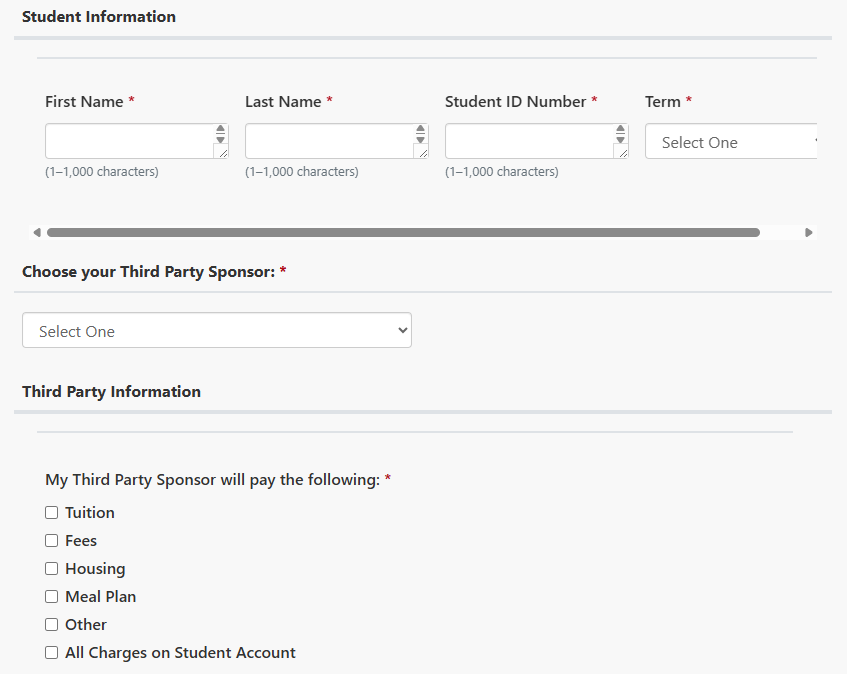
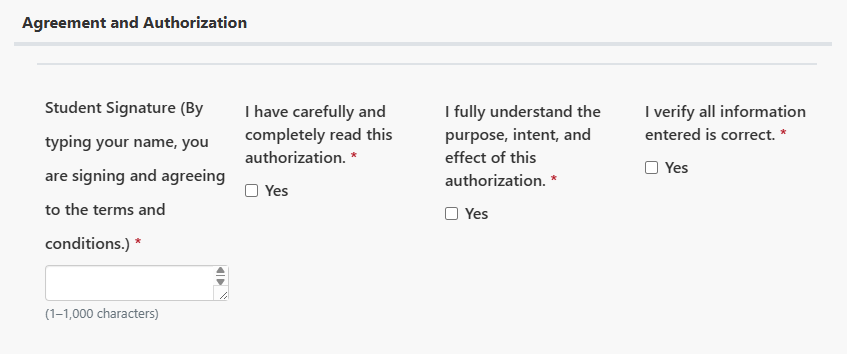
4. Fill in the required information.
a. Please be specific when Choosing your Third Party Sponsor in the drop down. Please note that some will have you provide further information pertaining to the sponsor.
i. Example: Military - Which branch? Air Force, Army, Coast Guard, Marines, Navy, Veteran Affairs - Choose from drop down selection.
ii. Example: Rehabilitation Services - What city is the Service Location? Arkansas Rehab-Little Rock or Arkansas Rehab-Jonesboro, etc.
5. Click on Continue when done.
6. It will show you what you entered. Please verify you entered information correct.
7. Scroll down and click Checkout
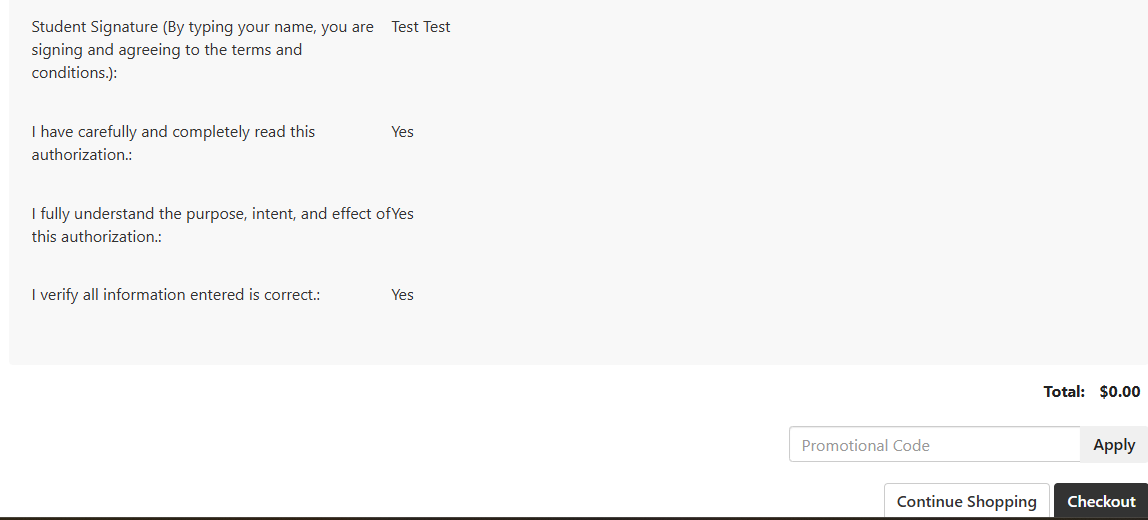
8. You can setup a Login if you choose or Checkout as a Guest.
a. If you create a Login, then remember it as it is not tied to your Pack Portal nor Self Service account. You will need to remember for the next time you attempt to check out in our Marketplace system.
b. If you check out as a Guest, then be sure you enter the correct email address so you receive a copy of the form.
9. Click on Submit Order.
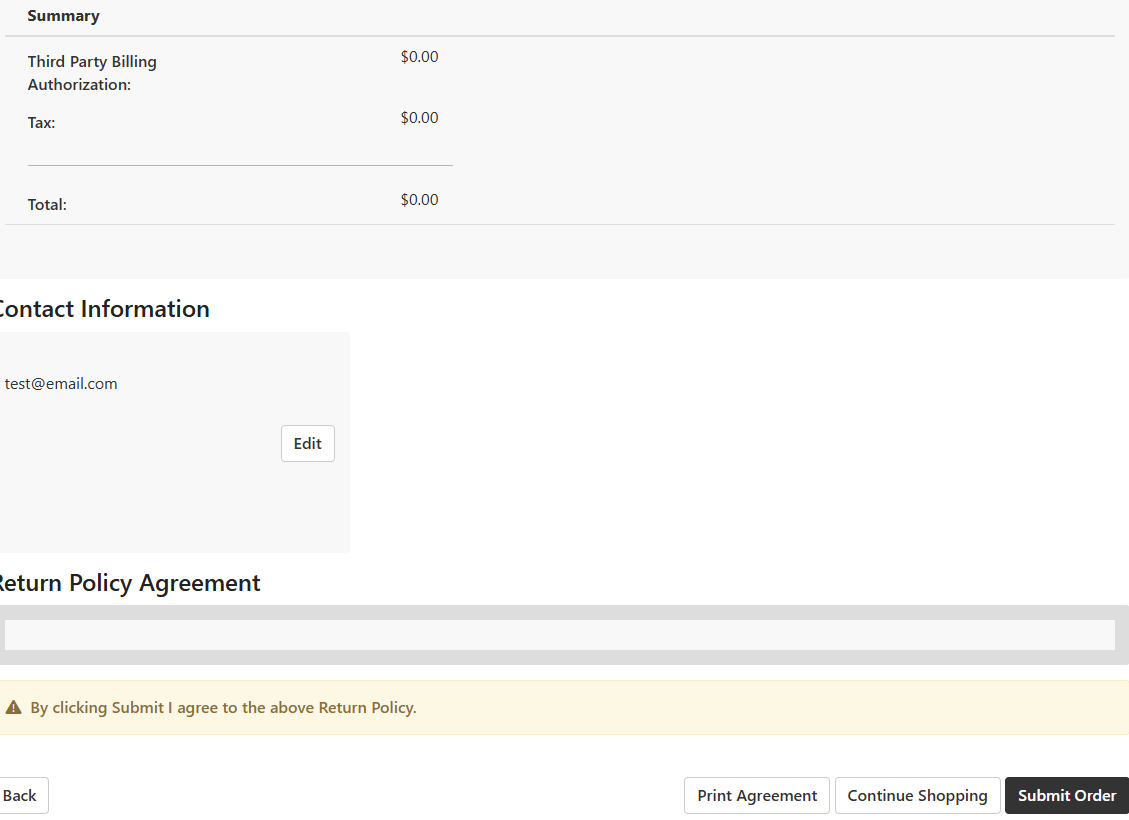
10. Once submitted, a copy will be sent to you and another copy to our Third Party Billing Processors automatically.
If you have any questions about Third Party Billing, then please contact the Treasurer's Office at 870-972-2285 or thirdparty@astate.edu.