Security
Information Security Attack Spotlight
This section provides an overview of real cybersecurity threats the A-State IT Security team has encountered with the goal of helping prepare users to identify future threats.
SharePoint Phishing Campaign
This article highlights a campaign seen on campus during the second week of May 2026. This malicious phishing campaign saw users receive legitimate SharePoint file sharing emails from threat actors external to our organization. The following details specific components of this email and takes a deeper dive into what indicators exist within the email.

-
#1 – Header information: A solid first stop in identifying potentially malicious emails. In this attack however, the traffic is legitimate SharePoint traffic. This occurs because another organization has either been maliciously created or has had a security incident leading to their users being able to share malicious documents.
-
#2 - “Who” is sharing the file with you: It can be tricky for a threat actor to perfectly manipulate the necessary fields in a malicious email where there are no suspicious gaps. In this instance, that is displayed in the “who” is sharing a file with you.
-
#3 – Creating a sense of urgency: Threat actors will lean on publicly available information to help create a sense of urgency and legitimize some content in the attack. In this instance, the threat actor is doing this by manipulating fields to imply this message comes from Dr. Robin Myers. Sometimes traffic like this can be legitimate, so reviewing the message as a whole helps to narrow things down.
-
#4 – Footer information: In this instance, the largest crack in this attacks foundation is the footer information SharePoint has automatically added to their traffic. This clearly conveys that the message originates from SRI SARVARAYA SUGARS LTD's SharePoint, which is not associated with Arkansas State University.
Having reviewed all components of the email and not just the header, we can safely confirm this email is malicious and should be reported to security@astate.edu so that it can be removed from everyone's inbox.
What You Should Do
Be Skeptical of Unknown Senders: If you receive an unexpected or unusual email, verify its legitimacy by contacting the sender through a known and trusted channel.
- Requests to Respond to Personal E-Mails: If you receive an e-mail from an A-State student or faculty, and there is a request to respond with information to a personal e-mail (e.g. Gmail, Yahoo, Hotmail etc.) please do not respond and forward to security@AState.edu for review to determine the legitimacy of the sender/e-mail.
- Report Suspicious Emails: If you receive a suspicious email, do not respond, click any links, or download attachments. Instead, report it by forwarding the email to security@AState.edu.
- A Suspicious Email Was Interacted With: If you received and interacted with an email before determining it was suspicious, please take the following steps:
-
- Immediately take steps to reset your account password. This crucial step helps ensure that any access a threat actor may have gained is revoked.
-
- If malicious attachments are downloaded to your asset, be sure to delete them.
-
- Contact security@AState.edu to report the incident. Be sure to provide details of the incident, including forwarding the malicious email to our team and detailing if attachments were downloaded.
Interested in additional information security training? The A-State IT Security team holds regular in-person training sessions on campus. Be sure to check the Daily Digest for advertisements on the next training session.
Immediate Attention Required (URGENT) Phishing Campaign
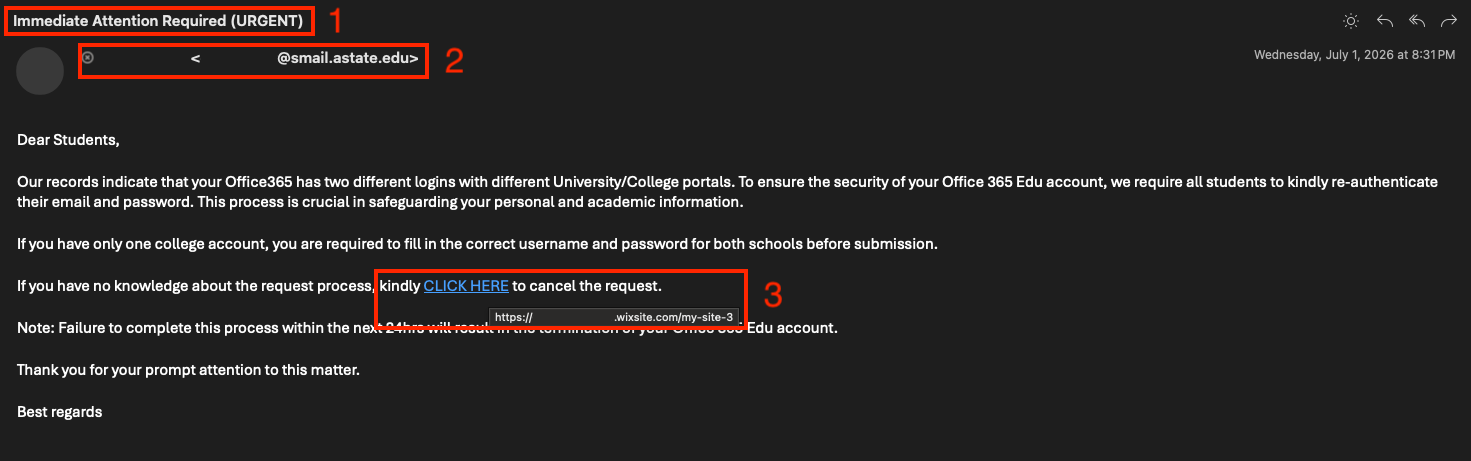
This article highlights a campaign seen on campus during the last week of June and first week of July 2026. This malicious phishing campaign saw users receive emails from already compromised internal users with a malicious form to fill out. The following details specific components of this email and takes a deeper dive into what indicators exist within the email.
-
#1 – Header information: A solid first stop in identifying potentially malicious emails. Phishing emails fabricate a sense of urgency in order to trick readers into providing sensitive information. Legitimate emails may sometimes contain these "urgent" key words, but generally these indicate a malicious email.
-
#2 - “Who” is emailing you: Where external or unrecognized senders may be easily dismissed by the reader, this particular campaign leveraged a compromised internal account to circumvent that. In this context of university account issues, this sort of email would never come from a student (smail.astate.edu) account.
-
#3 – Investigation of inserted links: Having created a sense of urgency in this email and borrowing "legitimacy" from an internal account, an embedded link to the real threat (a malicious website requesting sensitive information) covers up what would otherwise stand out as suspicious. By hovering over this embedded link instead of clicking on it, the reader can see this directs to a Wix site set up by the threat actor. This is not a service Arkansas State University uses and is another indicator this is malicious.
-
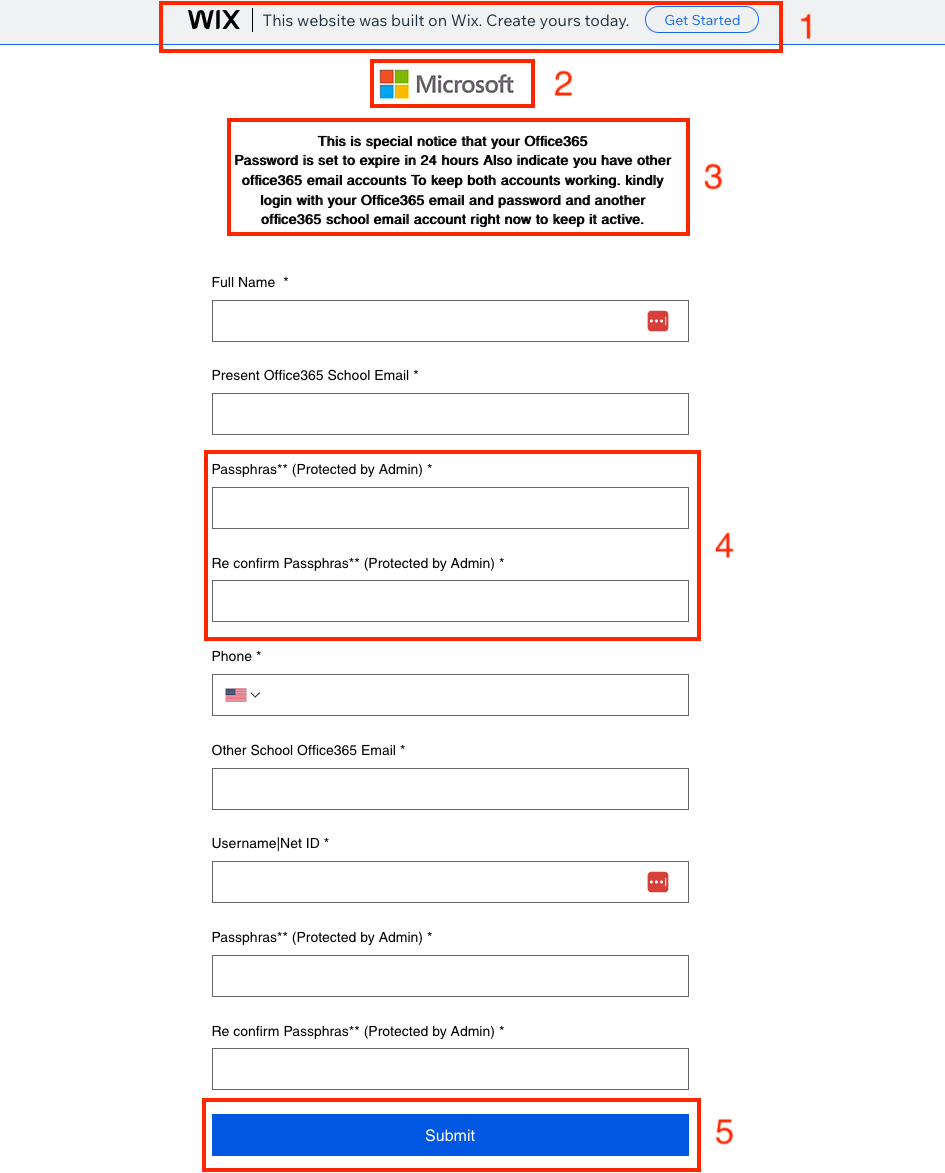
#1 – Website Header information: Shows the visitor that this was a website created on an external service.
-
#2 - Fake Logo: Displays a fake Microsoft logo to create a sense of legitimacy.
-
#3 – Further Creating a Sense of Urgency: This form description reinforces that a delay in immediate action will result in unwanted consequences. Not only does this form attempt gain one accounts information from the reader, but it also asks for a second accounts information. This would likely be a secondary account used as a recovery method.
-
#4 – Password Compromise: The form attempts to make the reader believe this is actually a login screen and not just a custom form. Despite this attempt, readers can see through this by the spelling mistakes and the false claims this is "Protected by Admin".
-
#5 - Submit vs Login: Instead of displaying a "login" or other similarly worded phrase to show this isn't a form, it instead shows "submit" which is another indication this is a malicious form and not a secure space to input sensitive information.
Having reviewed all components of the email and the underlying form, we can safely confirm this email is malicious and should be reported to security@astate.edu so that it can be removed from everyone's inbox.
What You Should Do
Be Skeptical of Unknown Senders: If you receive an unexpected or unusual email, verify its legitimacy by contacting the sender through a known and trusted channel.
- Requests to Respond to Personal E-Mails: If you receive an e-mail from an A-State student or faculty, and there is a request to respond with information to a personal e-mail (e.g. Gmail, Yahoo, Hotmail etc.) please do not respond and forward to security@AState.edu for review to determine the legitimacy of the sender/e-mail.
- Report Suspicious Emails: If you receive a suspicious email, do not respond, click any links, or download attachments. Instead, report it by forwarding the email to security@AState.edu.
- A Suspicious Email or Form Was Interacted With: If you received and interacted with an email or form before determining it was suspicious, please take the following steps:
-
- Immediately take steps to reset your account password. This crucial step helps ensure that any access a threat actor may have gained is revoked.
-
- If malicious attachments are downloaded to your asset, be sure to delete them.
-
- Contact security@AState.edu to report the incident. Be sure to provide details of the incident, including forwarding the malicious email to our team and detailing if attachments were downloaded.
Interested in additional information security training? The A-State IT Security team holds regular in-person training sessions on campus. Be sure to check the Daily Digest for advertisements on the next training session.
Summer Part Time Job at ASU Phishing Campaign
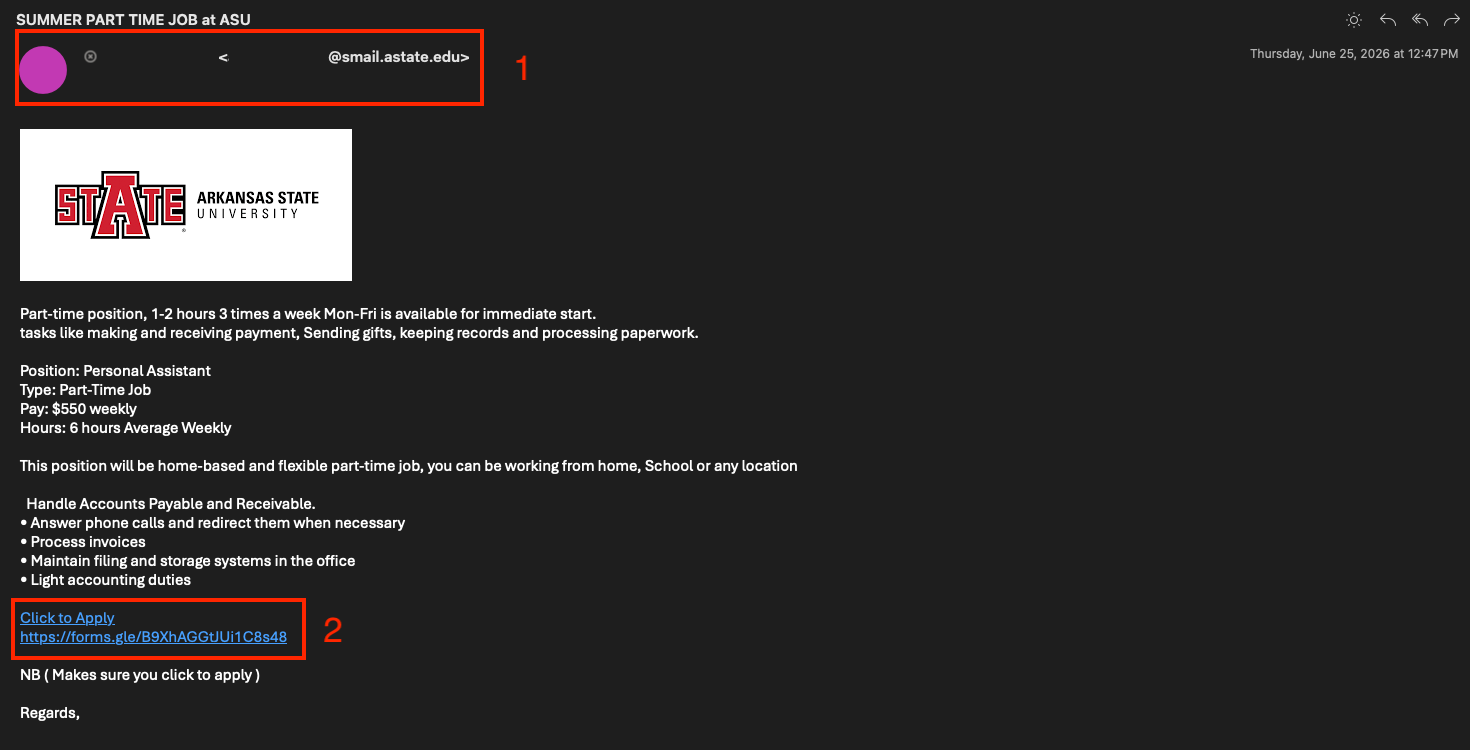
This article highlights a campaign seen on campus during the last week of June and first week of July 2026. This malicious phishing campaign saw users receive emails from already compromised internal users with a malicious form to fill out. The following details specific components of this email and takes a deeper dive into what indicators exist within the email.
-
#1 – “Who” is emailing you: Where external or unrecognized senders may be easily dismissed by the reader, this particular campaign leveraged a compromised internal account to circumvent that. In this context of university job postings, this sort of email would never come from a student (smail.astate.edu) account.
-
#2 - Suspicious Links and Forms: Having created an enticing job opportunity in this email and borrowing "legitimacy" from an internal account, a link to the real threat (a malicious Google form) is the next step in this risk. Google forms are not a service Arkansas State University uses and is another indicator this is malicious.
Having reviewed all components of the email and the underlying form, we can safely confirm this email is malicious and should be reported to security@astate.edu so that it can be removed from everyone's inbox.
What You Should Do
Be Skeptical of Unknown Senders: If you receive an unexpected or unusual email, verify its legitimacy by contacting the sender through a known and trusted channel.
- Requests to Respond to Personal E-Mails: If you receive an e-mail from an A-State student or faculty, and there is a request to respond with information to a personal e-mail (e.g. Gmail, Yahoo, Hotmail etc.) please do not respond and forward to security@AState.edu for review to determine the legitimacy of the sender/e-mail.
- Report Suspicious Emails: If you receive a suspicious email, do not respond, click any links, or download attachments. Instead, report it by forwarding the email to security@AState.edu.
- A Suspicious Email or Form Was Interacted With: If you received and interacted with an email or form before determining it was suspicious, please take the following steps:
-
- Immediately take steps to reset your account password. This crucial step helps ensure that any access a threat actor may have gained is revoked.
-
- If malicious attachments are downloaded to your asset, be sure to delete them.
-
- Contact security@AState.edu to report the incident. Be sure to provide details of the incident, including forwarding the malicious email to our team and detailing if attachments were downloaded.
Interested in additional information security training? The A-State IT Security team holds regular in-person training sessions on campus. Be sure to check the Daily Digest for advertisements on the next training session.
Student Report Phishing Campaign
This article highlights a campaign seen on campus during the second week of May 2026. This malicious phishing campaign saw users receive emails from a compromised user account in our organization. The following details specific components of this email and takes a deeper dive into what indicators exist within the attack.

- #1 – Compromised Account: Occasionally threat actors will successfully gain access to an A-State employee's account. This makes phishing emails harder to identify because they come from an offical A-State email address. When attacks like this occur, users must use other sources of information to determine the legitimacy of an email (e.g., Institutional knowledge of job roles and duties). In this instance the sender address did not match who they were claiming to be, so this helps to identify it as suspicious.
- #2 – Creating a sense of urgency: Threat actors will lean on publicly available information to help create a sense of urgency and legitimize some content in the attack. In this instance, the threat actor is doing this by claiming the content of this message is about an ongoing student report that is being shared on behalf of Martha Spack.
- #3 – Link to another document: The largest crack in this attack foundation is the link provided by the attacker. In this case the link directs to Google Drive where a malicious file can be downloaded. A-State employs various tools to help secure our environment. Threat actors know this and will attempt to direct you out of our environment and into another less secure one to increase their effectiveness.
- #4 – Unauthorized Software: Here the attacker calls out the name of the tool that can be downloaded from the Google Drive link. Upon researching this tool, it can be found that it is a remote support tool that allows connection to another computer. There are a couple of key issues here:
- First is that there would be no need to remote into a computer to share the document mentioned above.
- The other is that Zoho Assist is not an Arkansas State University approved tool.
Having reviewed all components of the email and not just the header, we can safely confirm this email is malicious and should be reported to security@astate.edu so that it can be removed from everyone's inbox.
What You Should Do
Be Skeptical of Unknown Senders: If you receive an unexpected or unusual email, verify its legitimacy by contacting the sender through a known and trusted channel.
- Requests to Respond to Personal E-Mails: If you receive an e-mail from an A-State student or faculty, and there is a request to respond with information to a personal e-mail (e.g. Gmail, Yahoo, Hotmail etc.) please do not respond and forward to security@AState.edu for review to determine the legitimacy of the sender/e-mail.
- Report Suspicious Emails: If you receive a suspicious email, do not respond, click any links, or download attachments. Instead, report it by forwarding the email to security@AState.edu.
- A Suspicious Email Was Interacted With: If you received and interacted with an email before determining it was suspicious, please take the following steps:
-
- Immediately take steps to reset your account password. This crucial step helps ensure that any access a threat actor may have gained is revoked.
-
- If malicious attachments are downloaded to your asset, be sure to delete them.
-
- Contact security@AState.edu to report the incident. Be sure to provide details of the incident, including forwarding the malicious email to our team and detailing if attachments were downloaded.
Interested in additional information security training? The A-State IT Security team holds regular in-person training sessions on campus. Be sure to check the Daily Digest for advertisements on the next training session.
"Downsizing" Phishing Campaign
This article highlights a campaign seen on campus during the second week of May 2026. This malicious phishing campaign saw users receive emails from a compromised user account in our organization. The following details specific components of this email and takes a deeper dive into what indicators exist within the email.
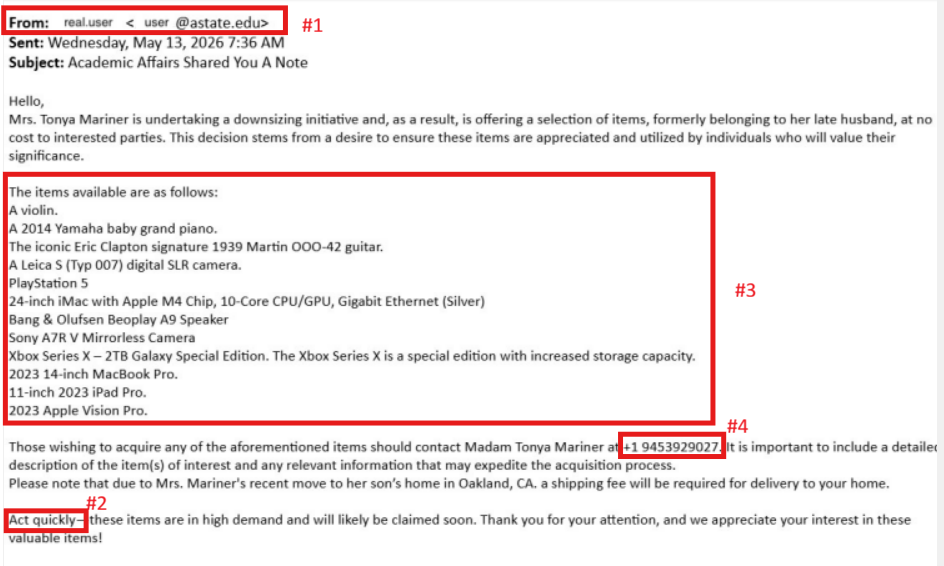
- #1 Sender’s address: The sender’s address appears to come from an official Arkansas State University account (user@astate.edu). However, attackers often compromise legitimate accounts to make phishing emails appear trustworthy. Always remain cautious, even when the message comes from a known or internal email address. Verify suspicious requests through another communication method before responding.
- #2 Sense of Urgency: Threat actors commonly create a sense of urgency to pressure recipients into acting quickly without carefully reviewing the email. In this example, the attacker claims the items are in “high demand” and may be claimed soon. This tactic is intended to encourage immediate action and reduce the likelihood that users will question the legitimacy of the message.
- #3: Body of the message: The body of the email contains several red flags, including unusual wording, unrelated content, and offers that are uncommon in legitimate university communications. Messages advertising expensive items such as electronics, instruments, or vehicles at unusually low or no cost are commonly used in phishing scams to attract attention and persuade users to respond.
- #4 External Contact information: The email instructs recipients to contact the sender using a personal phone number instead of official university communication channels. Threat actors frequently include external contact methods, such as personal phone numbers or non-business email addresses, to continue conversations outside monitored systems and increase the likelihood of financial fraud or credential theft.
Remember: Even emails sent from legitimate accounts can be malicious if the account has been compromised. Always verify suspicious requests before taking action.
What You Should Do
Be Skeptical of Unknown Senders: If you receive an unexpected or unusual email, verify its legitimacy by contacting the sender through a known and trusted channel.
- Requests to Respond to Personal E-Mails: If you receive an e-mail from an A-State student or faculty, and there is a request to respond with information to a personal e-mail (e.g. Gmail, Yahoo, Hotmail etc.) please do not respond and forward to security@AState.edu for review to determine the legitimacy of the sender/e-mail.
- Report Suspicious Emails: If you receive a suspicious email, do not respond, click any links, or download attachments. Instead, report it by forwarding the email to security@AState.edu.
- A Suspicious Email Was Interacted With: If you received and interacted with an email before determining it was suspicious, please take the following steps:
-
- Immediately take steps to reset your account password. This crucial step helps ensure that any access a threat actor may have gained is revoked.
-
- If malicious attachments are downloaded to your asset, be sure to delete them.
-
- Contact security@AState.edu to report the incident. Be sure to provide details of the incident, including forwarding the malicious email to our team and detailing if attachments were downloaded.
Interested in additional information security training? The A-State IT Security team holds regular in-person training sessions on campus. Be sure to check the Daily Digest for advertisements on the next training session.