"Downsizing" Phishing Campaign
This article highlights a campaign seen on campus during the second week of May 2026. This malicious phishing campaign saw users receive emails from a compromised user account in our organization. The following details specific components of this email and takes a deeper dive into what indicators exist within the email.
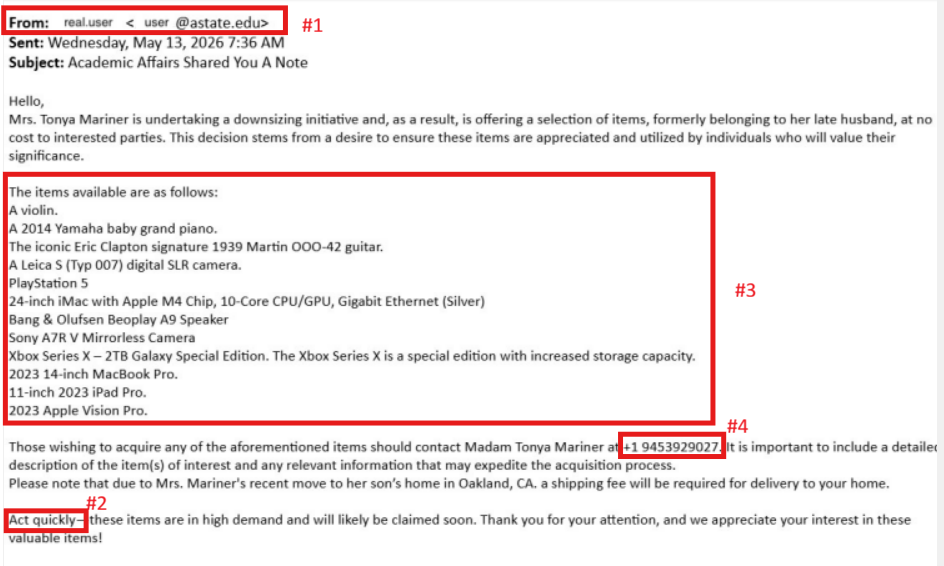
- #1 Sender’s address: The sender’s address appears to come from an official Arkansas State University account (user@astate.edu). However, attackers often compromise legitimate accounts to make phishing emails appear trustworthy. Always remain cautious, even when the message comes from a known or internal email address. Verify suspicious requests through another communication method before responding.
- #2 Sense of Urgency: Threat actors commonly create a sense of urgency to pressure recipients into acting quickly without carefully reviewing the email. In this example, the attacker claims the items are in “high demand” and may be claimed soon. This tactic is intended to encourage immediate action and reduce the likelihood that users will question the legitimacy of the message.
- #3: Body of the message: The body of the email contains several red flags, including unusual wording, unrelated content, and offers that are uncommon in legitimate university communications. Messages advertising expensive items such as electronics, instruments, or vehicles at unusually low or no cost are commonly used in phishing scams to attract attention and persuade users to respond.
- #4 External Contact information: The email instructs recipients to contact the sender using a personal phone number instead of official university communication channels. Threat actors frequently include external contact methods, such as personal phone numbers or non-business email addresses, to continue conversations outside monitored systems and increase the likelihood of financial fraud or credential theft.
Remember: Even emails sent from legitimate accounts can be malicious if the account has been compromised. Always verify suspicious requests before taking action.
What You Should Do
Be Skeptical of Unknown Senders: If you receive an unexpected or unusual email, verify its legitimacy by contacting the sender through a known and trusted channel.
- Requests to Respond to Personal E-Mails: If you receive an e-mail from an A-State student or faculty, and there is a request to respond with information to a personal e-mail (e.g. Gmail, Yahoo, Hotmail etc.) please do not respond and forward to security@AState.edu for review to determine the legitimacy of the sender/e-mail.
- Report Suspicious Emails: If you receive a suspicious email, do not respond, click any links, or download attachments. Instead, report it by forwarding the email to security@AState.edu.
- A Suspicious Email Was Interacted With: If you received and interacted with an email before determining it was suspicious, please take the following steps:
-
- Immediately take steps to reset your account password. This crucial step helps ensure that any access a threat actor may have gained is revoked.
-
- If malicious attachments are downloaded to your asset, be sure to delete them.
-
- Contact security@AState.edu to report the incident. Be sure to provide details of the incident, including forwarding the malicious email to our team and detailing if attachments were downloaded.
Interested in additional information security training? The A-State IT Security team holds regular in-person training sessions on campus. Be sure to check the Daily Digest for advertisements on the next training session.