
Lightboard Recording Studio
The recording studio has been designed to make it simple for faculty to create high high-quality videos that they can use in their class or for other projects. We have recently added a lightboard to our setup to give you more options when recording in our studio.
Any Faculty or Staff member on Campus can reserve this space for themselves. See below for Studio Specifications and our Reservation Policy
Studio Specifications
Lighting
- Dimmable glass edge internal lights. Causes the Neon whiteboard markers to appear to glow.
- Integrated, dimmable presenter-facing LEDs for even illumination of the presenter.
Audio
- RØDE RODECaster Pro Integrated Podcast Production Studio
- Channel 1 - RØDE Wireless GO II Lavalier Microphone
- Channel 2 - RØDE PodMic Dynamic Podcasting Microphone (Right Side)
- Channel 3 - RØDE PodMic Dynamic Podcasting Microphone (Left Side)
- Channel 4 - Blackmagic Design Pocket Cinema Camera 6K Pro Audio Out
- USB Channel - PC Audio Out
Video
- Blackmagic Design Pocket Cinema Camera 6K Pro (Recordings will be in 1080p unless otherwise specified)
- Sigma 18-35mm f/1.8 DC HSM Art Lens
- Tiffen 72mm Circular Polarizing Filter
Computer
- Dell Windows 10 PC
- Blackmagic
designDesign DeckLink Quad HDMI Recorder - OBS to mirror camera output so text written on the Lightboard is still legible.
AlsoAlso, for scene transitions between layouts with multiple video sources. - Stream Deck MK.2 for push button automation of the entire recording process (e.g., Start, Pause, Stop, and all scene changes).
- 2 - Dell 32" 4K Monitors. One to monitor the OBS Recording and the other for Content Sources, e.g., Firefox, PowerPoint, etc.
Other
- Teleprompter
- Glide Gear TMP 100 mount
- Premium iPad app, by Teleprompter Apps Ltd
- 66" Lightboard
WorkThe work surface can be adjusted to any desired height with just the touch of a button. Adjustment range: 28" to 53" at desktop, 65"-90" at top of lightboard.
What is a Lightboard?
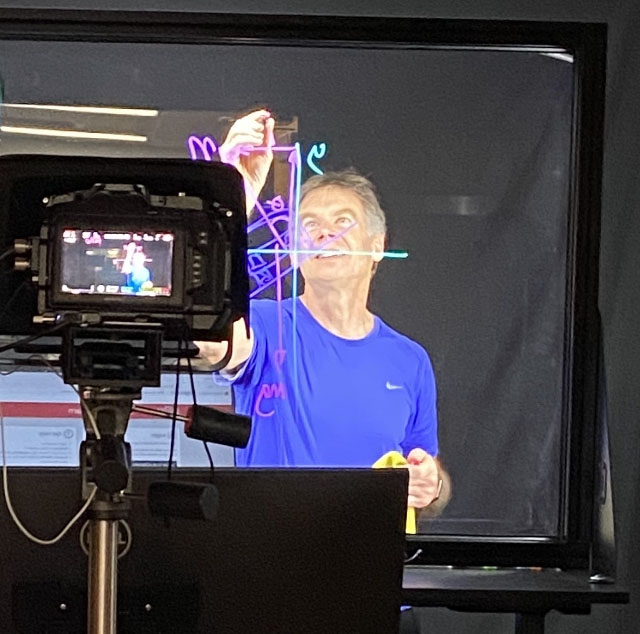
A lightboard is a transparent whiteboard made of glass with internal lighting to make writing glow. A lightboard allows a presenter to write and draw while maintaining eye contact to deliver their message in a naturalnaturally and engaging way.engagingly. Video is filmed through the glass andis mirroredthen mirrored, so the orientationwriting appears correct to the viewer.
Reservation Policy
Our spaces are available for reservation only by AState faculty and staff. The individual making the reservation must be present for the duration of the event and is responsible for student behavior during that time.
For more information or to make a reservation, please email CETL@AState.edu.