
Lightboard Recording Studio
The recordingCETL studioRecording hasStudio beenis designed to make it simple forhelp faculty toand staff create high-quality instructional videos thatwith theyease. canOur usesetup innow theirincludes classa orLightboard, offering a dynamic way to present visual content while maintaining eye contact with your audience—ideal for otherSTEM projects.demonstrations, Wediagrams, haveand recentlyengaging addedlectures.

Any FacultyA-State faculty or Staffstaff member on Campus can reserve thisthe space for themselves.studio. See below for Studiostudio Specificationsspecifications, accessibility features, and our Reservationreservation Policypolicy.
? What Is a Lightboard?
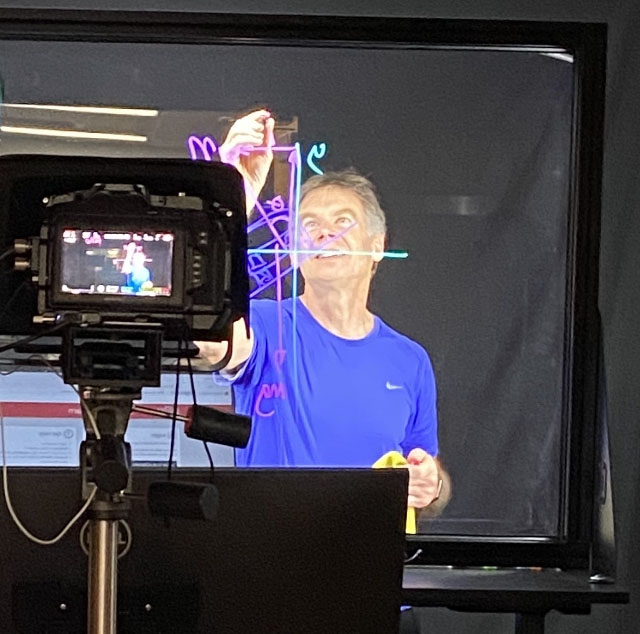
A Lightboard is a transparent glass whiteboard with internal lighting that makes neon markers glow. It allows presenters to write and draw while facing the camera, creating a natural and engaging delivery. The video is mirrored so the writing appears correctly to viewers.
? Want to see it in action?
? Studio Specifications
Lighting
- Dimmable
glassinternal edgeinternallightslights.forCausesglowingtheneonNeonmarkerwhiteboard markers to appear to glow.visuals. Integrated,Presenter-facing dimmablepresenter-facingLEDs for evenillumination of the presenter.lighting.
Audio
- RØDE RODECaster Pro
ProductionStudio- Channel
1 -1: RØDE Wireless GO II LavalierMicrophoneMic - Channel
2 -2: RØDE PodMicDynamic Podcasting Microphone(Right Side)Right) - Channel
3 -3: RØDE PodMicDynamic Podcasting Microphone(Left Side)Left) - Channel
4 -4: BlackmagicDesign Pocket CinemaCamera6K ProAudio Out - USB
Channel -Channel: PC Audio Out
- Channel
Video
- Blackmagic Design Pocket Cinema Camera 6K Pro
(Recordings- Records in 1080p
unlessbyotherwisedefaultspecified)(4K- available upon request)
will be - Records in 1080p
- Sigma
18-18–35mm f/1.8DC HSM ArtLens - Tiffen
72mmCircular Polarizing Filter
Computer & Automation
- Dell Windows 10 PC
- Blackmagic
DesignDeckLink Quad HDMI Recorder - OBS
toStudio formirror cameramirrored outputso text written on the Lightboard is still legible. Also, forand scene transitionsbetween layouts with multiple video sources. - Stream Deck MK.2
pushpush-buttonautomationautomation:of- Start, Pause,
Stop,Stop recording - Switch between camera views and
allcontentscenesources
the entire recording process (e.g.,changes). - Start, Pause,
2 -Dual Dell 32" 4KMonitors.Monitors:- One
to monitor thefor OBSRecordingmonitoring - One for
ContentcontentSources, e.g., Firefox,(PowerPoint, browser, etc.)
and the other- One
OtherTeleprompter
Teleprompter- Glide Gear TMP 100 mount
- Premium iPad
app,app by Teleprompter Apps Ltd
- 66"
Lightboardglass surface with internal lighting - Height adjustable from:
The work surface can be adjusted to any desired height with just the touch of a button. Adjustment range:28"to–53"at(desktop)- 65"
-–90"at(top oflightboard.board)
desktop, - Adjustable height for ADA compliance
- Clear audio capture for automatic captioning via Kaltura
- Using a script with the teleprompter can improve caption accuracy, but it is
anotLightboard? - Caption
lightboardeditingis a transparent whiteboard made of glass with internal lighting to make writing glow. A lightboard allows a presenter to write and draw while maintaining eye contact to deliver their message naturally and engagingly. Video filmed through the glass is then mirrored, so the writing appears correct to the viewer.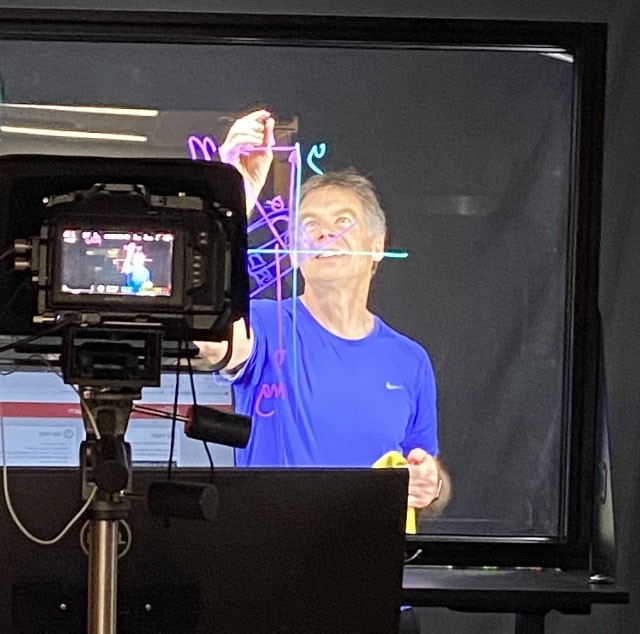
Reservation PolicyOur spacesinstructions are availableforinreservationtheonlyKaltura chapterbyofAStatethe CETL Knowledge Base
Lightboard
What
♿ Accessibility Features
Notes:
required.
Notes:
A
? Reservation Policy
Studio use is limited to A-State faculty and staff. The individualperson making the reservation must be present for the duration of the event and is responsible for any student behavior during that time.participants.
ForTo morereserve informationthe studio or toask makequestions, a reservation, please email email CETL@AState.edu.