Entra ID Join Procedure - Remote Assets
EffectiveBefore Date:completing Julythe 1,steps 2026Revisedin Date:this Julydocument 1,be 2026sure that you have backed up all files from your current local profile to OneDrive. At the end of this joining process you will no longer be accessing the managed asset using a local account. For additional information on OneDrive, please see the following KB Articles: https://kb.astate.edu/books/microsoft-365/chapter/onedrive
1. Purpose
This Standardprocedure establishes the mandatorynecessary requirementssteps for thean managementinstitutionally ofowned technologyand resourcesmanaged at Arkansas State University (A-State). The purpose of this standard isasset to ensurebe that these resources are managed in a manner that protects university data and mitigates institutional risk. Through the processes outlined in this standard, University staff will be equippedjoined to manage institutional technology resources at every stage of their lifecycle within A-State.
2. Scope
This standard applies to all A-State technology resources that are owned, leased, or managed by the university and that access institutional resources or institutional data. This includes, but is not limited to desktops, laptops, mobile devices, virtual desktops, virtual machines, and specialized computing devices used for academic, research, or administrative purposes.
3. Definitions
Technology Resources – The machines, devices, systems, services, and related components used in information processing. This includes:
Machines, devices, and transmission facilities used in information processing, such as computers, word processors, terminals, telephones, cables, software, and related products.Devices used to process information through electronic capture, collection, storage, manipulation, transmission, retrieval, and presentation of information in the form of data, text, voice, or image, including telecommunications and office-automation functions.Any component related to information processing and wired or wireless telecommunications, including hardware, software, services, planning, personnel, facilities, and training.Procedures, equipment, and software designed, built, operated, and maintained to collect, record, process, store, retrieve, display, and transmit information, along with associated personnel such as consultants and contractors.All email accounts issued by A-State.
User – Any individual, whether authorized or unauthorized, who makes use of any university technology resource from any location. This includes faculty, staff, students, contractors, affiliates, and members of the system community.
System Community - Any person who accesses the ASU System’State’s IT infrastructure who is not classified as a member of the faculty, staff, or enrolled student.
Systems Administrator - A Systems Authority may designate another person as “Systems Administrator” to manage the particular system assigned to him or her. Systems Administrators oversee the day-to-day operation of the system and are authorized to determine who is permitted access to particular technology resources.
Privileged Access – Authorized access that allows a user or account to perform administrative or security-sensitive actions on a technology resource that a standard user cannot perform.
4. Responsibilities
All university personnel involved in the configuration, maintenance, and review of controls necessary to ensure the effective management of technology resources. This includes:
Chief Information Officer (CIO) - Responsible for the executive sponsorship, governance, and oversight of the University’s technology resource management processes within the scope of this standard. Ensures that applicable regulatory, statutory, and contractual obligations are identified, translated into actionable controls, and operationalized across institutional systems and processes.
Assistant Vice Chancellor of IT Infrastructure and Operations – Responsible for the management and coordination of the university’s patch management program, lifecycle management program, and the technology resource inventory program.
ITS Hardware Services – Responsible for the management and coordination of the university’s technology resource repair program. Responsible for the maintenance of technology resource procurement processes such as the generation of purchase orders for campus stakeholders and the maintenance of standard hardware configurations.
ITS Endpoint Technician – Responsible for the management and support of institutional technology resources across the University. This includes the escalation of resources requiring repair, the audit of deployed resources to ensure they comply with standard configuration requirements, and the primary support source of technology resource standard users. Responsible for the regular inventory of technology resources under their individual responsibility and for updating accurate inventory information in a timely manner when changes occur.
ITS Systems Team – Responsible for the management and configuration of the university’s Active Directory Users and Computers (ADUC) and Group Policy environments.
ITS Microsoft AdministrationEntra TeamID –tenant. Responsible for the management and configuration of technology resource management systems such as mobile device management (MDM) and mobile application management (MAM) solutions.
ITS Security – Responsible for the management and coordination of the university’s vulnerability management program and for assisting individual teams with determining sufficient security baselines.
5. Standard Exceptions
The Chief Information Officer is authorized to review and approve exceptions to this standard when organizational needs justify a deviation, and the associated risks are deemed acceptable. All exceptions must be documented, including a defined scope, a scheduled review date, and compensating controls when appropriate. The CIO may delegate this authority as necessary but retains overall accountability for exception management and review.
6. Standardized Configuration
To ensure compliance with university standards and a consistent experience for users, all technology resources shall be configured to meet a minimum standard. BothRemote ITSdevices Hardwarethat Servicesare and ITS Endpoint Technicians shall be responsible for ensuring this configuration is complete on all new and existing technology resources under the management of A-State.
This standard configuration shall meet the following requirements:
Devices shall be named in alignment with the institution’s approved naming scheme.Devices shall be centrally managed through an approved Mobile Device Management (MDM) platform, such as Microsoft Intune or Jamf.Devices shall benot joined to theinstitutionalon-premisedomain,domainsuchmustasbe manually joined to Entraor on-premises domains.Devices shall display a system use notificationID tousersensurebeforecompliancegrantingwithaccessthese standards.2. Scope
This standard applies to
theallsystem.ArkansasThis notification must comply with Criminal Justice Information Services (CJIS) policy v6.0 control AC-8.Full disk encryption shall be enabled using an approved encryption standard, such as BitLocker with TPM 2.0.Local administrator privileges shall be restricted as follows:Standard users shall not have standing local administrator rights.Privileged access shall be limited to authorized A-StateITSUniversitypersonnel.Authorized privileged access shall not be granted via the use of static local accounts and will instead utilize an approved privileged access management(PAM) solution, such as Microsoft Local Administrator Password Solution (LAPS). Upon use, this password will automatically be regenerated.
Automatic screen lock shall be enforced after no more than five (5) minutes of inactivity.An institutionally approved endpoint detection and response (EDR) solution, such as CrowdStrike, shall be installed and actively reporting to the central management console.Technology resources will be configured to restrict security level 3 accounts from direct access. Instead, privileged access shall be granted via elevation from a security level 2 account using system-specific solutions, such as Sudo or RunAs.
7. Standard Noncompliance
Failure to comply with the requirements detailed in this standard increases institutional risk and will result in corrective action being taken. This corrective action includes restriction of access to institutional systems, removal of the technology resource from the network, and/or referral to the appropriate university office for further disciplinary action. Noncompliance may be identified through technical controls, such as access logs and vulnerability scanning, routine audits, or reports from technology resource users and administrators. Suspected noncompliance should be reported to ITS through established support and incident reporting channels.
8. Technology Resource Repair
All institutionallyA-State) owned technology resources requiringand repairusers mayof onlythose beresources. repaired
3. eitherDefinitions
Entra approvedID vendors– orEntra byID certifiedis HardwareMicrosoft’s Servicescloud-based staff.identity Institutionallyand ownedaccess technologymanagement resources(IAM) service, parallel to on-premise Active Directory.
4. Responsibilities
IT Security Team – Responsible for the technical configuration of device joining settings in Entra ID, including the permissions of who is able to join devices.
ITS Endpoint Technician – Responsible for assisting users in their area of support with the Entra join process.
User – Responsible for enrolling their remote assets into Entra ID and ensuring all necessary files are notbacked authorized for repairs or servicing by any unapproved third-party provider. All technology resource repairs shall be coordinated by Hardware Services to ensure all restrictions and requirements are met.
Assets requiring repairs or servicing that cannot be completed by certified Hardware Services staff must have full disk encryption enabled using an approved encryption standard, such as BitLocker with TPM 2.0. Any technology resources unable to be encryptedup prior to repairthis mustenrollment.
5. theirEntra storageID mechanismJoin removedSteps
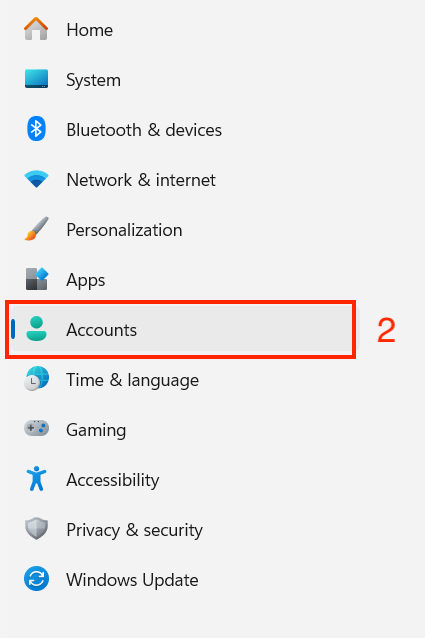
- On your A-State owned asset, sign in and
securelygostoredtountilsystem settings. - On the
resourceleft,isselectreturned“Accounts”.
to institutional control.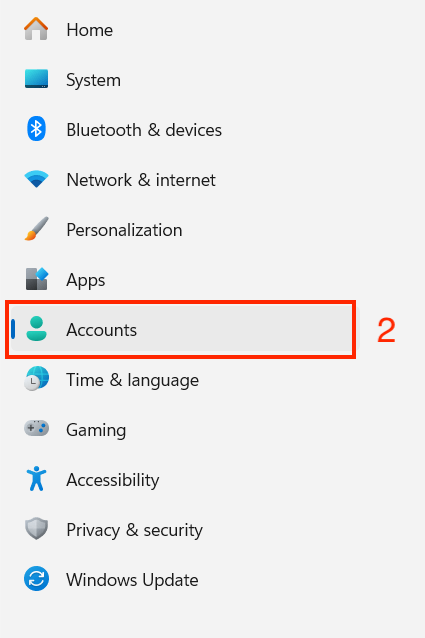
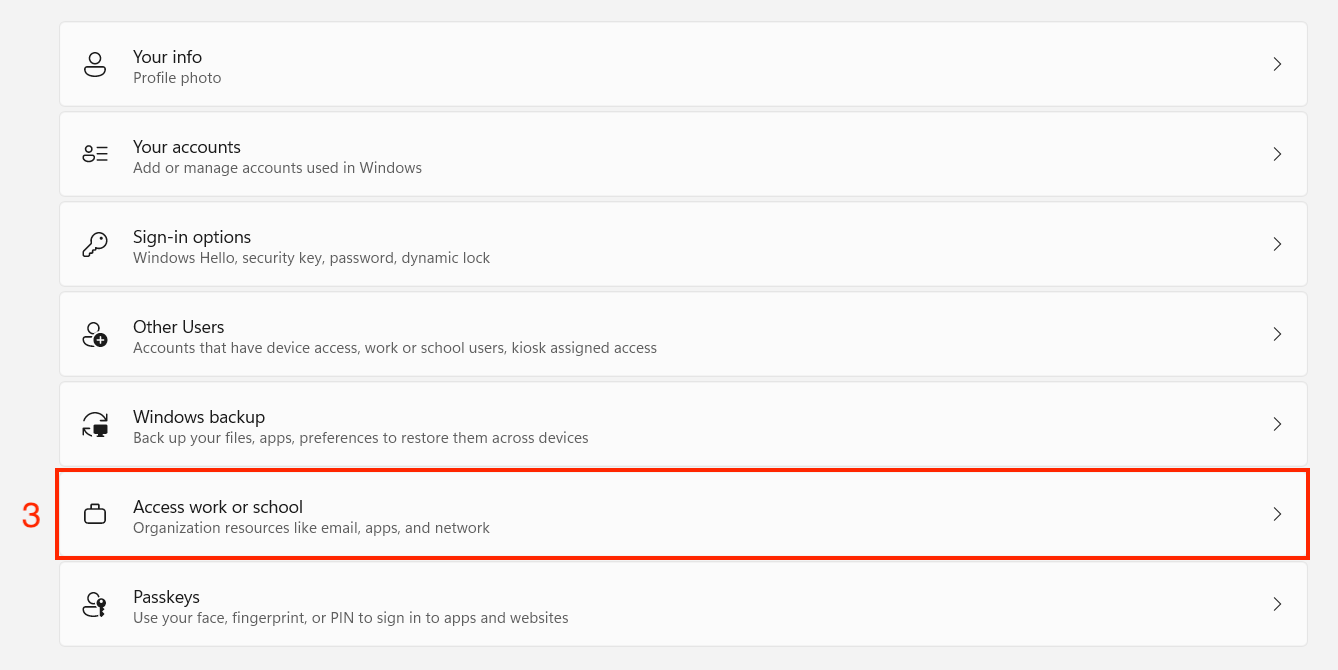
9. - Find
HardwareandConfigurationselect “Access work or school”.
To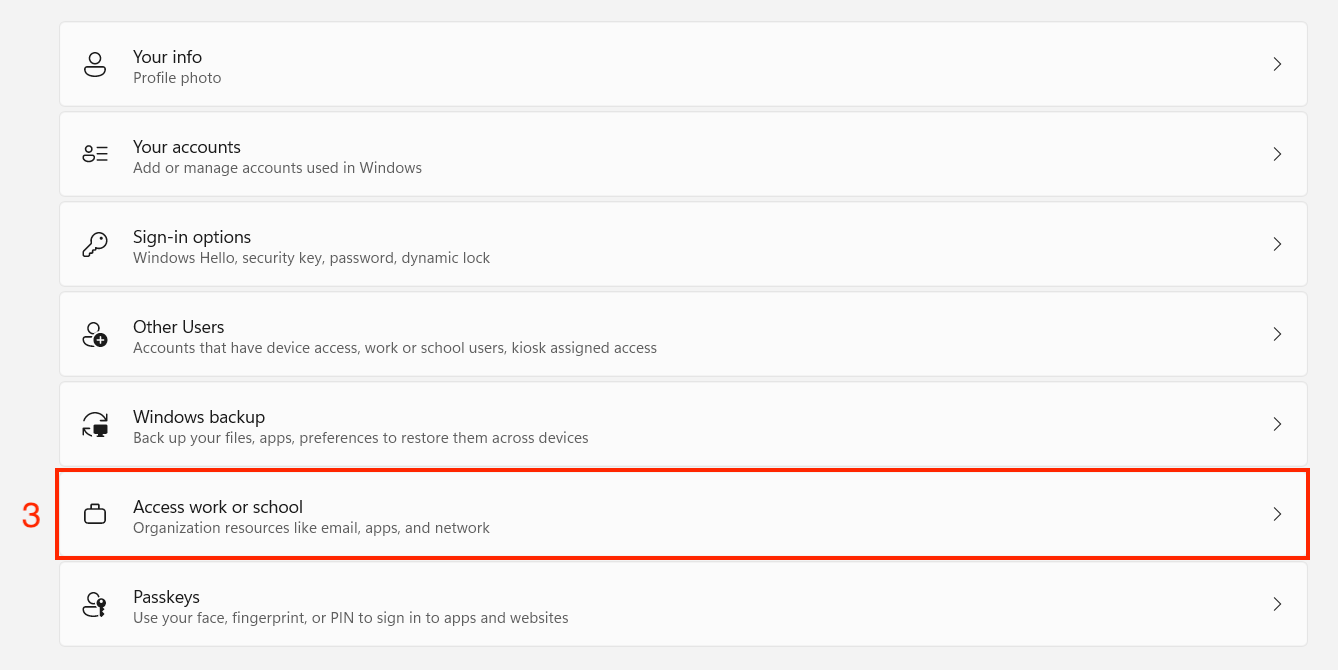
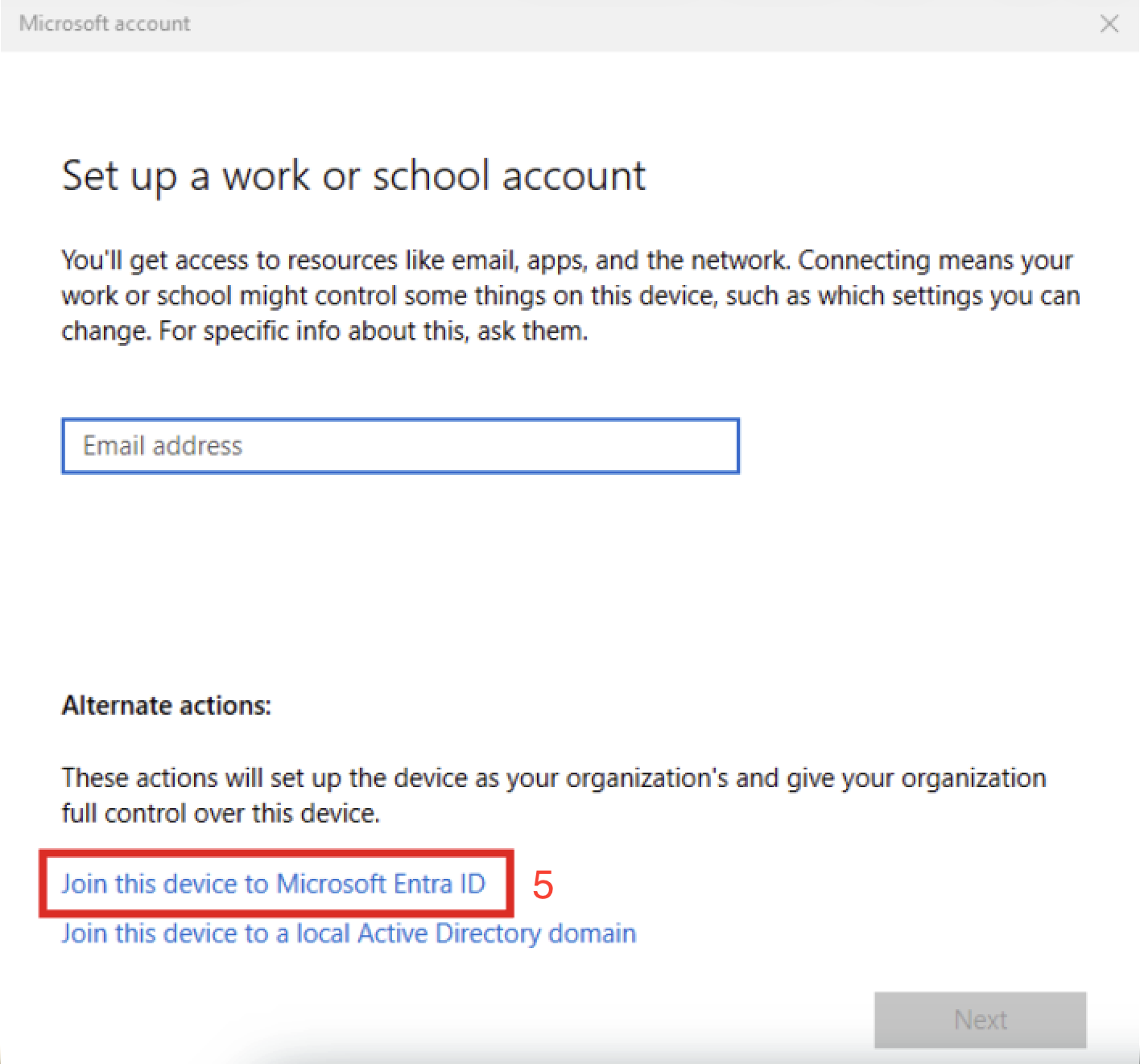
ensure - In
withtheuniversity standards,“Add aconsistentworkexperienceorforschoolusers,account”andsection,ensureclick “Connect”.

- At the
efficacy of internal hardware repair practices, all newly procured technology resources must be purchased from a limited selection of hardware configurations. ITS shall maintain a list of approved hardware configurations for each major operating system, including Windows, Linux, Mac, and ChromeOS, and will only utilize this standard list when processing purchase requests from departments.Exceptions to this procurement restriction may be granted on a case-by-case basis and only if the university’s business needs truly cannot be met on onebottom of theavailablewindow,hardwarethereconfigurations.isThesetextexceptionsthataresays,separate from the CIO exception requirements listed in“Join thisstandarddevice to Microsoft Entra ID”. Click on that text.
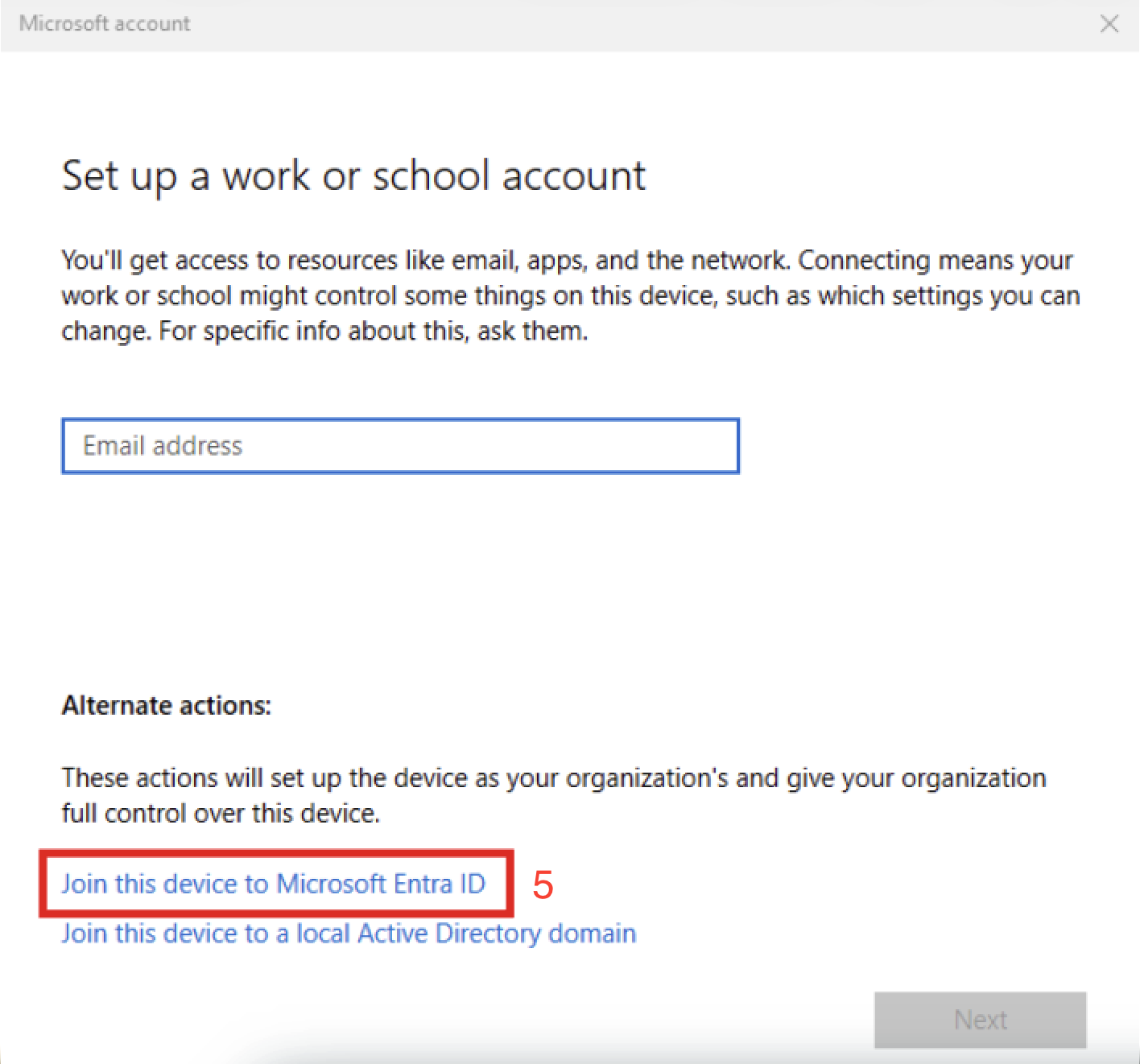
- A Microsoft credential window will pop-up, enter your A-State email and
are instead the responsibility of the ITS leadership responsible for generating purchase orders of technology resources.Hardware configurations of variable components such as RAM, storage space, and other minor components of a vendor's hardware configuration that may be changed during the ordering process are not subject to this requirement.10. Lifecycle Management and Inventory Tracking RequirementsTo ensure compliance with university standards, technology resources shall be managed throughout their full lifecycle, from acquisition through disposal. ITS will maintain and administer asset lifecycle management processes, including inventory tracking, assignment, maintenance, and secure decommissioning, with the institutional goal of reducing operational, financial, and security risks associated with unmanaged or improperly disposed technology resources.These lifecycle management processes will be maintained separately from any other university departments or staff responsible for campus inventory practices. This separation ensures that accurate and actionable information is always maintained and available for ITS staff in both lifecycle management and user support processes. Data produced by this separate inventory will be made available to other university departments or staff responsible for campus inventory practices upon request but otherwise operates independently from their purview.This lifecycle management will include the following requirements:Devices shall be recorded in the institutional technology resource asset inventory and shall be reviewed and validated at least annually, no less than once every 12 months.Devices recorded in this institutional technology resource asset inventory will have the following details documented:Device ownership.Device status, including Active, Storage, Lost, Stolen, Repair, or M&R.Assigned data classification.Zone of support from ITS endpoint technicians.Make, model, H-tag, and serial number.Date of procurement and anticipated date of retirement, based on the applicable number of years following procurement date.Purchase order requestor as a fallback identification point.
DetailedAMarketingwindowandshouldRedistributionpop(M&R)upprocessesaskingwill be established and maintained.Detailed processes for the secure destruction and disposal of institutional data housed within technology resources in alignment with their assigned data classification will be established and maintained.
11. Patch ManagementTo ensure compliance with university standards, technology resources shall be actively patched for system and security updates. ITS will maintain, support, and centrally administer a patch management system with the institutional goal of reducing cybersecurity risk associated with unsupported or out-of-date operating systems. ITS shall maintain a supplemental Technology Resource Vulnerability and Patch Management Standard, separate from this standard, that outlines how technology resource patch versions are maintained.12. Vulnerability ManagementTo ensure compliance with university standards, technology resources shall be actively monitored for vulnerabilities. ITS will maintain, support, and centrally administer a vulnerability detection system with the institutional goal of reducing cybersecurity risk associated with globally reported and documented vulnerabilities. ITS shall maintain a supplemental Technology Resource Vulnerability and Patch Management Standard, separate from this standard, that outlines how technology resource vulnerabilities are maintained.13. Export ControlTo ensure the security and integrity of institutional technology resources travelling abroad, all assets exiting the country must go through a formal export control process that verifies and approves this travel based on federal travel advisory level. While export control processes are not managed by ITS, the review and configuration of devices travelling falls within ITS responsibilities. IT Security reviews assets and grants approval based on the following matrix:Travel Advisory LevelsInstitutional TierRequired Application(s)Required Configuration(s)Level 1 & 23CrowdStrike Sensor installed and operational.Malwarebytes installed and operational.
Asset correctly assignedyou tothe traveler within TDX.Asset joined to the institutional domain / MDM enrolled and managed.Operating system is not EOL.Asset storage drive encrypted.Operating system patch is up to date.All Critical vulnerabilities identified on the asset must be remediated.
Level 32CrowdStrike Sensor installed and operational.Malwarebytes installed and operational.
Asset correctly assigned to the traveler within TDX.Asset joined to the institutional domain / MDM enrolled and managed.Operating system is not EOL.Asset storage drive encrypted.Operating system patch is up to date.All Critical and High vulnerabilities identified on the asset must be remediated.
Level 41Institutional assets, assigned or loaned, are not authorized for travel.Institutional assets, assigned or loaned, are not authorized for travel.Alternate / High-Risk1Institutional assets, assigned or loaned, are not authorized for travel.Institutional assets, assigned or loaned, are not authorized for travel.14. Software and Application ControlTo ensure compliance with university standards, technology resources shall have their software and applications actively managed. ITS will maintain, support, and centrally administer a software and application management system with the institutional goal of reducing operational and cybersecurity risk associated with rogue or unmanaged software and applications. ITS shall maintain a supplemental Technology Resource Software and Application Governance Standard, separate from this standard, that outlines how software and applications are maintained.This standard will include the following requirements:Software and applications available for installation must be restricted to authorized sourcesaccept, and/orITS-approvedaapplicationconfirmationcatalogs.window asking you to “Make sure this is your organization”. Hit Accept/Join.ApprovedYousoftwareshouldandreceiveapplicationsashallmessagebestatingmadethatavailableyour device has been connected tostandardA-State.users via an institutional mobile application management (MAM) solution, such as Microsoft Company Portal.Requests for new software or applications to be purchased and deployed must first be approved through institutional procurement processes.
15. Bring Your Own Device (BYOD) ManagementTo ensure compliance with university standards, personal technology resources shall have restrictions and controls separate from those outlined in this standard. ITS will maintain, support, and centrally administer these controls with the institutional goal of reducing operational and cybersecurity risk associated with BYOD equipment. ITS shall maintain a supplemental Bring Your Own Device (BYOD) Governance Standard, separate from this standard, that outlines how these resources are managed.16. Standards ReviewThis document will be reviewed and reaffirmed annually, or upon significant changes to university IT governance, systems, or regulatory requirements.Effective Date:July 1, 2026Next Review Date:July 1, 2027Version:1.0Referenced Policies, Standards, and ProceduresLogical Access Security StandardTechnology Resource Vulnerability and Patch Management StandardTechnology Resource Software and Application Governance StandardBring Your Own Device (BYOD) Governance StandardData Security and Classification Policy