
Immediate Attention Required (URGENT) Phishing Campaign
This article highlights a campaign seen on campus during the secondlast week of MayJune 2026. This malicious phishing campaign saw users receive legitimate SharePoint file sharing emails from threatalready actorscompromised externalinternal users with a malicious form to ourfill organization.out. The following details specific components of this email and takes a deeper dive into what indicators exist within the email.
-
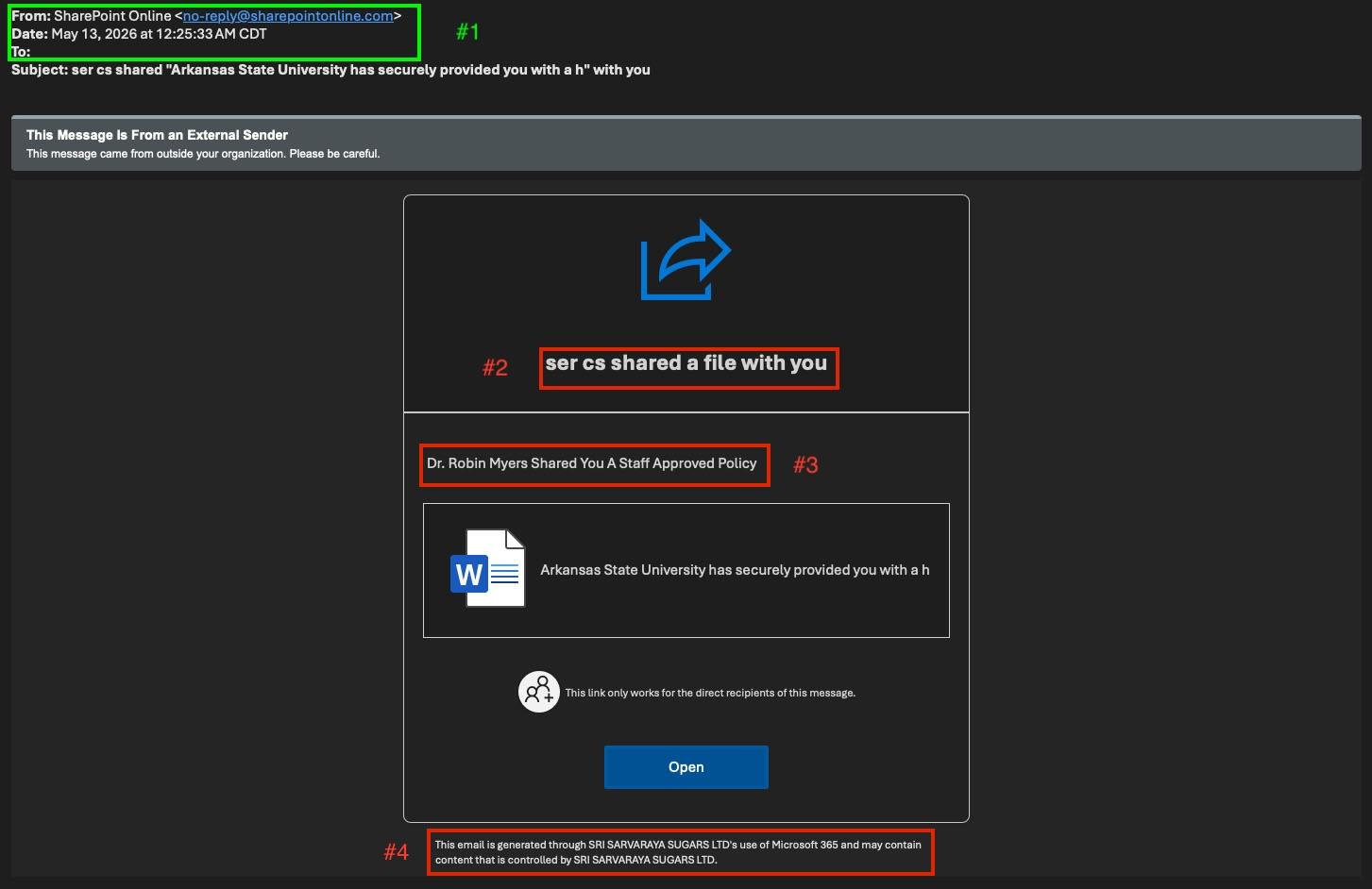
#1 – Header information: A solid first stop in identifying potentially malicious emails.
InPhishingthisemailsattack however, the traffic islegitimateSharePoint traffic. This occurs because another organization has either been maliciously created or has hadfabricate asecuritysenseincidentofleadingemergency in order totheirtrickusersreadersbeingintoableprovidingtosensitiveshareinformation. Legitimate emails may sometimes contain these "urgent" key words, but generally these indicate a maliciousdocuments.email. -
#2 - “Who” is
sharing the file withemailing you:ItWherecanexternal or unrecognized senders may betrickyeasilyfordismissed by the reader, this particular campaign leveraged athreatcompromisedactorinternal account toperfectlycircumventmanipulate the necessary fields in a malicious emailwhere there are no suspicious gaps.that. In thisinstance,contextthatofisuniversitydisplayedaccountinissues,thethis“who”sortisofsharingemail would never come from afilestudentwith(smail.astate.edu)you.account. -
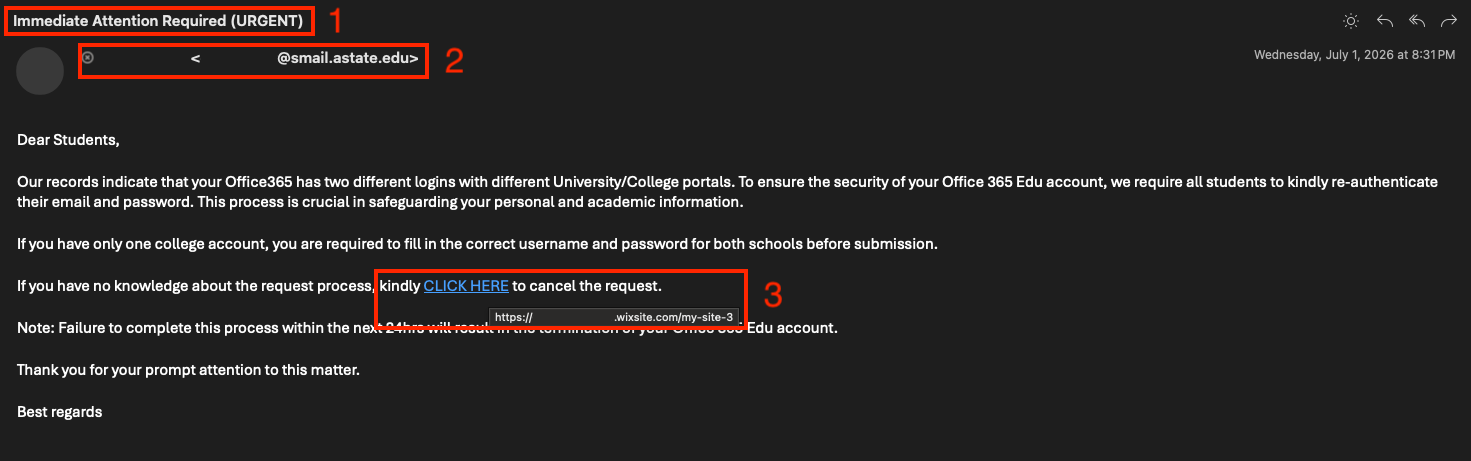
#3 –
CreatingInvestigation of inserted links: Having created a sense of urgency in this email and borrowing "legitimacy" from an internal account, an embedded link to the real threat (a malicious website requesting sensitive information) covers up what would otherwise stand out as suspicious. By hovering over this embedded link instead of clicking on it, the reader can see this directs to Wix site set up by the threat actor. This is not a service Arkansas State University uses and is another indicator this is malicious.
-
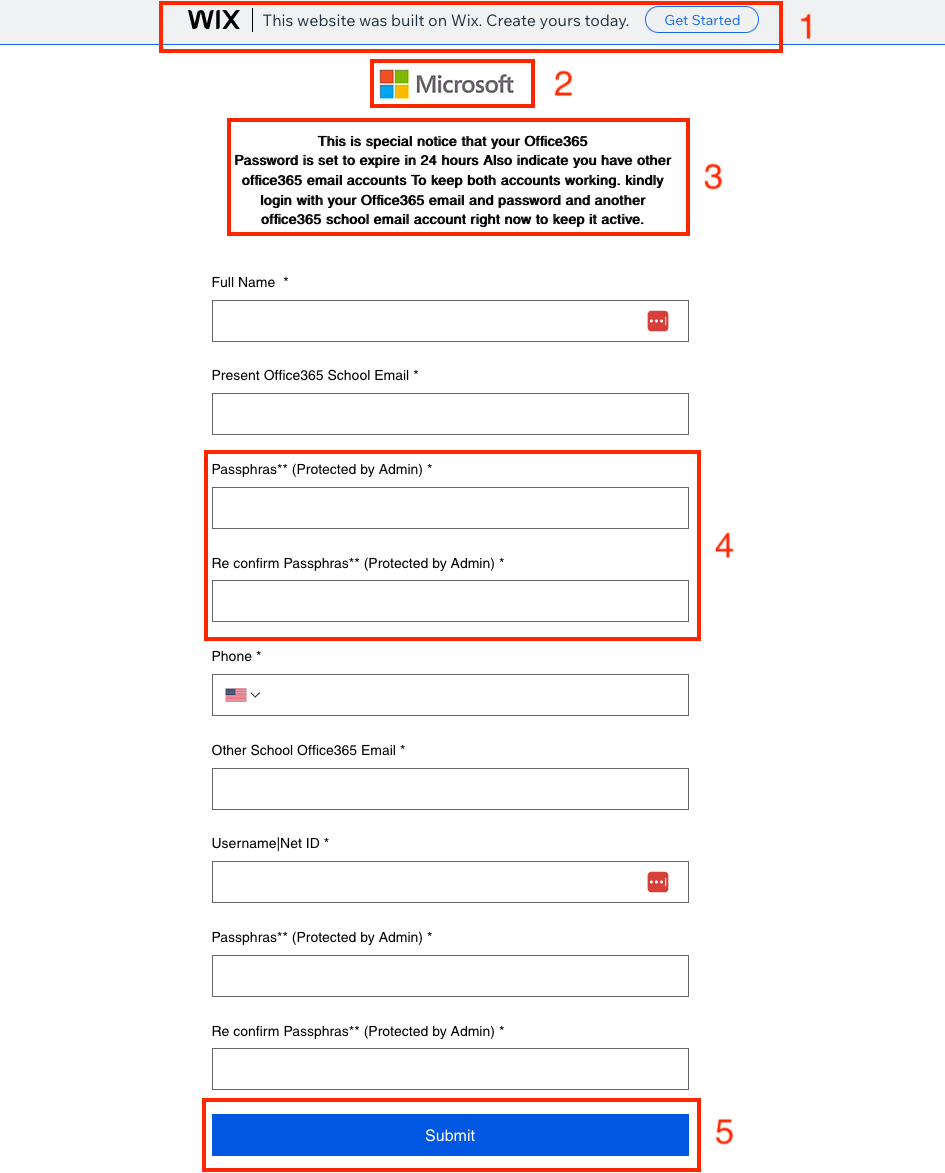
#1 – Website Header information:
ThreatShowsactorsthewillvisitorleanthat this was a website created onpubliclyanavailableexternalinformationservice. -
#2 - Fake Logo: Displays a fake Microsoft logo to
helpcreate a sense ofurgencylegitimacy.andlegitimize -
content#3 – Further Creating a Sense of Urgency: This form description reinforces that a delay in
theimmediateattack.actionInwill result in unwanted consequences. Not only does thisinstance,form attempt gain one accounts information from thethreatreader,actorbutisitdoingalsothisasksbyformanipulatingafieldssecondtoaccountsimplyinformation.thisThismessagewouldcomes from Dr. Robin Myers.Sometimes traffic like this canlikely belegitimate,asosecondaryreviewingaccounttheusedmessageas awholerecoveryhelpsto narrow things down.method. -
#4 –
FooterPasswordinformationCompromise:InThe form attempts to make the reader believe thisinstance,is actually a login screen and not just a custom form. Despite this attempt, readers can see through this by thelargestspellingcrackmistakesinand the false claims this is "Protected by Admin". -
#5 - Submit vs Login
attacks:foundationInsteadisofthedisplayingfooterainformation"login"SharePointorhasotherautomaticallysimilarlyaddedworded phrase totheirshowtraffic.thisThisisn'tclearlyaconveysform,thatittheinsteadmessageshowsoriginates from SRI SARVARAYA SUGARS LTD's SharePoint,"submit" which is another indication this is a malicious form and notassociatedawithsecureArkansasspaceStatetoUniversity.input sensitive information.
Having reviewed all components of the email and not just the header,underlying form, we can safely confirm this email is malicious and should be reported to security@astate.edu so that it can be removed from everyone's inbox.
What You Should Do
Be Skeptical of Unknown Senders: If you receive an unexpected or unusual email, verify its legitimacy by contacting the sender through a known and trusted channel.
- Requests to Respond to Personal E-Mails: If you receive an e-mail from an A-State student or faculty, and there is a request to respond with information to a personal e-mail (e.g. Gmail, Yahoo, Hotmail etc.) please do not respond and forward to security@AState.edu for review to determine the legitimacy of the sender/e-mail.
- Report Suspicious Emails: If you receive a suspicious email, do not respond, click any links, or download attachments. Instead, report it by forwarding the email to security@AState.edu.
- A Suspicious Email Was Interacted With: If you received and interacted with an email before determining it was suspicious, please take the following steps:
-
- Immediately take steps to reset your account password. This crucial step helps ensure that any access a threat actor may have gained is revoked.
-
- If malicious attachments are downloaded to your asset, be sure to delete them.
-
- Contact security@AState.edu to report the incident. Be sure to provide details of the incident, including forwarding the malicious email to our team and detailing if attachments were downloaded.
Interested in additional information security training? The A-State IT Security team holds regular in-person training sessions on campus. Be sure to check the Daily Digest for advertisements on the next training session.