
Summer Part Time Job at ASU Phishing Campaign
This article highlights a campaign seen on campus during the last week of June and first week of July 2026. This malicious phishing campaign saw users receive emails from already compromised internal users with a malicious form to fill out. The following details specific components of this email and takes a deeper dive into what indicators exist within the email.
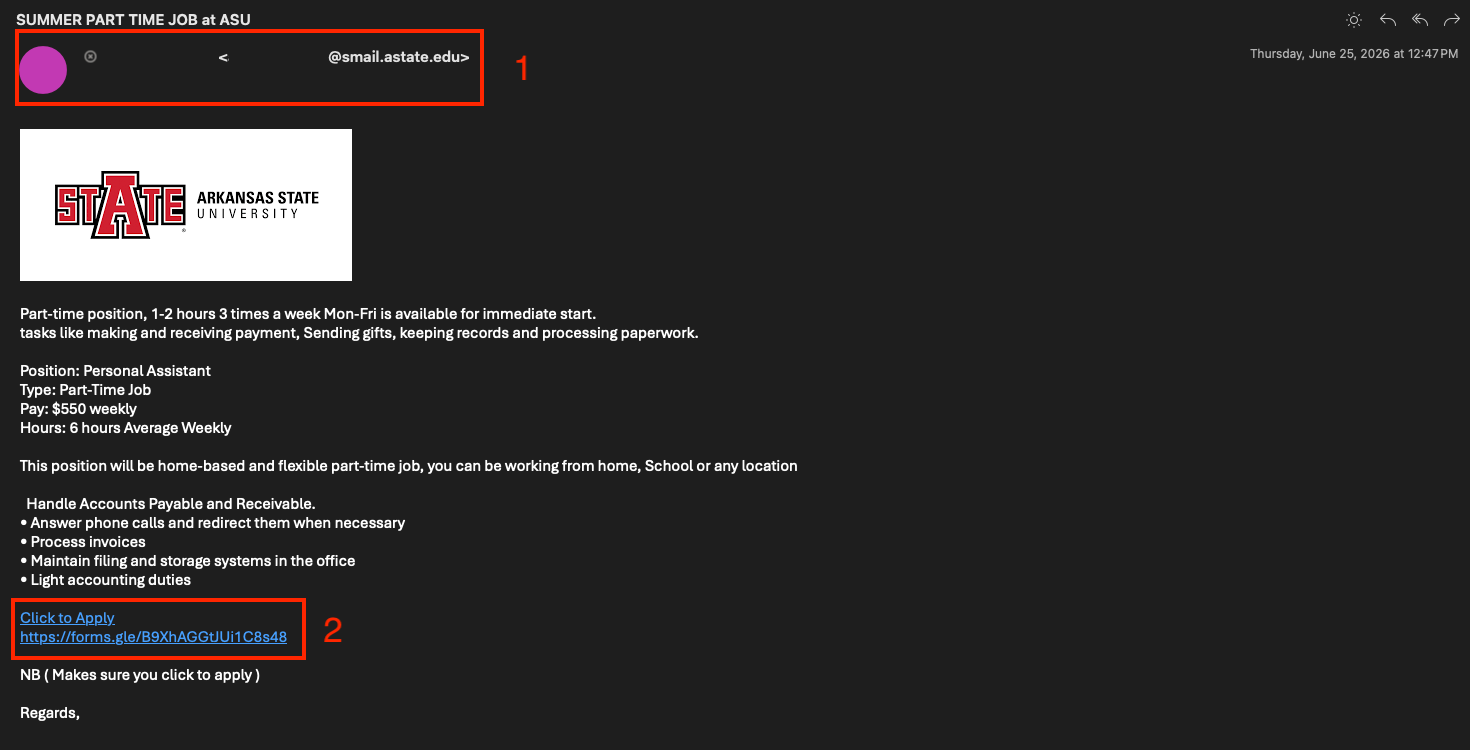
-
#1 – “Who” is emailing you: Where external or unrecognized senders may be easily dismissed by the reader, this particular campaign leveraged a compromised internal account to circumvent that. In this context of university job postings, this sort of email would never come from a student (smail.astate.edu) account.
-
#2 - Suspicious Links and Forms: Having created an enticing job opportunity in this email and borrowing "legitimacy" from an internal account, a link to the real threat (a malicious Google form) is the next step in this risk. Google forms are not a service Arkansas State University uses and is another indicator this is malicious.
Having reviewed all components of the email and the underlying form, we can safely confirm this email is malicious and should be reported to security@astate.edu so that it can be removed from everyone's inbox.
What You Should Do
Be Skeptical of Unknown Senders: If you receive an unexpected or unusual email, verify its legitimacy by contacting the sender through a known and trusted channel.
- Requests to Respond to Personal E-Mails: If you receive an e-mail from an A-State student or faculty, and there is a request to respond with information to a personal e-mail (e.g. Gmail, Yahoo, Hotmail etc.) please do not respond and forward to security@AState.edu for review to determine the legitimacy of the sender/e-mail.
- Report Suspicious Emails: If you receive a suspicious email, do not respond, click any links, or download attachments. Instead, report it by forwarding the email to security@AState.edu.
- A Suspicious Email or Form Was Interacted With: If you received and interacted with an email or form before determining it was suspicious, please take the following steps:
-
- Immediately take steps to reset your account password. This crucial step helps ensure that any access a threat actor may have gained is revoked.
-
- If malicious attachments are downloaded to your asset, be sure to delete them.
-
- Contact security@AState.edu to report the incident. Be sure to provide details of the incident, including forwarding the malicious email to our team and detailing if attachments were downloaded.
Interested in additional information security training? The A-State IT Security team holds regular in-person training sessions on campus. Be sure to check the Daily Digest for advertisements on the next training session.