
A-State Online Student Quick Start Guide
Getting Started
Your official A-State student email account is usually generated within about 72 hours after your admission is fully processed. You'll receive a "Welcome to A-State Online!" email with all the details you'll need to get started.
Once you get that welcome email, you can activate your account and set up your password. You'll be able to access your student email via Pack Portal or outlook.com!
Set up your student account and university e-mail address
Important Contacts
· Registration - onlineregistration@astate.edu
· Financial Aid - onlinefinaid@astate.edu
· Student Accounts/Billing - onlinebilling@astate.edu
· Military, TA, GI, and VA questions – militaryonline@astate.edu
· All Other Inquiries - astateonline@astate.edu
Resources
🔎A-State Online Services – Explore tools, resources, and support waiting for you here.
🗓️Academic Calendars – Review important dates for each semester: Academic Calendars
♿Access and Accommodations – Support for students with disabilities: Access & Accommodations
📔Canvas – Access all your course materials and assignments here. (Quick Links → Canvas)
🏢Career Center – Explore career paths, internships, and job search resources:
📚 Catalog – Up-to-date Degree requirements & course descriptions: A-State Catalog
📅 Course Schedule Tool – View current offerings: A-State Course Schedule Tool
🔄 Course Rotation Sheets – Plan ahead with typical term offerings: Course Rotations
📜 Degree Works – Track your progress anytime via Pack Portal (Quick Links → Degree Works)
📖Library – Access academic resources, research databases, and support: Dean B. Ellis Library
💻IT Support Services - Need tech help? From password resets to login issues, IT Support is here.
✍🏻Online Writing Center – Get support and feedback on your writing assignments: Writing Center
📝 Registration – You self-register through the Pack Portal (Quick Links → Self Service → Student → Registration → Register for Classes)
🎓Student Success Center – Find academic support, tutoring, and retention resources: AOS Success Center
🗒️Simple Syllabus – If you are curious as to what the course pertains to or the materials needed, you can search for the syllabus here.
📖 Textbooks – To purchase or rent textbooks, you can do so via astatebookstore.com. The Textbook Store's phone number is (870) 935-2325.
📑Undergraduate Transfer Equivalency Portal – View courses from other institutions and how they apply at A-State Online: A State - Transfer Course Equivalency Tool
Undergraduate Term Limits
🕒 Semester Structure & Credit Limits
- A-State Online runs two 7-week terms each semester. Summer courses run in 5- or 7-week formats depending on the program.
- For undergraduates:
- Full-time = 12 hours per semester (2 classes per term)
- Maximum = 18 hours per semester (3 classes per term)
- If taking a full-semester math or science course, you may add up to 2 more classes each 7-week term
- If receiving financial aid, please check with FA to confirm your enrollment requirements.
Graduate Term Limits
⏰ Term Structure & Credit Hours
Our semesters are split into two 7-week terms, and summer terms may be 5–7 weeks depending on your course selection.
- Graduate students can take up to 12 hours per semester (2 courses per term)
- Full-time status = 6 hours per semester (1 course per term)
- You’re welcome to attend part-time—just check with financial aid to ensure continued eligibility, if needed
Common Course Numbering
Arkansas State University is transitioning to a statewide common course numbering system initiated by the Arkansas Department of Higher Education (ADHE). This goes into effect Fall 2026. You can learn more by visiting our knowledge base linked here: https://kb.astate.edu/books/a-state-common-course-numbering
Click here for Common Course Numbering Look Up!
Degree Works and Finding Classes
Degree Works serves as your official degree audit. We encourage you to check Degree Works regularly. The A-State Catalog serves as the official source of your degree requirements.
Finding Classes & Electives 🔎
You can browse and choose upper-level elective or general class options directly from the 👉 A-State Course Schedule Tool
Here’s how to find available courses:
- Visit the A-State Course Schedule Tool
- Select the term (e.g., Fall 2026).
- Select the part of term (e.g., Session I)
- Select the course subject code (e.g., DIGI or STCM)
- Select the level of study (e.g., Undergraduate or Graduate)
- Click on the Results to view available courses.
For electives, look for:
- Upper-level courses (3000–4000 for undergraduates, 6000 for graduate students)
- Courses outside of your major and emphasis requirements.
For courses applying directly to your degree, look for:
- Course that are under your program of study that you haven't already taken.
Determining an AOS Class
Here’s a quick and easy way to tell which classes are A-State Online (AOS) and which Part of Term (POT) they fall under 😊
🔍 How to Identify AOS Courses
A course is considered A-State Online (AOS) if:
- The section ends in “A” (example: 10A)
- The tuition attribute is listed as LSDE Tuition
📅 How to Identify the Part of Term (POT)
You can find the Part of Term by checking the tuition attribute in Banner:
- LSDE Tuition – POT I → Term I
- LSDE Tuition – POT II → Term II
Once you click on the course/CRN in Banner Self-Service, you’ll be able to see:
- The tuition attribute
- The start and end dates, which will confirm the term length
📌 Helpful Tip
If a section does not end in “A” or does not list LSDE Tuition, it is not an AOS course.
Registering
At A-State Online, students are responsible for registering themselves each term.
Before selecting courses, make sure the correct term is selected in Banner. You’ll see a term dropdown menu in the top left corner of the screen (right above where your profile picture appears). Confirm it reflects the correct semester (e.g., Spring 2026).

🖥️ How to Register (Link to Self-Registration Video)
- Visit pack.astate.edu
- Log in with your student email and password.
- Click on Banner Self Service → Student → Registration → Register for Classes.
- Select the term (e.g., Spring 2026)
- Navigate to the Enter CRNs tab
- Enter the CRNs (Course Reference Numbers) for the classes you want.
- Hit add to schedule.
- Repeat steps 5, 6, and 7 for all desired classes.
- Hit Submit to lock in your schedule!
Need Help or Hit a Snag?
Our A-State Online Registration team is here to help! You can email them which classes you'd like to take and request to be added manually. Be sure to include you student ID, requested classes + CRNs if possible, and the term(s) for each class.
📧 Email: onlineregistration@astate.edu
📞 Call: 870-972-2920, option 3
📝 Student Registration Guide – Step-by-step visual guide for the whole process.
Viewing Start Dates and Professor Information
Option 1: Check in Banner Self-Service
- Log into Pack Portal.
- Navigate to Banner 9 Self-Service.
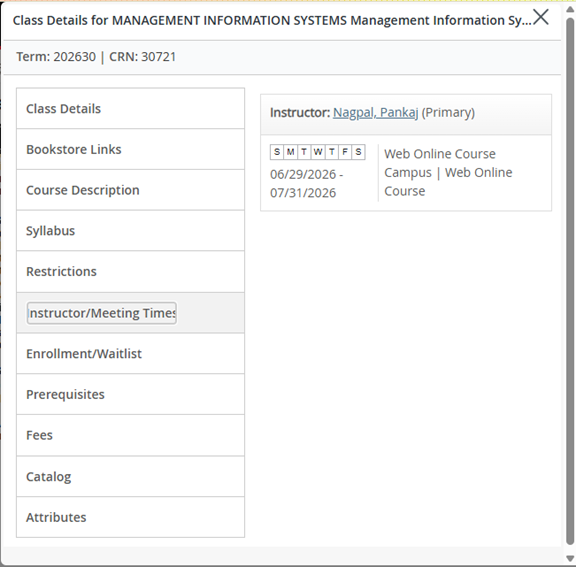
- Click on the CRN of each class on your schedule to view the start and end dates.
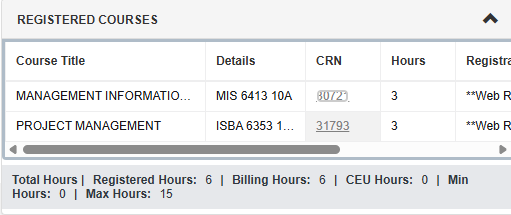
- This is under the "Instructor/Meeting Times" tab.
Note: make sure the correct term is selected in Banner. You’ll see a term dropdown menu in the top left corner of the screen (right above where your profile picture appears). Confirm it reflects the correct semester (e.g., Spring 2026).

Option 2: Review Registration Information and Schedules Please review https://kb.astate.edu/books/banner-self-service-student/page/view-registration-information for instructions on locating your schedule.
TEST SCORES
Placement into English and Math is based on ACT/SAT scores or the Accuplacer exam (Reading, Writing, and Math QAS). If you have less than 13 credit hours, test scores are required prior to registering for your first class.
- ACT/SAT scores less than 5 years old may be submitted directly for placement.
- If you do not have scores, you’ll need to complete the Accuplacer through the Testing Center | Arkansas State University.
- Students who do not meet minimum placement for College Algebra (MATH 1023/1043) or Composition I (ENG 1003) must first complete developmental coursework. Please note: developmental math courses (e.g., Fundamentals of Mathematics) may not be covered by financial aid, so plan carefully.
o Comp I requires a Writing Accuplacer scores of 251 or greater. Since A-State Online does not offer developmental English courses, you have 2 options if you score below the minimum requirements:
-
-
- You may need to self-study and retest
- You may complete the developmental coursework through Arkansas State University - Newport as a visiting student. You will need to contact them directly if you wish to pursue this option. o Quantitative Reasoning requires a QAS Accuplacer score of 256 or higher. College Algebra requires a score of 265 or higher. You can either:
- Self-study and retest if you do not meet the minimum score requirements.
- Complete Math 00173 Foundations of College Mathematics before you take your college level math course.
-
You can also explore CLEP exams to earn credit by examination. Details and required scores are available here.
Dropping Courses
Here’s how to drop a course if you’ve decided it’s the best option — but before doing so, we highly recommend speaking with Financial Aid to confirm how it may affect your aid or future eligibility.
📞 Financial Aid Contact:
onlinefinaid@astate.edu | 870-972-2920, option 4
💡 Dropping a Class | A-State Knowledge Base:
- Visit pack.astate.edu and log in.
- Select Banner 9 Self-Service → Student → Registration → Register for Classes.
- Choose the correct term and click Continue.
- In your registration summary, select “Drop Web” from the Action drop-down next to the course you wish to drop.
- Click Submit.
- A successful drop will show the status as “Deleted.”
🕓 Important:
Refunds vary depending on when you drop, so please review the drop schedule calendar carefully in your A-State Academic Calendar.
Billing
For A-State Online courses, payment is due in full on the Friday before your classes begin, unless you have financial aid fully covering the cost of your courses. Please be aware that students with outstanding balances are typically dropped for non-payment by the second day of class.
How to View and Pay Your Bill: You can manage your student account and make payments through the online MyBill system. Here is a quick summary of your payment options:
- Credit/Debit Card: You can pay using a card, but please note that a 2.95% service fee will apply.
- Bank Account (Web-Check): You can pay directly from your bank account, which is a completely free option.
For step-by-step instructions on how to access MyBill and complete your payment online, please review this helpful guide: https://kb.astate.edu/books/payment-options/chapter/pay-online-mybill
If you have any specific questions about your balance or making a payment, you can reach out directly to the Student Accounts/Billing team at sasbillpayment@astate.edu or by calling 870-972-2285. For questions regarding financial aid, please contact onlinefinaid@astate.edu.
Graduation
If you’re registered for your final semester, it’s time to apply for graduation! 🎉 This step ensures your degree is officially awarded once all requirements are met — so don’t skip it!
📝 How to Apply:
Visit the A-State Graduation Page for step-by-step instructions and to view the application deadlines for each term.
Degrees are not conferred immediately at the time of graduation. Conferral typically occurs 2–4 weeks after graduation, once all final grades are posted and degree audits are completed.
Once your degree has been officially conferred:
- You will receive an email from Parchment sent to your A-State student email with a link to access your digital diploma.
After that:
- Your paper diploma will be mailed approximately 2–4 weeks after conferral.
Please be sure to monitor your student email during this timeframe, as all official diploma communication is sent there.