
Argos Login Troubleshooting
Argos
Favorite the Argos link for easier access
Acceptable Browsers: Google Chrome, Firefox, or Edge
Argos URL: evisions | eLauncher
You will be prompt to login, please try your email address (BCREECH@ASTATE.EDU)
If that does not work, please try everything before the @ASTATE.EDU (BCREECH)
NOTE: If you are a MAC user you will have to use the Web Viewer. Otherwise, Click Argos, and download if prompted.

If you experience an error saying wrong username/password, please follow the steps below
Resync Password
Table: GUAPSWD
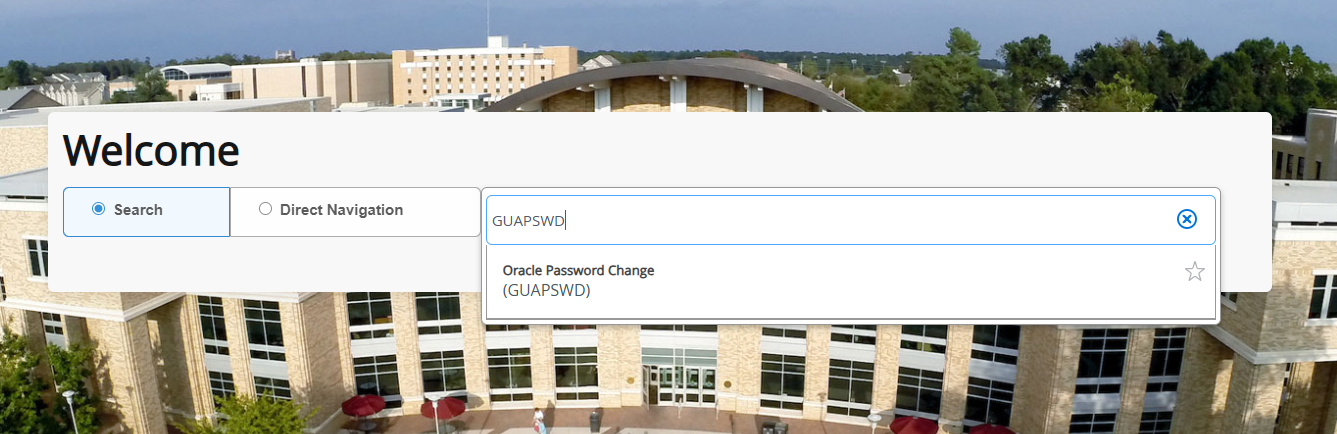
Tip: If you cannot login to the first sign in screen, please resync your password on the banner table GUAPSWD. If you do not remember your old password or do not have access, please reach out to ITS_DBA@astate.edu to reset the old password. Your new password will be the current password you use.
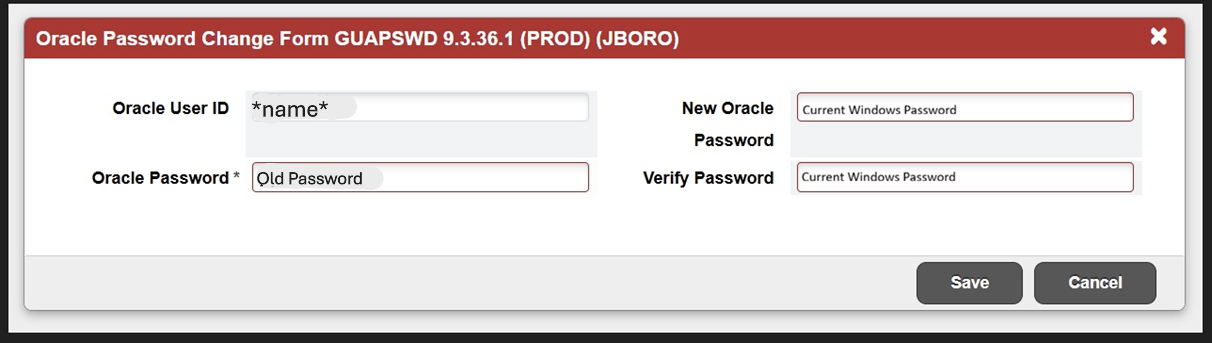
Then hit save.
Before you try logging into Argos again, Please clear your cache and cookies of all time.
Go to Argos and try to log in.
