
5. Page Templates
We’re going to outline some page structure ideas in templates for you to use when creating pages, based on the content you have. Determine which kind of page aligns most with the content you have, and recreate it in your CMS with the recommended patterns.
How to determine your page template
Page templates allow the user to have a consistent experience across the site, and makes it easier for us to build out pages according to user expectations. The following questions can help you determine which page template you should select.
Is this page at the first hierarchical level of the site?
If yes, use the Top-Level Landing Page template.
Is this page providing an overview for a range of programs, services, or opportunities?
If yes, use the Guide Page template.
Is this page introducing one specific department, office, or group that is relevant to prospective or current students?
If yes, use the Overview Page template.
Is this page sharing detailed information about one topic?
If yes, use the Basic Page template.
Is this page sharing curated resources for a specific audience?
If yes, use the Curated Page template.
If none of the questions above seem to apply to the page you’re working on, go with the Basic Page template. You may always modify or add to these templates to make them fit user needs better.
Templates
Top-Level Landing Page
| Purpose | A high-impact page that prioritizes imagery & linking deeper into the site. |  |
| Content | Include imagery, videos, testimonials, and CTAs. | |
| Suggested Patterns | Photo Collage, Image List, WYSIWYG, CTA Bar, Outcomes Feature, Contact | |
Guide Page
| Purpose | A scannable page that gives high-level overviews for a range of options, presenting each option equally. |  |
| Content | Include consistent links and an overview of how to compare options. | |
| Suggested Patterns | 3 Column, Stats + Photo, Accordion, Directory Embed, Contact | |
Overview Page
| Purpose | A scannable page that introduces one specific offering, department, group, or service. | 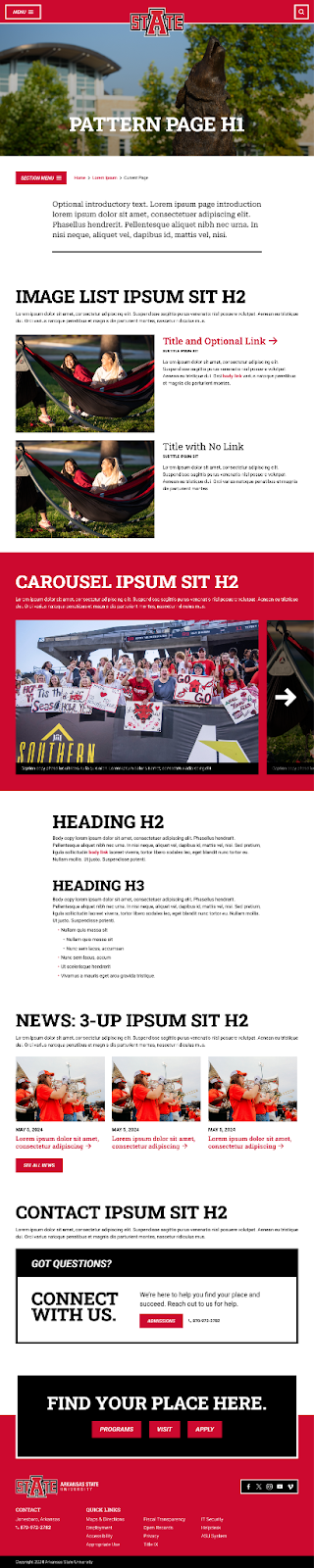 |
| Content | Primarily text content, with some stories or imagery included for visual variety. | |
| Suggested Patterns | Image List, Carousel, WYSIWYG, News 3-Up, Contact | |
Basic Page
| Purpose | A succinct, primarily informational page which describes one topic in detail. | 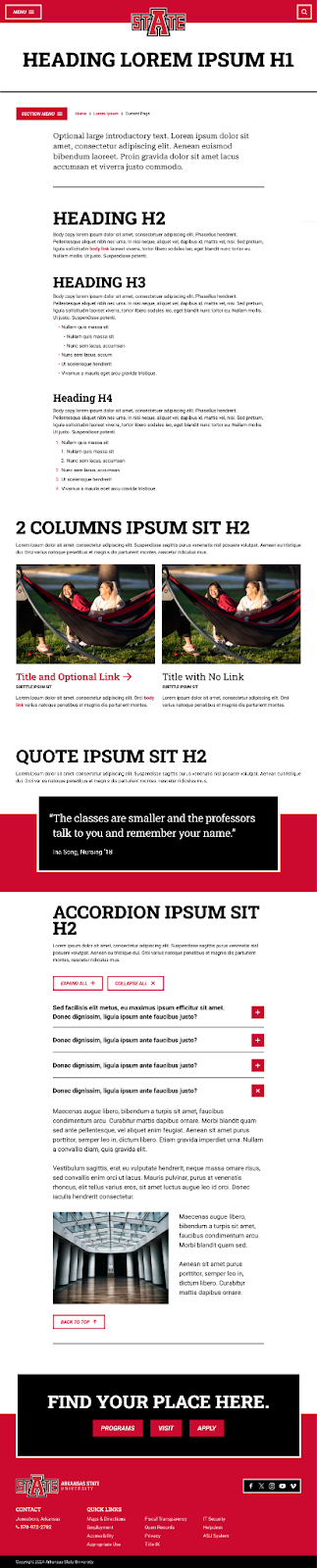 |
| Content | Text content with images or lists as needed. | |
| Suggested Patterns | WYSIWYG, 2 Column, Quote, Accordion | |
Curated Page
| Purpose | A page gathering a range of helpful links and resources for one specific audience. |  |
| Content | Lists of links, with and without images, and callouts for specific pieces of information that users should know. | |
| Suggested Patterns | 2 Column, Accordion, News 3-Up, Calendar 3-Up, Contact | |