
A-State Online Student Quick Start Guide
Bookmark this guide! It answers FAQs about registration, account setup, finding classes, test scores, placement, and course rotations. Check it first before reaching out.
Getting Started
Your official A-State student email account is usuallytypically generatedcreated within about 72 hours after your admission is fully processed. You'You’ll receive a "“Welcome to A-State Online!"” email with alleverything the details you'llyou need to get started.begin.
Once you get that welcomeemail email, you canarrives, activate your account and set up your password. You'llYou be able tocan access your student email viathrough Pack Portal or outlook.com! Outlook.com.
Set up your student account and university e-mail address
Action: Activate your account as soon as you get the welcome email. If you don’t see it, check your spam folder. After activation, log in to Pack Portal and make sure you can access your email.
Important Contacts
Use the right email for each issue. Do not email a general address for a specific question — it will delay your response.
|
Topic |
|
Phone |
|
Registration |
|
|
|
Financial Aid |
|
|
|
Student |
|
|
|
Military, TA, GI, |
|
|
|
Advising |
onlineadvising@astate.edu |
|
|
All |
870-972-2920, option 1 |
Action: Save these contacts. When you email, include your full name and student ID number in every message.
Resources
Use these tools to manage your own progress. Bookmark the ones you use most.
|
|
What it does |
Where to find it |
|
A-State Online Services |
Explore tools, resources, and support |
|
|
Academic Calendars |
Important dates |
|
|
|
Help for students with |
|
|
|
All course materials and assignments |
Quick Links → |
|
|
Career paths, internships, |
|
|
|
Degree requirements & course |
|
|
|
View current |
|
|
Course Rotation Sheets |
See |
|
|
|
Track your degree progress |
Pack Portal |
|
|
Academic resources, research |
|
|
|
Password |
|
|
Online Writing Center |
Feedback on |
|
|
|
Register |
Pack Portal |
|
|
Tutoring, retention |
|
|
|
View course |
|
|
Textbooks |
Purchase or rent |
astatebookstore.com |
|
|
See how other courses |
Action: Open each link once. Decide which ones you’ll need regularly (Degree Works, Course Schedule Tool, Canvas) and howbookmark they apply at A-State Online: A State - Transfer Course Equivalency Toolthem.
Student Responsibilities
📝As Studentan ResponsibilitiesWhileonline we'student, you're alwaysbuilding herereal toplanning supportand decision-making skills that'll serve you andafter graduation. You are responsible for your own academic planning. Your advisor can help you interpret requirements, but they cannot register you, choose your requirements;electives, studentsor aremake expectedyou to take an active role in their academic planning. This includes:register.
·You Reviewingmust:
- Check Degree Works regularly
·(atEnsuringleasttheyonceareameetingterm). - Ensure you meet graduation requirements outlined in the A-State Bulletin
·(theUsingcatalog). - Use the Course Rotation
toolTool, Course Rotions, andcatalogCatalog to exploreoptionsoptions. - Verify prerequisites and term availability
- Register yourself through
thePack Portal - Reach out to the right department when
questionsyouarise
· Verifying
·before Registeringregistering.
themselves
·on Reachingor after your registration date.
Questionsa canquestion. alwaysWhen bein directeddoubt, toemail your academic advisor or the appropriate department (e.g., Financial Aid for FAFSAguidance and loanresources.
que stions).
If you need a degree plan: Email your advisor with your student ID, how many classes you want per term, your target graduation date, whether you plan to take summer classes, and any scheduling needs. Degree Plans are not created automatically and are not required.
Action: If you don’t know what you should take next term, start by opening Degree Works and your program’s catalog pages. Then review the Course Rotation Sheets and Course Schedule Tool for anyplanned reason,and itoffered iscourses. Once you have selected your responsibilityclasses, either register using Banner Self Service or email your advisor to reachconfirm outif tothey yourare advisor. correct.
Undergraduate Term Limits
🕒 Semester Structure & Credit Limits
A-State Online runs two7-week termseach semester. Summer courses run in5- or 7-weekformats depending on the program.For undergraduates:- Full-time = 12 hours per semester (2 classes per 7-week term)
- Maximum = 18 hours per semester (3 classes per 7-week term)
- If
takingyou take a full-semester math or science course, you may add up to 2 more classes each 7-week term - If
receivingyou receive financial aid,please check with FA toconfirm your enrollmentrequirements.load with Financial Aid before changing anything.
Action: Count your credit hours each term. Do not exceed the maximum — the system may block you or affect your aid.
Graduate Term Limits
⏰ Term Structure & Credit Hours
Our semesters are split into two 7-week terms, and summer terms may be 5–7 weeks depending on your course selection.
Graduate students can takeMaximumup to12 hours per semester (2 courses per 7-week term)- Full-time status = 6 hours per semester (1 course per term)
You’rePart-timewelcomeistoallowed,attendpart-time—justbut check withfinancialFinancialaidAid toensurekeepcontinuedyoureligibility,aidif neededeligibility.
Action: If you want to take 3 courses in a term (9 hours), you will need approval from your department chair.
Common Course Numbering
Arkansas State University is transitioning to a statewide common course numbering system initiated by the Arkansas Department of Higher Education (ADHE). This goes into effectstarting Fall 2026.2026). You can learn more byand visitinglook ourup knowledgecourse baseequivalencies linkedat here:the https://kb.astate.edu/books/a-state-common-course-numberingCommon Course Numbering Knowledge Base .
Action: If you are taking a course that might transfer or has a different number than what you expected, use the lookup tool to confirm the equivalent. Click here for Common Course Numbering Look Up!
Undergraduate Transfer Work
Transfer work will be entered on the student’s permanent academic record when an official transcript is presented to the University from a regionally accredited institution. All courses completed, including D and F grades, are added to the student’s transfer record. A-State will consider awarding credit toward an Associate or a Baccalaureate degree for Advanced Placement (AP), College Level Examination program (CLEP), Military service education and experience, DANTES, formal non collegiate courses for which credit has been recommended as listed in the Directory of National Program on Non Collegiate Sponsored Instruction and in the National Guide to Educational Credit for Training Programs published by ACE, International Baccalaureate, and Excelsior College Exams.
Transfer credit might not satisfy specific General Education Requirements. Transfer credit might not satisfy specific degree requirements. Students must review the university requirements and specific major requirements required for their degree.
Students pursuing a degree which requires a previously earned associate degree or work experience for “credit by articulation” will not see the previously earned hours applied to their degree evaluation until their final graduating semester. This may affect financial aid.
Courses, other than general education, used for an Associate of Applied Science, a technical certificate or work that is considered part of those technical tracks will not transfer unless they are part of a degree program with an articulated transfer agreement or the student is pursuing a Bachelor of Applied Science.
Graduate Transfer Work
A student who has a “B” grade average or above in graduate work from another approved institution may be permitted to transfer a maximum of nine semester hours of credit. Only work with “B” or better grades earned at an accredited graduate school and acceptable toward a graduate degree at that institution will be considered for transfer. No correspondence courses may be transferred.
If you’re seeking to have graduate-level transfer credits evaluated for your program at A-State, we ask that you complete the request form available through the link below. This helps us gather the necessary information directly from you and streamlines the review process:
Once submitted, we’ll review your request and follow up if any additional documentation—such as course syllabi or transcripts—is needed.
Degree Works and Finding Classes
Degree Works serves asis your official degree audit. WeCheck encourageit youat toleast checkonce Degreeper Worksterm. regularly. The A-State Catalog serves as the official source for your degree requirements.
FindingHow Classesto &find Electivesclasses 🔎and electives
You
canbrowse and choose elective or general class options directly fromto the 👉 A-State Course Schedule Tool
Here’s how to find available courses:
Visit theA-State Course Schedule Tool.- Select the term (e.g., Fall 2026)
. - Select the part of term (e.g., Session I)
- Select the course subject code (e.g., DIGI or STCM)
- Select the level of study (
e.g.,Undergraduate or Graduate) - Click
on theResults toviewsee availablecourses.courses
For electives,electives: lookLook for:
Coursescourses outsideofyour major and emphasis requirements.Upper-Level Electives are 3000–4000 level classes for undergraduate students and 6000 for graduate students
For courses applying directly to your degree, look for:
Course that are under yourprogram of studythat you haven't already taken.
Understanding Electives & Upper-Level Electives
Let's clarify what electives are, especially "upper-level" ones:
- Elective:
An elective is aA course youchoosepickthatthat'sisn't specificallynot required for yourmajor, minor,major or generaleducationed.requirements.It'sElectives allow you to explore subjects that interest you, try something new, or simply earn additionalextra credithours towardstoward your degree.They offer flexibility in your academic journey! Upper-Level Elective: An
upper-levelelectiveis an elective course takenat the300003000 or40000 course4000 level.TheseIt'scoursesharderarethangenerallyintromore advanced and build upon foundational knowledge.courses. Manydegreeprogramsrequireneed a certain number ofupper-levelthesecredit hours, whichcredits—you canbe fulfilled by specific major courses or by theseuse upper-levelelectives. They're a great wayelectives todeepencheckyourthatknowledgebox.in- Upper-level
particularelectivesarea(undergraduate):or3000–4000explorelevel - Upper-level
relatedelectivesfield(graduate):at6000a more advanced level.level
aaFor courses that apply directly to your degree: Look for courses under your program of study that you haven’t already taken.
Action: When each registration period opens, review the Course Schedule Tool and search for the courses you plan to take. Write down the CRNs — you’ll need them to register.
Determining an
AOS ClassHere’s a quick and easy way to tellwhich classes areA-State Online (AOS)andClasswhichNot
“online”ParteveryofcourseTermwith(POT)theyinfalltheundername😊is an AOS course. Use these rules to check:🔍How to Identify AOS Courses
A course isconsideredA-State Online (AOS)AOS if:- The section number ends in “A” (example:
10A)10A) - The tuition attribute is listed as LSDE Tuition
📅Identify the Part of Term (POT)You canfind thePartpart ofTermterm (POT):by checking thetuition attributein Banner:- LSDE Tuition – POT I → Term I (first 7 weeks)
- LSDE Tuition – POT II → Term II (second 7 weeks)
seeOnceInyouBanner Self-Service, click on thecourse/CRNinofBanneraSelf-Service, you’ll be ablecourse tosee:Theits tuition attributeThestartand start/end dates,.whichAction:
willBeforeconfirmregistering, verify that each course you select is actually an AOS course. If theterm length
📌Helpful TipIf asectiondoes notdoesn’t end in “A” ordoesdoesn’tnotshowlistLSDETuition,Tuition, it is notanofferedAOSthroughcourse.A-State Online.Planning Courses and Searching in Banner Self-Service
📚- Upper-level
- Browse Classes
🗂– How to browse for classes in Banner Self Service. - Plan Ahead in Banner
📝– You can save courses to a “plan” before registration opens. - All Banner Registration How-To Guides – Available in the A-State Knowledge Base.
When registration opens, you’llgo register through yourto Pack Portal → Banner Self-Service → Student → Registration → Register for Classes.Classes.
Courses post to the Course Schedule Tool the day registration opens.
Action: Before the registration window opens, do your “planning” step: search for courses, confirm they’re AOS, check prerequisites, and note the CRNs. This saves time when registration begins.
Registering
At A-State Online, studentsYou are responsible for registering themselvesyourself each term. Advisors cannot register you.
Before selecting courses, make sure the correct term is selected in Banner. You’ll see a term dropdown menu in the top left corner of the screen (right above where your profile picture appears). Confirm it reflects the correct semester (e.g., Spring 2026).

🖥️ How to Register (Link to Self-Registration Video)
- Go to
Visitpack.astate.edu and log in. Log in with your student email and password.- Click
onBanner Self Service → Student → Registration → Register forClasses.Classes. - Select the correct term from the dropdown in the top-left corner (e.g., Spring 2026).
- Navigate to the Enter CRNs
tabtab. - Enter the CRNs
(Course Reference Numbers)for the classes youwant.want (one per line). - Click
Hit addAdd toschedule.Schedule. - Repeat
steps 5, 6, and 7for all desired classes. - Click
HitSubmit to lock in yourschedule!schedule.
NeedIf Helpyou or Hithit a Snag?snag and cannot self-register:Our
- Email the
A-StateOnline Registration teamteamatisonlineregistration@astate.edu. - Include
help!yourYoustudentcanID,emailthethem whichclassesyou'd+likeCRNsto(iftakeyou have them), andrequestthe term(s). - Requests to be added
manually.orBedroppedsure to include youstudent ID, requestedfrom classes+mustCRNsbeifinpossible,writing from your student email.
Action: On the first day of registration, log in and theregister term(s)as forsoon eachas class.📧possible. Email:Classes onlineregistration@astate.edu📞fill Call:up. 870-972-2920,Do optionnot 3📝wait Student Registration Guide – Step-by-step visual guide foruntil the wholelast process.day.
Viewing Start Dates and Professor Information
Option 1: Check inIn Banner Self-Service
- Log into Pack
Portal.Portal. - Navigate to Banner 9 Self-
Service.Service. - Click on the CRN of each class on your
scheduleschedule. - Under the Instructor/Meeting Times tab, you’ll see start and end dates.
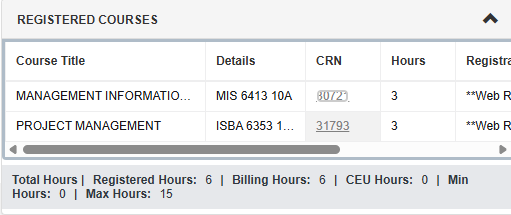
This is under the "Instructor/Meeting Times" tab.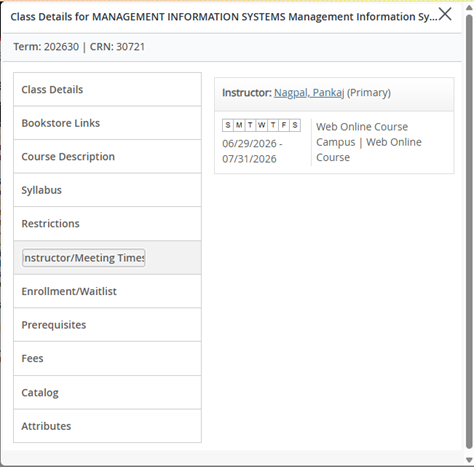
Note: make sure the correct term is selected in Banner. You’ll see a term dropdown menu in the top left corner of the screen (right above where your profile picture appears). Confirm it reflects the correct semester (e.g., Spring 2026).

Option 2: Review Registration Information and Schedules
- Use
Action: Before classes start, log in and verify the start dates for your schedule.classes.
Test Scores
Placement into English and Math is based on ACT/SAT scores or the Accuplacer exam (Reading, Writing, and Math QAS). If you have lessfewer than 13 credit hours,hours, you must submit test scores are(ACT/SAT requiredor priorAccuplacer) tobefore registering for your first class. These scores are also required if you have not completed ENGL 10103 – Composition I or your college-level Math course.
- ACT/SAT scores less than 5 years old may be
submitteduseddirectly for placement.directly. - If you
do notdon’t have scores,you’ll need tocomplete the Accuplacer through the Testing Center | Arkansas State University. Students
Minimum do not meet minimum placementscores for placement:
|
Course |
Required Score |
|
Composition I (ENGL 10103) |
Accuplacer Writing ≥ 251 |
|
Quantitative Reasoning (MATH 11103) |
Accuplacer QAS ≥ 256 |
|
College Algebra (MATH |
|
If you score below minimum:
- English: A-State Online does not offer developmental
EnglishEnglish.courses, you have 2 options if you score below the minimum requirements:- You
may need tocan self-study andretestretest, You mayor complete thedevelopmentalcoursecoursework throughat Arkansas StateUniversity -University–Newport as a visiting student.You will need to contact them directly if you wish to pursue this option.
oQuantitative Reasoning requires a QAS Accuplacer score of 256 or higher. College Algebra requires a score of 265 or higher.- Math: You can
either:Self-self-study andretestretest,iforyoucompletedo not meet the minimum score requirements.CompleteMath 00173 Foundations of College Mathematicsbefore you take your college level math course.first.
Alternative:
You
can also exploreCLEP examstomay earn credit byexamination.examinationDetailsthrough CLEP exams. See details and required scoresare availablehere.Action: If you haven’t submitted test scores yet, do it now. Without placement, you cannot register for your first class.
Dropping Courses
Here’s how to dropDropping a courseif you’ve decided it’s the best option — butbefore doing so, we highly recommend speaking with Financial Aidto confirm how it maycan affect youraidfinancialor future eligibility.📞aid. Always contact Financial AidContact:first
before dropping.Contact Financial Aid: onlinefinaid@astate.edu | 870-972-2920, option 4
💡HowDroppingto drop aClass | A-State Knowledge Base:courseVisitGo to pack.astate.edu and log in.- Select Banner 9 Self-Service → Student → Registration → Register for
Classes.Classes. - Choose the correct term and click
Continue.Continue. - In your registration summary,
select“Drop Web”from theActiondrop-down next tofind the course youwishwant to drop. - From the Action dropdown, select Drop Web.
- Click
Submit.Submit. A successful drop will show theThe statusasshould change to“Deleted.”Deleted.
🕓
Refundsvary dependingdepend onwhenyouryoudropdrop,date.soReviewpleasethereviewacademic calendar and the drop schedulecalendarcarefully in yourA-State Academic Calendar.carefully.Action: If you’re considering dropping a course, email Financial Aid first. Then, if you decide to go ahead, drop before the refund deadline to avoid owing money.
Post-Degree
PlansStudentsIf
you’dyoulikeare a post-degree student (a student seeking a Bachelor's degree beyond the first one), you only need to complete requirements specific to your declared degree:- Department-specific general education courses
- Degree core courses
- Emphasis or concentration area requirements
That's it. You don't need any additional university-wide general education courses.
Want a Course to Count Toward Your Degree?
Send your advisor a list with:
- Course name
- Where you took it
- Which requirement you want it to apply to
Requirements for a Bachelor’s Degree
In order to graduate, all of the following must be fully completed:
- A minimum of 120 total credit hours
- All General Education requirements (these are required and cannot be waived)
- All degree requirements, including any grade, emphasis, or certificate requirements
- A minimum 2.0 cumulative GPA.
- A minimum of 40 upper-level (3000–4000 level) credit hours
- 30 credit hours complete at Arkansas State University
- 18 of your last 24 credit hours must be taken at an Arkansas State University Campus
Even if you exceed 120 total hours, graduation cannot be approved until all degree requirements above are satisfied.
Requirements for a Master’s Degree
In order to graduate, all of the following must be fully completed:
· A minimum of 30 total credit hours. Hours vary by program. Review the Bulletin for your program’s credit hour requirements.
· A minimum 3.0 cumulative GPA.
- All degree requirements, including any grade, emphasis, or certificate requirements
· Completion of a thesis, capstone, or comprehensive exam, as outlined in the Bulletin for your program.
Timeline: You have 6 years from when you start the program to finish everything.
Degree Plans
If you want a degree plan
that maps out your(a recommendedcoursescourseeachsequencetermterm-by-term),through graduation, please contactemail your advisorvia email! Degree plans follow a suggested path through the program based on the answers to the below questions. It is important to note that failure to follow this recommended plan, as outlined by your academic advisor,may result in a delayed graduation.To get started, please replywith the followinginformation so I can tailor your plan to your goals:information:- Student ID
Numbernumber 🎯How many classesyou’d like to takeper term (1, 2, or 3)Undergraduate students can take a maximum of 18 credit hours per semester.Graduate students can take a maximum of 12 credit hours per semester.📅 YourtargetTarget graduation date orthetermyou’dyoulikewant to finishby.byIfWhether you’d like toll takeSummersummer classes.💬 Whether you preferlighterLighter or heaviercourseloads during certain terms(for example, taking one class in summer).🕒 AnyspecificSpecific scheduling needs (VA benefits, work commitments, etc.)I should be aware of.
DegreeYourplansadvisorarewillcreatedcreateusinga plan based on yourrecord inDegree Works,therecord,CoursecourseRotationrotationSheets,sheets, and yourdesired pace toward graduation.pace.Note:
AdvisorsYourdoadvisor does not choose yourelectiveselectives.forThatyou. These classes areis yourresponsibility to choose.responsibility.Action: If you have never had a degree plan and would like one, request one now. Then, each term, cross-check your plan against the actual course schedule — rotations can change. A degree plan is not required.
Undergraduate Academic Standing
Status
Condition
What happens
Good Standing
A student is inGood Standingwhenbothof the following are met:- Term GPA
(current≥semester)is2.0orANDhigher,and - Cumulative
A-StateGPA(Institutional≥GPA)is2.0or
higherStudentsNoin Good Standing may continue enrollment without restriction.restrictionsAcademic Probation
A student is placed onAcademic Probationwheneitherof the following occurs:- Term GPA
isbelow 2.0,or Cumulative A-State GPAisbelow 2.0
Probation status will beremovedat the end of any enrollment period (Fall, Spring, or Summer) whenboth the term GPA and cumulative A-State GPA return to< 2.0orORhigher.Cumulative GPA < 2.0StudentsYouplacedmustonraiseacademicyourprobation arestrongly encouragedGPA tomeetstaywith their academic advisor or contact theUniversity Advising Center at (870) 972-3001.enrolled.First-time,first-yearstudentsplaced on probation after their first semester may enroll inCollege Choices, a one-credit study skills course, by contacting the University Advising Center.Academic Suspension (first)
A student is placed onAcademic Suspensionwhen:- Both
thetermGPAand cumulativeA-StateGPAare below< 2.0, - AND
theyoustudent waswere onacademicprobationinthe previous term
ReadmissionYouAfter SuspensionFirst SuspensionMustmust complete the Restart@State Program or Studentsyoutakingmustcourseworksitelsewhereoutduringforsuspensiononearefullstronglycalendaradvisedyear.to
consulttheirA-State advisor before enrollingSecond & Third Suspension
StudentsareSame
notconditions,permittedrepeatedtoYou cannot enroll
at A-Statefor one full calendar year;After the suspension period, studentsthen mustmeetreapplywithtothecomeUniversitybackAdvisingtoCenterschool.beforeregisteringFourth or Subsequent Suspension
StudentsareSame conditions, repeated
dismissedDismissal from the university.ReturnAppealis permittedonlyby appealto theUniversityGraduation and Academic Credit AppealsCommitteeAction: Check your GPA each term. If you are on probation, make a plan to improve your GPA. Reach out to your advisor with questions.
RESTARTRestart@A-State@A-StateProgramBelowThisis information on the program and next steps.TheRestart@State Programinterventionprogram for:- Students placed on
theirfirst academic suspension - Certain transfer students admitted by appeal
Program RequirementsRequirements:Students must completeComplete the Restart ApplicationTheEnroll in the Restart Seminaris(1-creditaone-credit-hour coursecourse)Emphasis is placed on:Self-responsibilityProper decision-makingStudy skills strategies
Eligibility RestrictionsProcess:Students areNOT eligibleif:They arenot on first suspensionThey havepreviously attempted the Restart@State Program
Here’s what to expect for theRestart@A-Stateprocess so there’s no confusion:1️⃣2️⃣ - You
- Email
the completed form to me for final review and signature. I will then returnthe form toyou.3️⃣yourOnceadvisorfinished,foremailreview and signature. - Email the signed form to
📧universityadvising@astate.edu. - University Advising will process the form and enroll you in your
classesclasses. - You
as soon as you’re registered and good to go. Credit/Credit / DebitCard:CardYou can pay using a card, but please note that a– 2.95% service feewill apply.applies- Bank Account (Web-Check)
:You–can pay directly from your bank account, which is a completely free option.Free - Email:
reviewsasbillpayment@astate.eduthisorhelpfulcallguide:870-972-2285 - Degrees are
notconferredimmediatelyat the time of graduation. Conferral typically occurs2–4 weeks after graduation,once(after all final grades are posted anddegreeauditsarecompleted). - Once
yourconferred,degree has been officially conferred: Youyou will receive an email from Parchmentsent(to your A-State studentemailemail) with a link toaccessyour digitaldiploma.diploma.- Your paper diploma
will beis mailedapproximately2–4 weeks after conferral. - Email
Email:astateonline@astate.eduor call
Phone:870-972-2920, option 1 - Tell them
knowyou are a returning applicantreapplying,reapplyingas—theyyour application fee may beablewaived.
5️⃣They will notify you
You do not
If you have questions about the form itself or wantsubmission: to confirm it was submitted correctly,Contact University Advising isdirectly.
Action: If you receive a suspension notice, begin the bestRestart pointprocess ofimmediately. contact.The program has deadlines, and missing them can delay your return by a full semester.
Graduate Academic Standing
|
|
Condition |
What happens |
|
Probation |
|
You |
|
|
Immediate suspension from the University and |
|
|
|
Readmission to the University does not |
Action: Graduate students: A single F ends your program. If a student is suspended from more than one program theyyou are ineligibleat forrisk readmissionof toa low grade, contact your instructor or the University.Student Success Center before the drop deadline.
Billing
ForPayment for A-State Online courses, paymentcourses is due in full on the Friday before your classes begin, — unless you have financial aid fully covering the cost ofcovers your courses.costs.
If you have an outstanding balance: You will typically be aware that students with outstanding balances are typically dropped for non-payment by the second day of class.
class.
How to Viewview and Pay Your Bill: You can managepay your studentbill
Use the online MyBill system.system Hereonline.
Payment options:
ForFull step-by-stepinstructions: instructionsPay on how to accessOnline MyBill andGuide
Questions about your paymentbalance?
Questions about financial aid?
Action: Log into MyBill the week before classes start. If you have anya specificbalance questionsand aboutdon’t have full aid coverage, pay by the Friday deadline. Otherwise, you will lose your balanceschedule.
Graduation
When you can reach out directly to the Student Accounts/Billing team at sasbillpayment@astate.edu or by calling 870-972-2285. For questions regarding financial aid, please contact onlinefinaid@astate.edu.
Graduation
When you’reare registered for your final semester, it’s time to apply for graduation! 🎉immediately. This stepis ensureshow your degree isgets officially awardedawarded.
Before applying: Check Degree Works to confirm all requirements are metlisted —as so“Complete” don’tor skip“In it!Progress.” If anything looks wrong, email your advisor right away. Note: Degree Works will show below 100% until all final grades are submitted.
💡 Pro Tip:Before applying, double-check your Degree Works to confirm that all degree requirements are listed as complete or in progress. If anything looks off, reach out to your advisor — we’re happy to review it with you!
📝 How to Apply:applyVisit
Go to the A-State Graduation Page for step-by-step instructions and to view the application deadlines for each term.deadlines.
Timeline:
After that:
PleaseAction: beIn sureyour tofinal monitorterm, apply for graduation before the published deadline. Monitor your student email duringfor thisthe timeframe,Parchment aslink. allCheck officialthat diplomayour communicationmailing address is sent there.current.
MSW and ND pre-reqPre-Requisite reminderReminder
JustIf ayou friendlyare remindercompleting aboutprerequisite yourcourses journey towardsfor a graduate program!program 😊
WhileMSW or MS in Nutrition and Dietetics), completing your prerequisitethose courses isdoes a fantastic step, please remember that it doesn't automaticallynot guarantee admission. toYou anymust program.still Onceapply you'veand successfullybe completed your courses, you'll need to reapplyaccepted to the graduate program you're interested in.program.
When you'reyou are ready to reapply, please reach out to our admissions office directly:reapply:
Let
If you have moreFor questions about the application process for our competitive graduate programs,program suchapplications: asThe the MSW or MS - Nutrition and Dietetics (RD track), our admissions team is the best resourceresource, not your advisor.
Action: After you complete your prerequisites, do not assume you are automatically admitted. Start the reapplication process early — competitive programs have limited slots.
Course Access in Canvas
Professors have until noon on the first day of class to helpmake guidetheir you!courses available in Canvas. We recommend allowing through the end of the second day of class, as this gives time for any technical issues to be resolved. If you still cannot access your course by the end of the second day of classes, email your advisor once so that we can look into this.