
How to Request a Home@AState Wi-Fi Password
If you are living on campus you will connect to the Home@AState Wi-Fi network. To request a password you will need to submit a ticket which should include your building name and room number. A password will then be assigned and emailed to you.
1. Go to pack.astate.edu.

2. Click Log In on the top right corner of the screen.
3. Enter your full A-State email address and click Next.

4. Enter your A-State password and click Login.


6. Click IT Services on the left.
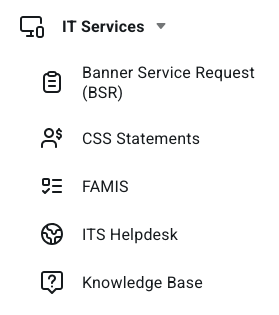
7. Click ITS Helpdesk.
5. Click on Sign In located at the top right of the screen.

6. Enter your full A-State email address and password and click Login.
7. Authenticate using Microsoft Authenticator on your mobile device.
8. Click on Get Started.


10. Click Create A Ticket.
10. Fill out the required fields on the form with your full A-State email address, phone number, building name, room number, and a subject of Home@AState password request.
11. This will be sent to our Housing and Student Support team and they will generate a password and email it to your A-State email address. The email should come from no-reply@extremecloudiq.com. If you do not see the email in your inbox, check your spam folder.
For further assistance, contact the ITS Help Desk at 870-972-3933 or stop by IT Support Services (itsupportservices@astate.edu). It is located on the bottom floor of the Dean B. Ellis Library, Room 149.